
This challenge is about applying conditional formulas in Excel to determine one of several possible outcomes. The question is: do you have what it takes to solve it? Here are your next steps:
- Watch the challenge video and read the instructions below.
- Download the Excel worksheet needed to complete the tasks.
- Ready, set, put your skills to the test!
Take the challenge
Download the practice file and share your solution with us!
Remember to share your progress in our GoSkills Learners Community on Slack and swap tips with other Excel pros.
The challenge
Your company is arranging to send its 20 employees to an amazing vacation spot with three interconnected resorts. Employees are welcome to bring their entire family, but the company has limits on how much it can cover.
Employees and their spouses or partners are fully covered, but children will be covered based on the employee's seniority and the number of kids coming on the trip.
Task 1🏋️
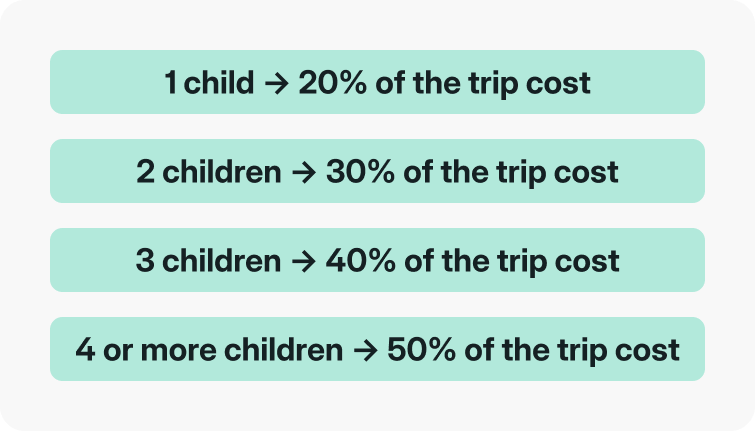
Calculate how much the company will cover for each employee's children.
Assuming that the cost per child is $1,200, use the following chart to work out the amount for the Compensation column.
Task 2 🏋️
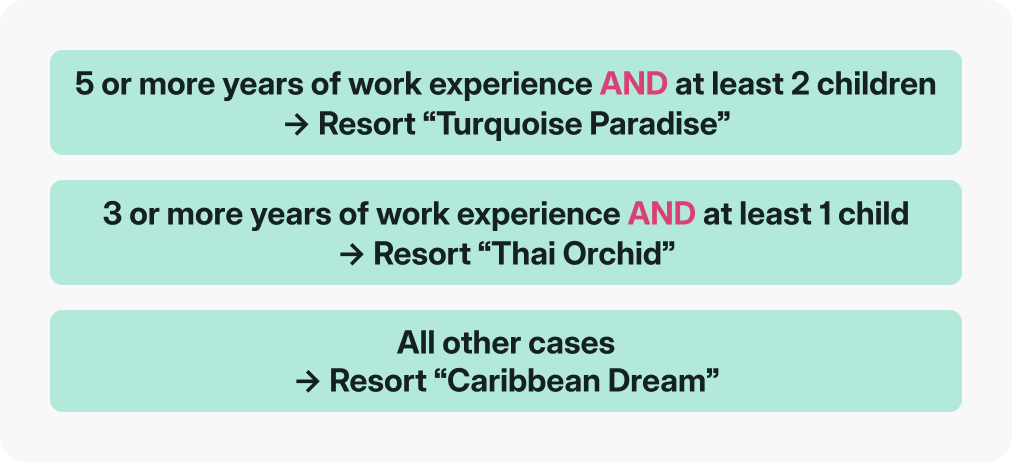
Determine which of the three resorts each family will be assigned to.
This vacation spot has three resorts, and we will assign each employee and their family based on seniority and family size.
Task 3 🏋️
Arrive at the correct totals.
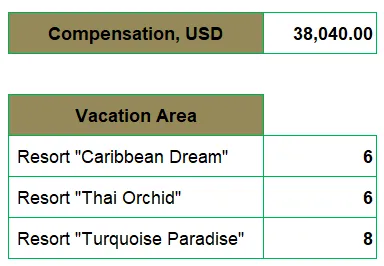 By the end of your computations, you’ll be able to see the total compensation the company will be covering to bring all those kids to the resorts, and how many families will be staying at each one.
So do you have what it takes? Download the challenge file and give it a try!
Take the challenge
Download the practice file and share your solution with us!
Hint 💡
Ready to crack this challenge? To help you get started, you might want to revisit working with conditional functions in Excel. We'll say no more — good luck and have fun!
The solution
So, how did you do? Was there any part of this exercise that gave you a hard time? Did you use the same approach we did, or do you have a clever method you'd like to share?
If you enjoyed taking this challenge and want more Excel practice, we have a whole set of Excel challenges designed to enhance specific skills. Plus, our Excel Resources hub is packed with tips, tricks, and detailed tutorials on the most important Excel functions and tools.
Until the next challenge! 👋