
If you love tackling real-world Excel problems, we have a great Excel challenge for you!
Here’s how it works:
- Watch the challenge video for a complete overview of the scenario.
- Review the instructions below to understand the tasks and guidelines.
- Download the Excel worksheet and share your solution.
- Watch our expert's solution to compare.
Download the file here
Get the practice exercise to solve this challenge.
The challenge 🧗
Imagine that your company is working on a project divided into different stages. Each stage has a Start Date and an End Date.
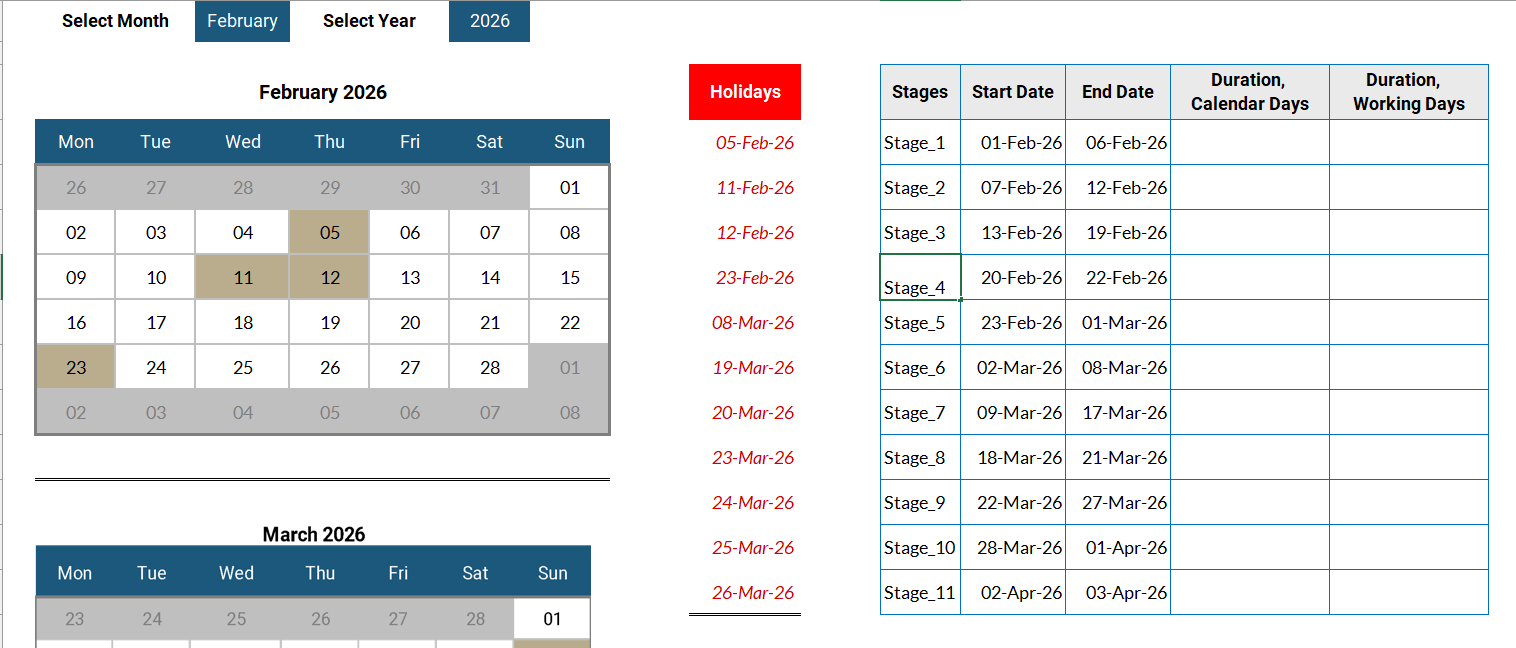 Project managers need accurate duration calculations to properly monitor:
- Project timelines
- Workforce planning
- Contract obligations
- Cost estimations
Your task
Your task is to calculate the number of days between the start and end dates for each stage. In each case, we will need both the calendar duration and the working duration.
- The calendar duration is the total number of days from the Start Date to the End Date (inclusive).
- The working duration is the number of working days between the two dates, excluding Saturdays, Sundays, and official holidays.
The hints 🕵️
Not sure which Excel formula to use? Grab a clue from our list of 20 Excel date functions! Or maybe you'll find the perfect one in this video of our favorite six!
Think you've got it? Prove it! Accurate working-day calculations are critical for realistic scheduling and performance measurement.
Download the file below to get started.
Download the file here
Get the practice exercise to solve this challenge.
The solution ✅
Did you crack the code? Now it’s time to see how your solution stacks up! Watch our walkthrough to discover how our expert approached this challenge.
Have a unique method? We’d love to see it! Excel is all about creativity and flexibility, and there’s always more than one way to solve a problem. Share your solution or even a new challenge idea with our community on Slack and connect with fellow enthusiasts.
Need more Excel? 🤩
If you enjoyed this challenge, keep the momentum going by exploring the rest of our Excel challenges or diving into the Resource Hub, which is packed with tutorials, tips, and tricks to boost your skills. For targeted learning, check out our Excel courses to master specific tools and techniques.
Keep crunching those numbers — we’ll see you in the next challenge! 👋