
We’ve all been there. You sign up for a software trial with the best of intentions. You click around the dashboard for ten minutes, get distracted by an urgent email, and completely forget about it until you receive the inevitable “Your trial is expiring tomorrow” notification.
When you’re looking for a free trial learning management system, treating it like a casual test drive is a major missed opportunity. An LMS is a significant investment in your company’s human capital. To ensure you choose a platform that actually drives employee growth, you need to approach your trial period strategically.
Here is your tactical blueprint to properly evaluate a corporate LMS online and prove business ROI in as little as seven days.
The pitfalls of aimless software testing
Most corporate software adoptions fail before a contract is even signed. Why? Because organizations tend to test software in a vacuum. A training director might sign up for an LMS free trial, marvel at a few colorful charts on the admin screen, and assume it will work for the entire company.
Without a structured LMS pilot program, you miss the friction points that cause real-world implementation to stall. Common pitfalls include:
- Testing without a target audience: Failing to involve actual learners during the evaluation phase.
- Ignoring content compatibility: Not checking if your existing training materials format correctly within the system.
- Lacking clear KPIs: Not knowing exactly what data leadership needs to see to approve the budget.
To find the right system, you must move away from aimless clicking and move toward structured, rigorous stress-testing.
Core distinction: Free trial vs. Free plan
When hunting for an educational or training platform, you will frequently run into two different acquisition models: a free trial and a free plan (often called a "freemium" tier). While they sound similar on paper, they serve completely different operational strategies. Understanding this distinction prevents you from accidentally locking your organization into a framework that isn’t suited to your needs.
What is an LMS free trial?
A free trial gives you unrestricted access to the premium, full-featured version of the software, but only for a fixed, limited window of time (typically 7 to 30 days).
- How it works: The goal is to let you experience the absolute maximum capability of the platform — including premium content, deep analytical tools, and full AI capabilities — so you can properly evaluate its true ROI before spending a dime. Once the timer expires, you must upgrade to a paid tier to keep using those features.
What is an LMS free plan (free version)?
A free plan gives you access to a scaled-back, permanently restricted version of the software that costs nothing indefinitely.
- How it works: With a free-forever LMS plan, premium features are locked away behind a paywall. For example, some free plans cap your total user count to a handful of people or limit custom content authoring tools, while others restrict access to reports or apply external branding over the user dashboard.
Should you choose a free plan or a free trial when testing an LMS?
The answer depends on what exactly is being tested. You may want to build out a training program before paying for the software. In that case, your 7 or 14-day trial will likely expire before you play around in your LMS sandbox. A free plan with access to course building will allow you to create or upload custom content at your own pace.
While a permanent free plan might sound attractive to small teams or bootstrapped startups, it rarely scales. If you have a growing team or are trying to build an agile corporate ecosystem, a free trial is almost always the superior choice. It allows your team to stress-test specialized, high-tier functionalities — like bulk user provisioning, API integrations, and customized white-labeling — without running into immediate, artificial paywalls during your proof-of-concept phase.
Best LMSs with free trial
If you are still evaluating options in the market, check this breakdown of the best LMSs with free trial.
| LMS Platform | Trial Duration | Credit Card Required? | Best for |
| GoSkills | 14 Days (Also offers free plan for unlimited number of learners) | No | Startups & SMBs seeking rapid deployment. Best for lean teams that want instant access to an external library of award-winning professional courses paired with AI course builder. Administrators can invite learners, assign courses, access reporting, analytics, and create learning paths without hours of investment. |
| TalentLMS | 14 Days (Also offers small free plan) | No | Teams transitioning from paper to digital. Ideal for small businesses looking for a classic compliance and certificate-tracking portal without a steep learning curve. |
| Docebo | 14 Days | No | Mid-to-large enterprises prioritizing AI automation. Built for complex organizations that need deep machine-learning personalization and secondary portals to train external partners or clients. |
| SAP Litmos | 14 Days | No | Sales-heavy teams. Best for rapid deployment in mid-market companies that require tight, native integration with CRMs to track how sales training impacts revenue. |
| Adobe Learning Manager | 30 Days | No | Organizations deeply embedded in the Adobe ecosystem. Ideal for enterprise L&D teams that want immersive, highly customized webpage modules and robust skill-based learning paths. |
Which one to choose: If your primary constraint is a lack of ready-made training content, limited time to build it, and not enough resources to track it, GoSkills bridges that gap instantly. If your constraint is a complex, thousands-strong global workforce with multiple external vendor pipelines, enterprise giants like Docebo or Adobe are built to absorb that architectural scale.
If you want to skip the bloated, overly complex legacy systems that require weeks of onboarding just to test, the GoSkills LMS is designed for rapid deployment.
- Zero-IT cloud architecture: GoSkills is a fully cloud-based, turnkey Software-as-a-Service (SaaS) platform. Because it operates entirely within a secure web browser environment, your organization does not need to download local applications, configure internal servers, or bog down your corporate IT department for deployment.
- Instant activation: There are zero implementation delays, hidden setup fees, or credit card requirements needed to get started.
- Integrated tools: Get immediate access to both a flexible, built-in course design engine and a premium library of expert-led professional skill courses.
Let's get you set up
Book a demo for a free trial of the GoSkills LMS — no credit card, no obligation.
Book your free trialWhat to evaluate during your LMS free trial
To effectively test corporate training platform capabilities, you need to divide your focus into three distinct pillars: administration, creation, and user experience.
1. The admin dashboard
Your administrators are the backbone of your L&D initiative. During your trial, log in as an admin and assess how intuitive the core functions feel. Can you enroll users in bulk without a manual? Is it simple to group users by department or job tier? How many clicks does it take to assign a mandatory compliance module?
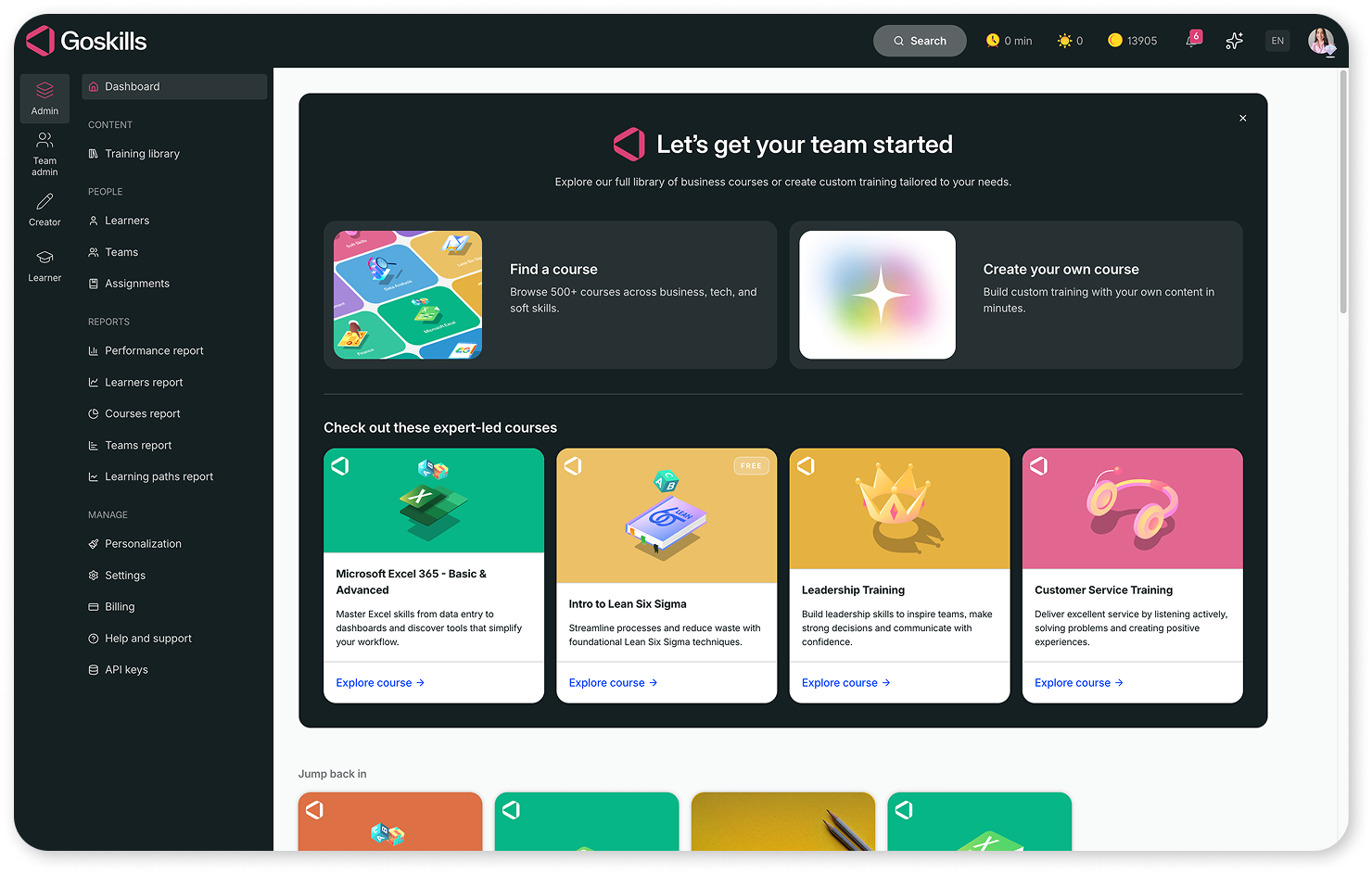
Insider tip: To successfully roll out a pilot program across a larger organization, assign a designated LMS administrator to collect internal team feedback and manage data pipelines.
2. The course builder
A learning platform is only as good as the content it houses. You need to know how efficiently you can build, import, and alter learning paths. Test the system’s content authoring capabilities by uploading your own corporate PDFs, powerpoints, or videos.
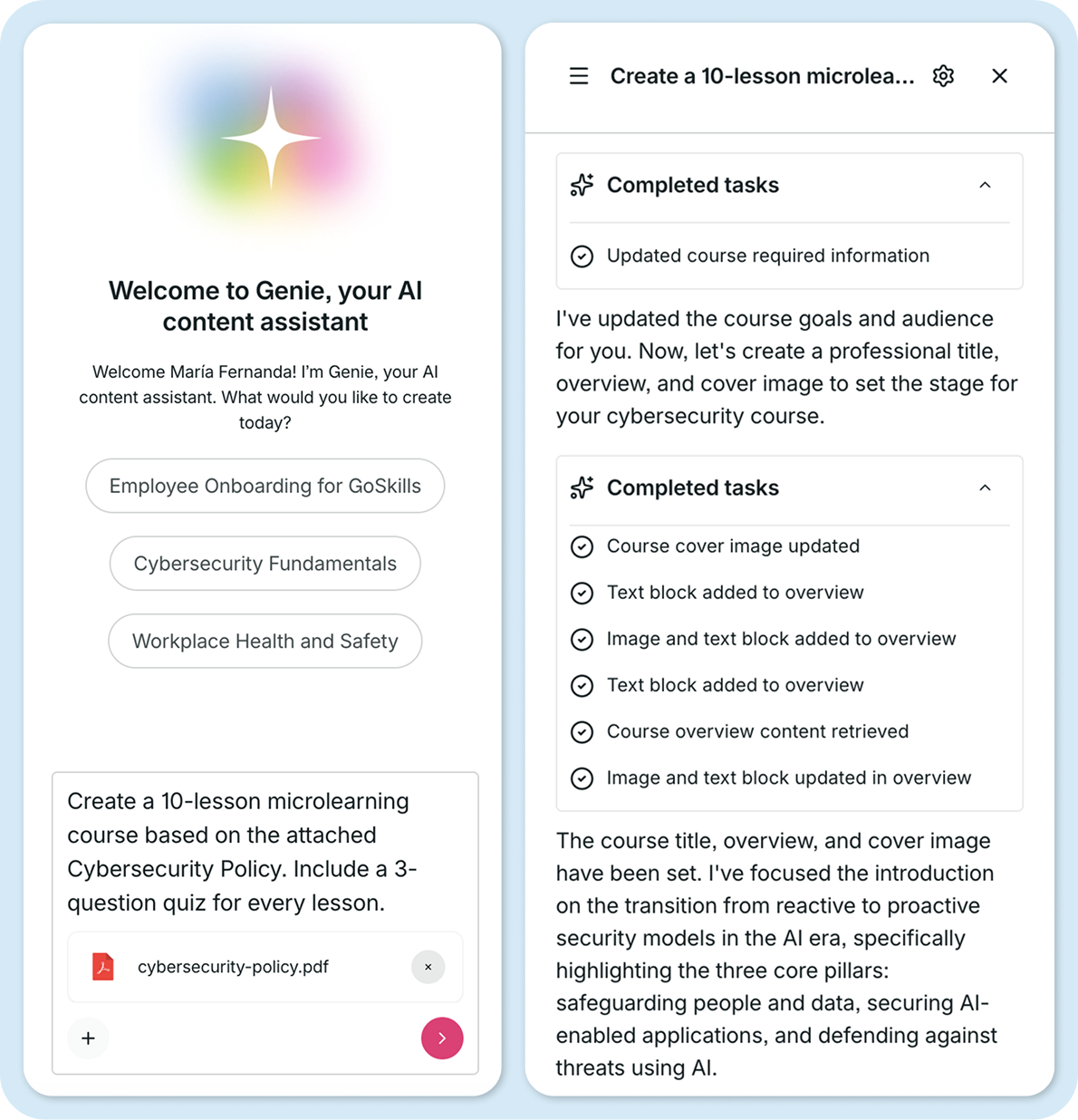
Look closely at modern efficiency features. For instance, does the platform feature a built-in AI assistant to help you auto-author custom training modules or draft quiz questions on the fly? If course creation feels like pulling teeth, your L&D team will quickly burn out.
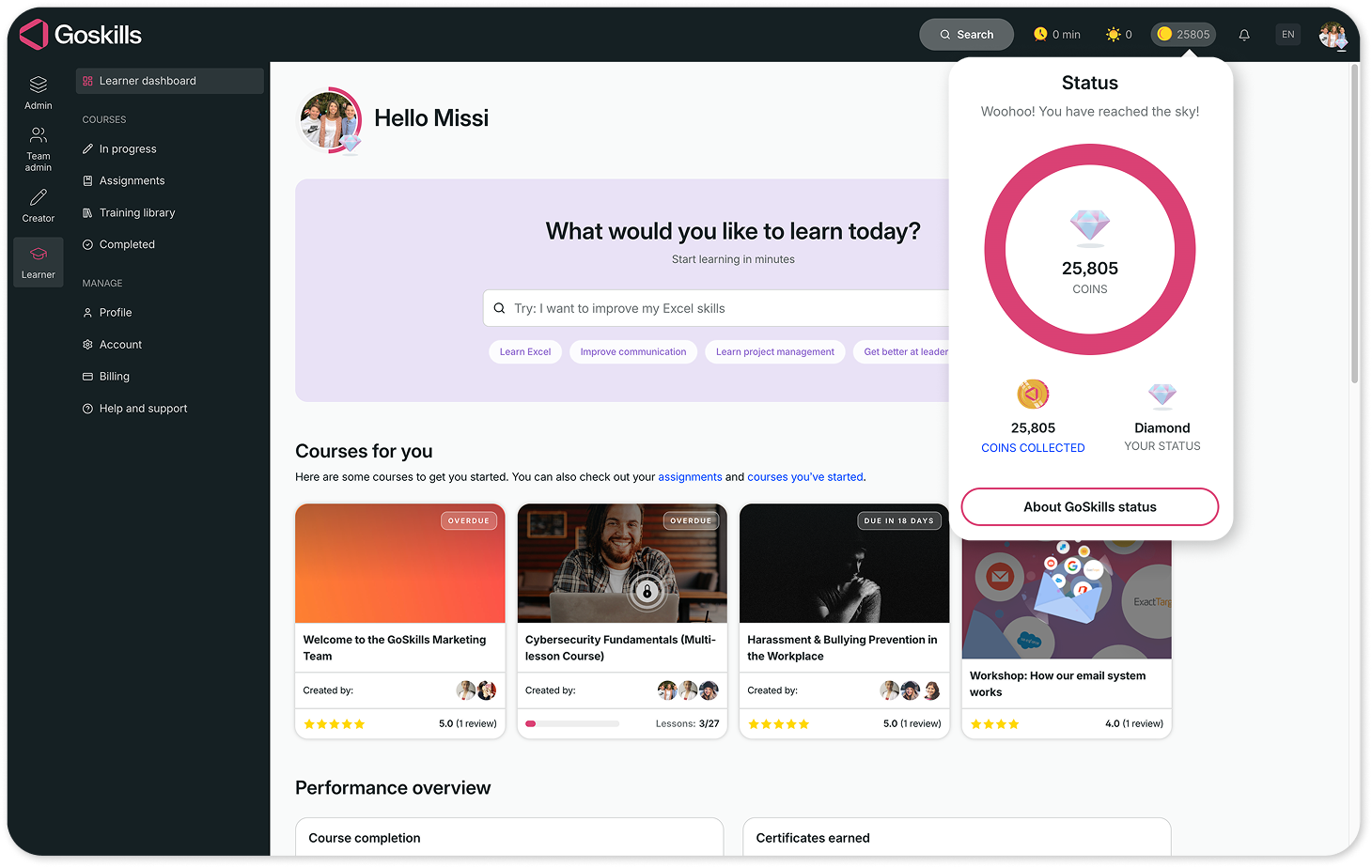
3. The learner interface
If your employees hate using the platform, adoption rates will plummet. Switch your view to the learner's perspective. Is the layout clean, or is it cluttered with unnecessary menus? Switch over to a tablet or mobile device — does the interface scale seamlessly?
Furthermore, look for engagement triggers. Does the platform leverage gamification — like badges, point systems, or leaderboards — to keep employees intrinsically motivated to finish their training?
You might find it useful to have a point-by-point outline of what to do during the trial run, as shown below.
Step-by-step checklist for your 14-day LMS free trial
Don't let the clock tick down on your trial. Use this structured timeline to maximize a 14-day evaluation window using a small control group of 3–5 diverse employees.
Get your free LMS free trial checklist
Download a printable version of our free 14-day LMS free trial evaluation checklist.
Phase 1: Environment & content setup (Days 1–3)
The goal of the first three days is to build a functional, branded environment so your test learners aren't logging into an empty software shell.
Day 1: Configure company branding
Upload your organization's logo, set custom brand colors, and adjust the login page layout to make the system feel familiar to your team.
Day 2: Build a sample onboarding track
Create a mini-course using the platform's course builder. Mix media formats by uploading a company handbook PDF, embedding a welcome video, and writing a short 3-question quiz.
Day 3: Integrate standard compliance content
If your company uses existing third-party training, upload a standard SCORM or xAPI package to ensure the system processes external tracking data without formatting bugs.
Phase 2: Pilot group launch & interaction (Days 4–9)
This is where you hand off the keys to your control group (ideally 3–5 diverse employees across different tech-skill levels) to test real-world usability.
Day 4: Provision user accounts
Invite your pilot learners to the platform via bulk email or magic links. Pay attention to how smoothly they pass through the initial sign-up and password setup.
Days 5-7: Monitor the learning sprint
Have your pilot group complete the sample learning path. Instruct them to purposefully test features on different hardware — completing half a lesson on a desktop and finishing it on a mobile web browser.
Days 8-9: Trigger engagement reminders
Use the admin panel to send automated notifications or nudge emails to anyone who hasn't finished the module. (With GoSkills, this is as simple as a checkbox at the time of course assignment.) Check if the automated system successfully gets users back into the app.
Phase 3: Analytics & decision matrix (Days 10–14)
The final days are all about gathering evidence. You are moving from evaluating user experience to pulling the data necessary to prove ROI to executive leadership.
Days 10-11: Extract completion analytics
Log back in as an administrator and run completion reports. Check if the data clearly shows individual scores, time spent per lesson, and overall pass/fail metrics.
Day 12: Collect qualitative pilot feedback
Send a quick survey to your 3–5 testers. Ask specific questions: Was the interface confusing? Did you run into bugs? Did the gamification elements feel motivating or distracting?
Days 13-14: Compile your business case
Cross-reference your pilot data against your organization's implementation goals. If the platform successfully solved your tracking and content creation bottlenecks, finalize your budget proposal before the trial window closes.
The 14-Day Golden Rule: Never run a trial without a timeline. By assigning specific actions to specific days, you guarantee that your team will have a data-backed verdict ready the exact moment the trial period expires.
Let's get you set up
Book a demo for a free trial of the GoSkills LMS — no credit card, no obligation.
Book your free trialFrequently Asked Questions
1. How long is a typical LMS free trial?
Most software trials range from 7 to 30 days. However, you don't need a month-long trial if you are organized. A focused 14-day trial backed by a dedicated pilot group is more than enough time to evaluate core functionalities, check admin workflows, and make an informed decision.
2. How many users should I realistically include in an LMS trial pilot program?
Keep your pilot group lean — ideally between 3 and 5 learners, plus 1 dedicated administrator. A smaller group allows you to easily collect qualitative feedback, monitor individual completion reports, and accurately gauge how intuitive the system is without getting bogged down managing a massive cohort.
3. Can I upload standard e-learning files like SCORM or xAPI during a free trial?
Yes, most premium LMS free trials allow you to test your existing content infrastructure. Uploading SCORM, AICC, or xAPI packages during the trial period is highly recommended so you can verify that the system accurately tracks learner progress, slide completions, and quiz scores without formatting errors.
4. What happens to my data if I decide not to purchase the LMS after the trial?
If you let your trial expire without upgrading, most platforms enter a temporary grace period (typically 30 to 60 days) where your data, custom courses, and user profiles are securely archived. With GoSkills, your account is automatically downgraded to the free version, where you can continue to use the courses you have created, along with the other features of the free-forever Basic plan.
5. Can my team access the GoSkills premium course library during our evaluation?
Absolutely. When previewing the platform, you and your learners get immediate access to up to 10 free lessons per course across our entire award-winning library. This allows you to evaluate our microlearning design, presentation quality, and instructor expertise before making a financial commitment.
6. Is there a setup fee or implementation delay when initiating a GoSkills LMS trial?
None at all. The GoSkills platform is fully cloud-based, meaning there are zero installation delays, software downloads, or hidden setup fees. From the moment you click sign up, you can go from account creation to assigning your first custom mini-course in under ten minutes.
7. Can I save the custom courses I build during the GoSkills trial period?
Yes. Any custom training paths you map out, branding elements you configure, or documentation you upload during your GoSkills trial will carry over seamlessly if you choose to transition to a paid tier. Your hard work won't be lost.
Let's get you set up
Book a demo for a free trial of the GoSkills LMS — no credit card, no obligation.
Book your free trialReady to create high-impact training?
Searching for an LMS means you are swimming through a sea of marketing buzzwords and overly complicated feature lists. The only way to cut through the noise is to stop reading feature pages and start running a structured evaluation.
An LMS free trial isn't a passive window-shopping experience; it is a tactical window to protect your company's time and budget. By utilizing a dedicated pilot group, testing your actual corporate content, and pulling real-time compliance metrics, you transform a simple software demo into a rock-solid business case for leadership.
Don't let another software trial expire unused. Set up your parameters, invite your control group, and launch your evaluation with clear KPIs.
Experience a platform built for modern teams. Sign up for a GoSkills LMS free trial today—no credit card, no implementation delays, just instant access to premium learning tools.