
Starting a new job is exciting! New people to meet, new things to learn, and hopefully a laptop that’s ready to go on day one.
But for the team making it all happen? There’s plenty to juggle, from paperwork and IT setup to training, team introductions, and 30-, 60-, and 90-day check-ins. That’s where employee onboarding software comes in.
Here’s the thing, though: not every onboarding tool does the same job. Some are better suited to specific onboarding tasks, while others are designed to manage several moving parts at once.
So, rather than another ranked list, we’ve rounded up 10 employee onboarding software tools based on what they do best, helping you find the right fit for your team.
Quick answer: What’s the best employee onboarding software?
- The best employee onboarding software depends on your team’s needs. For employee onboarding training, GoSkills is a strong choice for teams looking to launch and manage training without the complexity of a traditional LMS, from growing businesses to departments within larger organizations. It combines ready-made courses, customizable learning paths, AI-assisted course creation, and progress tracking.
- For HR administration, BambooHR is a strong choice for growing small businesses, while Gusto handles US payroll and new-hire paperwork.
- Rippling is well suited to HR and IT automation, while Donut helps remote hires build connections. Many companies benefit from combining tools rather than relying on one platform.
What is employee onboarding software?
Employee onboarding software is a digital tool that organizes and automates the steps between a job offer and a new employee getting up to speed. That can include collecting documents, setting up accounts, assigning training, coordinating tasks between HR, IT, and managers, and tracking progress.
Traditional onboarding focused on administration: contracts, tax forms, payroll, and benefits enrollment. That part still matters, but it only gets someone set up. Effective onboarding also builds the knowledge, relationships, and confidence people need to do the job well. This broader approach includes functional onboarding: job-specific training, company culture, team introductions, and role-based skill development.
In practice, onboarding breaks down into four jobs, and most tools specialize in one or two of them:
Onboarding need | What it covers | Typical tool |
|---|---|---|
| Training and ramp-up | Role-specific courses, policies, standard operating procedures (SOPs), skill development, and completion tracking | Learning management system (LMS) or SOP platform |
| HR administration and paperwork | Offer letters, e-signatures, tax forms, payroll and benefits setup | HR information system (HRIS) or payroll software |
| Workflow coordination | Task checklists, IT and account setup, manager reminders, and 30-, 60-, and 90-day check-ins | HRIS, onboarding platform, or workflow tool |
| Social connection | Onboarding buddies, team introductions, and culture-building | Employee engagement apps such as Donut |
This is why the best employee onboarding software is often a small stack rather than a single tool. A training platform helps new hires build the skills to succeed, while an HR system handles their paperwork and employee records.
Employee onboarding software compared: 10 tools at a glance
Here’s a quick comparison of the 10 employee onboarding software tools, including what each does best, who it's best suited for, and the pricing options available.
Software | Best for | Ideal fit | Pricing and free options |
| GoSkills | Ready-made and custom onboarding training | Growing businesses and teams within larger organizations | Free forever plan available. Monthly or annual per-user subscriptions starting at two seats. Free trial and demo also available. |
| BambooHR | HR records, paperwork, and checklists | Growing small businesses | Flat monthly fee for smaller teams; per-employee plans for larger ones. Free trial and demo available. |
| Connecteam | Mobile-first frontline onboarding | Retail, hospitality, and field teams | Hub-based subscriptions with base-team fees and additional users. Free small-business plan. |
| Deel | International hiring and onboarding | Teams hiring across borders | Per-contractor or per-EOR-employee subscriptions. No general free EOR plan. |
| Donut | Social connection for remote hires | Slack-based remote and hybrid teams | Free plan and tiered subscriptions based on active users. Free trial available. |
| Enboarder | Personalized onboarding journeys | Mid-sized and larger organizations | Custom quote. Demo available. |
| Gusto | US payroll and new-hire forms | US small businesses | Monthly base fee plus per-person charge; tiered plans. No free plan. |
| Rippling | Connected HR and IT onboarding | Growing and mid-market teams | Modular, quote-based pricing. No standard free plan. |
| Trainual | SOPs, company processes, and role-based knowledge | Process-heavy growing teams | Tiered, quote-based subscriptions. Demo available. |
| Zoho People | Affordable HR onboarding | Small teams and growing businesses | Free plan and tiered per-user subscriptions. Free trial available. |
Best employee onboarding training software
Onboarding can start before day one, with a warm welcome, a preview of the role, or helpful resources. But getting new hires ready takes more than completing paperwork. Structured onboarding training helps them understand how things work, build the skills their roles require, and gain the confidence to contribute sooner. GoSkills and Trainual support that process in different ways.
1. GoSkills
GoSkills is a learning management system (LMS) that combines 500+ expert-led courses with a no-code course builder for company-specific training. Teams can launch onboarding programs quickly, build their own content, and track learner progress in one place.
Who is GoSkills best for?
GoSkills is a strong choice for teams looking to launch and manage onboarding training without the complexity of a traditional LMS, from growing businesses to departments within larger organizations.
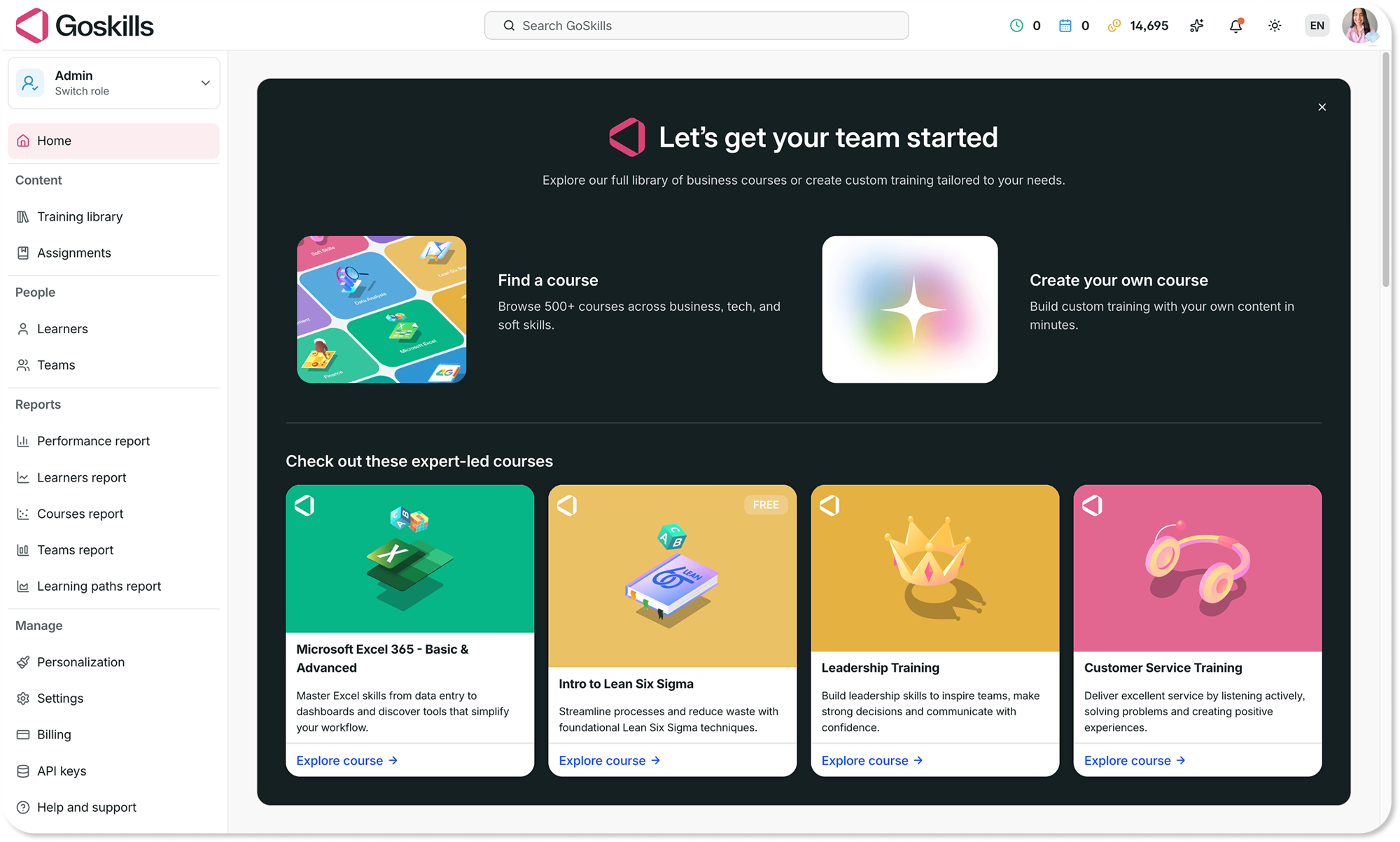
| Strengths | Ready-made courses, customizable learning paths, and AI-assisted course creation with Genie to turn internal documents or prompts into editable lessons and quizzes. Bite-sized lessons, certificates, and gamification help keep learners engaged. Automated assignments and reminders simplify training management, while LMS reporting tracks learner progress and course completion. |
|---|---|
| Limitations | Doesn’t replace an HRIS for payroll, paperwork, or employee records. Highly specialized training may require creating or importing your own content. |
| Pricing | Free forever plan available. Monthly or annual per-user subscriptions starting at two seats, with no long-term lock-ins. See GoSkills pricing for current plans and features. |
Onboard with ease
Onboarding is easier than ever with GoSkills LMS. Get started in minutes — no credit card required!
Get your free account now2. Trainual
Trainual is a training and knowledge management platform that helps companies document their processes, policies, and standard operating procedures (SOPs). Teams can organize this information into role-based training and track new-hire progress.
Who is Trainual best for?
Trainual is a good fit for growing businesses that want to document how work gets done and turn internal processes into repeatable onboarding training.
| Strengths | Centralized SOPs, customizable templates, role-based training, quizzes, and progress tracking. Includes AI tools to help create and maintain content. |
|---|---|
| Limitations | Primarily focused on internal processes and company knowledge. Access to its expert-built course library is available as an add-on, rather than included as standard. |
| Pricing | Tiered, quote-based subscriptions, with an implementation fee and optional add-ons. Demo available. |
Best HR onboarding software for paperwork and employee records
These tools handle the administrative side of onboarding, from employee records and paperwork to payroll-related tasks. The right choice depends on your company size, location, and existing HR setup.
3. BambooHR
BambooHR is an HR management platform that brings employee records, paperwork, and onboarding checklists into one place. New hires can complete forms and sign documents before their first day, while HR keeps track of what’s done and what’s still pending.
Who is BambooHR best for?
BambooHR is a good fit for growing businesses that want to manage employee records, onboarding paperwork, and everyday HR processes in one system.
| Strengths | Employee records, e-signatures, and onboarding checklists. Also supports I-9 and E-Verify workflows through Mitratech. |
|---|---|
| Limitations | Primarily focused on HR management. While some compliance training is available, teams needing broader, customized onboarding training may benefit from a dedicated LMS. |
| Pricing | Tiered subscriptions, with a flat monthly fee for smaller teams and per-employee pricing for larger organizations. Free trial and demo available. |
4. Gusto
Gusto combines payroll and HR tools to simplify new-hire paperwork. Employees can enter their tax and direct deposit details directly into the system, reducing manual data entry for HR teams.
Who is Gusto best for?
Gusto is a practical choice for US small businesses that want to manage payroll, collect new-hire information, and handle essential onboarding paperwork in one place.
| Strengths | Payroll, tax forms, direct deposit setup, and new-hire paperwork. Remote I-9 and E-Verify services are available. |
|---|---|
| Limitations | Primarily focused on US payroll and HR administration. Advanced HR features depend on the plan, and dedicated employee training requires another solution. |
| Pricing | Tiered subscriptions with a monthly base fee plus a per-person charge. Additional fees may apply to certain services. |
5. Zoho People
Zoho People is a cloud-based HR platform that helps teams manage employee records and everyday HR tasks. Its paid plans also include onboarding and offboarding workflows, making it an affordable option for businesses moving away from spreadsheets.
Who is Zoho People best for?
Zoho People is well suited to budget-conscious teams that need an affordable HR system with the flexibility to add more features as they grow.
| Strengths | Employee records, onboarding and offboarding workflows, and integrations with other Zoho products. |
|---|---|
| Limitations | The free plan doesn’t include onboarding workflows. Payroll is a separate product, and learning management is included in higher-tier plans or available as a paid add-on to certain plans. |
| Pricing | Free plan for very small teams, with tiered per-user monthly or annual subscriptions. A free trial of paid plans is available. |
Best software for automating employee onboarding workflows
Both tools help automate employee onboarding, but they focus on different needs. Rippling connects HR and IT processes, while Enboarder helps coordinate personalized onboarding journeys for new hires and managers.
6. Rippling
Rippling is an HR and IT management platform that automates onboarding tasks across departments. When a new employee joins, it can trigger workflows for account access, device setup, and other administrative tasks.
Who is Rippling best for?
Rippling is a good fit for growing businesses and mid-sized teams that want to automate HR and IT onboarding from one connected platform.
| Strengths | Connected HR and IT management, automated onboarding workflows, app access provisioning, and device management. |
|---|---|
| Limitations | Costs can increase as additional modules are added. Its broad range of features may be more than smaller teams need for basic onboarding. |
| Pricing | Modular, per-employee subscriptions with a monthly base fee for some products. Custom quotes based on selected features and team size. |
7. Enboarder
Enboarder is an employee onboarding platform that helps organizations create personalized onboarding journeys. It automates communications, tasks, and reminders to keep new hires, managers, and HR teams aligned throughout the process.
Who is Enboarder best for?
Enboarder is well suited to mid-sized and larger organizations looking to deliver consistent, personalized onboarding experiences across teams and departments.
| Strengths | Personalized onboarding journeys, automated communications, manager reminders, and progress tracking. Role-based ramp-up plans are available on select packages. |
|---|---|
| Limitations | Works alongside existing HR systems rather than replacing them. Setting up personalized journeys requires planning and coordination. |
| Pricing | Custom, quote-based pricing depending on organizational needs and selected solutions. Demo available. |
Best onboarding software for international and frontline teams
Hiring across borders and onboarding employees who don’t work at a desk come with different challenges. Deel helps manage international employment, while Connecteam supports mobile-first onboarding for frontline teams.
8. Deel
Deel is a global HR and payroll platform that helps businesses hire and onboard international employees and contractors. Its Employer of Record (EOR) service handles local contracts, payroll, and compliance in supported countries, without requiring companies to establish a local entity.
Who is Deel best for?
Deel is a good fit for businesses hiring internationally that need help managing employment contracts, payroll, and onboarding requirements across different countries.
| Strengths | International hiring, contractor management, local employment contracts, and global payroll and compliance support. |
|---|---|
| Limitations | EOR services can be more costly than standard HR software, and availability varies by country. Learning management is available through the separate Deel Engage offering. |
| Pricing | Per-worker subscriptions depending on the service, including contractor management, Contractor of Record, and EOR. Demo available. |
9. Connecteam
Connecteam is a mobile-first employee management platform that helps businesses onboard and manage frontline workers. It brings together onboarding tasks, employee documents, team communications, and training in one app.
Who is Connecteam best for?
Connecteam is well suited to businesses with frontline or deskless employees, such as retail, hospitality, construction, and field service teams that need mobile access to onboarding resources.
| Strengths | Mobile onboarding, employee checklists, document management, team communication, and built-in courses and quizzes. |
|---|---|
| Limitations | Features are spread across Operations, Communications, and HR & Skills hubs. Course and document limits vary by plan. |
| Pricing | Hub-based monthly or annual subscriptions covering a set number of users, with additional-user fees. Free small-business plan and free trial available. |
Best tool for remote onboarding and social connection
Remote and hybrid hires don’t always get the spontaneous introductions that happen in an office. Donut helps teams make those connections more intentional.
10. Donut
Donut is an employee engagement platform that helps coworkers connect through automated introductions and onboarding messages. It pairs new hires with colleagues for virtual chats and can automate onboarding journeys in Slack.
Who is Donut best for?
Donut is a good fit for remote and hybrid teams that want to help new hires build relationships and feel connected to their colleagues.
| Strengths | Automated introductions, onboarding buddy programs, and personalized onboarding messages. Integrates with Slack and supports introductions in Microsoft Teams. |
|---|---|
| Limitations | Doesn’t replace an HR system or dedicated LMS. Onboarding journeys are available on all plans, but message limits vary by tier. Microsoft Teams functionality is more limited than Slack. |
| Pricing | Free plan and tiered monthly or annual subscriptions based on active users and features. A 14-day free trial of paid plans is available. |
How to choose employee onboarding software
Before booking demos, think about which parts of your onboarding process need the most attention. Then use these questions to compare your options:
- Training: Can you assign role-specific courses, set due dates, and track completion? Does it include ready-made content, or will you need to build everything yourself?
- HR paperwork and compliance: Does it handle e-signatures, digital forms, and any required employment verification workflows, such as I-9 and E-Verify in the US?
- Task workflows: Can you assign onboarding tasks to HR, IT, and managers, with owners, deadlines, and automated reminders?
- Social connection: Does it help new hires connect with teammates, onboarding buddies, and managers, especially in remote or hybrid environments?
- Integrations: Does it connect to your HRIS, applicant tracking system (ATS), and payroll software to avoid duplicate data entry?
- Mobile access: Can new hires, especially frontline workers, complete tasks and training on their phones?
- Reporting: Can you track progress and identify where new hires may need support? Is reporting included in your plan?
- Ease of setup: How long will implementation take, and who needs to be involved?
- Pricing and fit: Is pricing per user, based on a monthly fee, modular, or quote-based? What limitations apply to free plans and trials?
A practical tip: If new hires are completing their paperwork but still struggling to get up to speed, focus on training features rather than adding more HR administration tools.
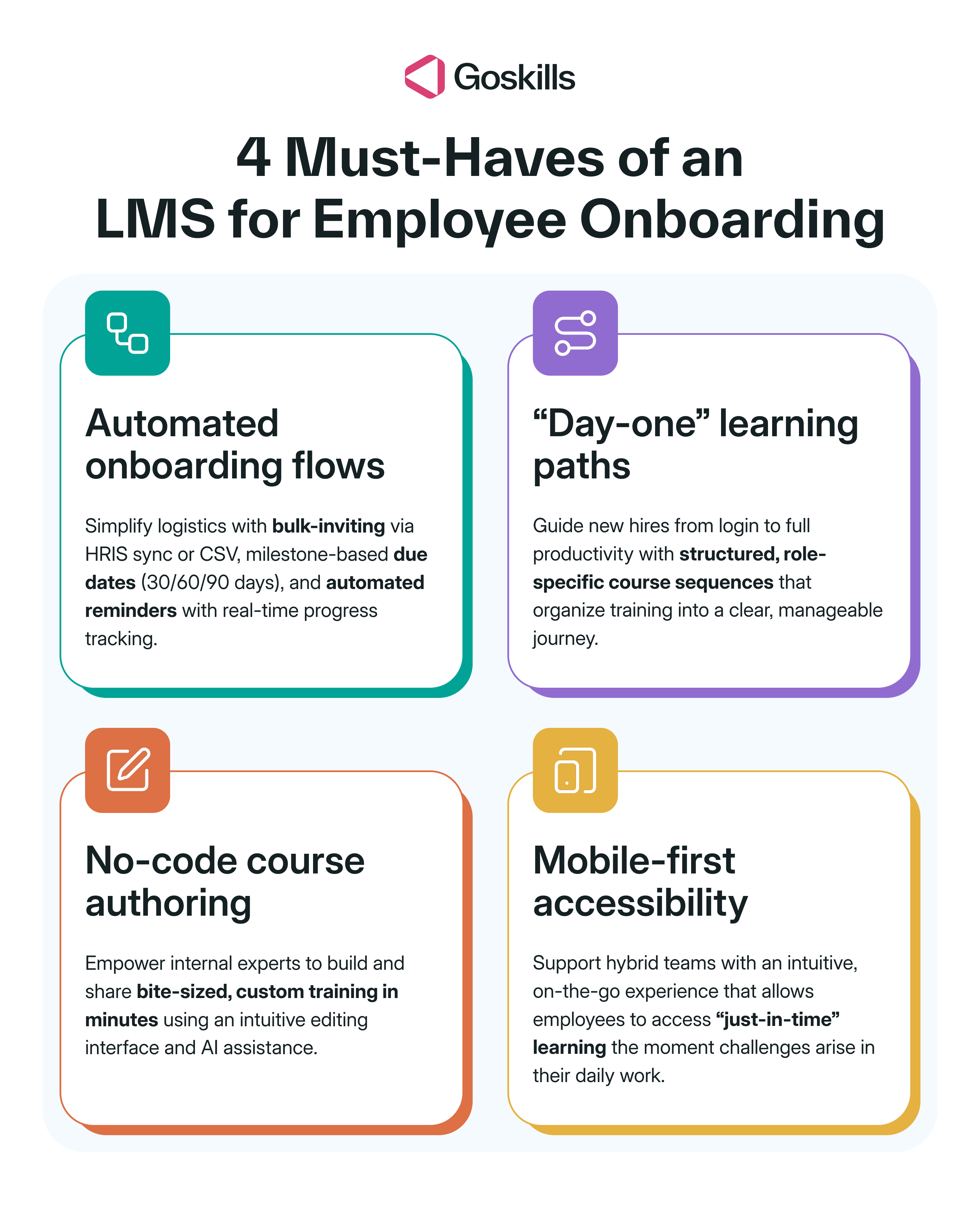
How can GoSkills improve employee onboarding training?
Your HR system gets new hires set up. GoSkills helps them learn what comes next. As an employee training platform, it works alongside tools like BambooHR, Gusto, or Rippling to turn onboarding into a structured, trackable training program, without requiring HR teams and managers to create everything from scratch.
Whether you’re looking for an LMS for a small business or managing training within a larger organization, here’s what that looks like in practice.
1. Simplify training assignments and progress tracking
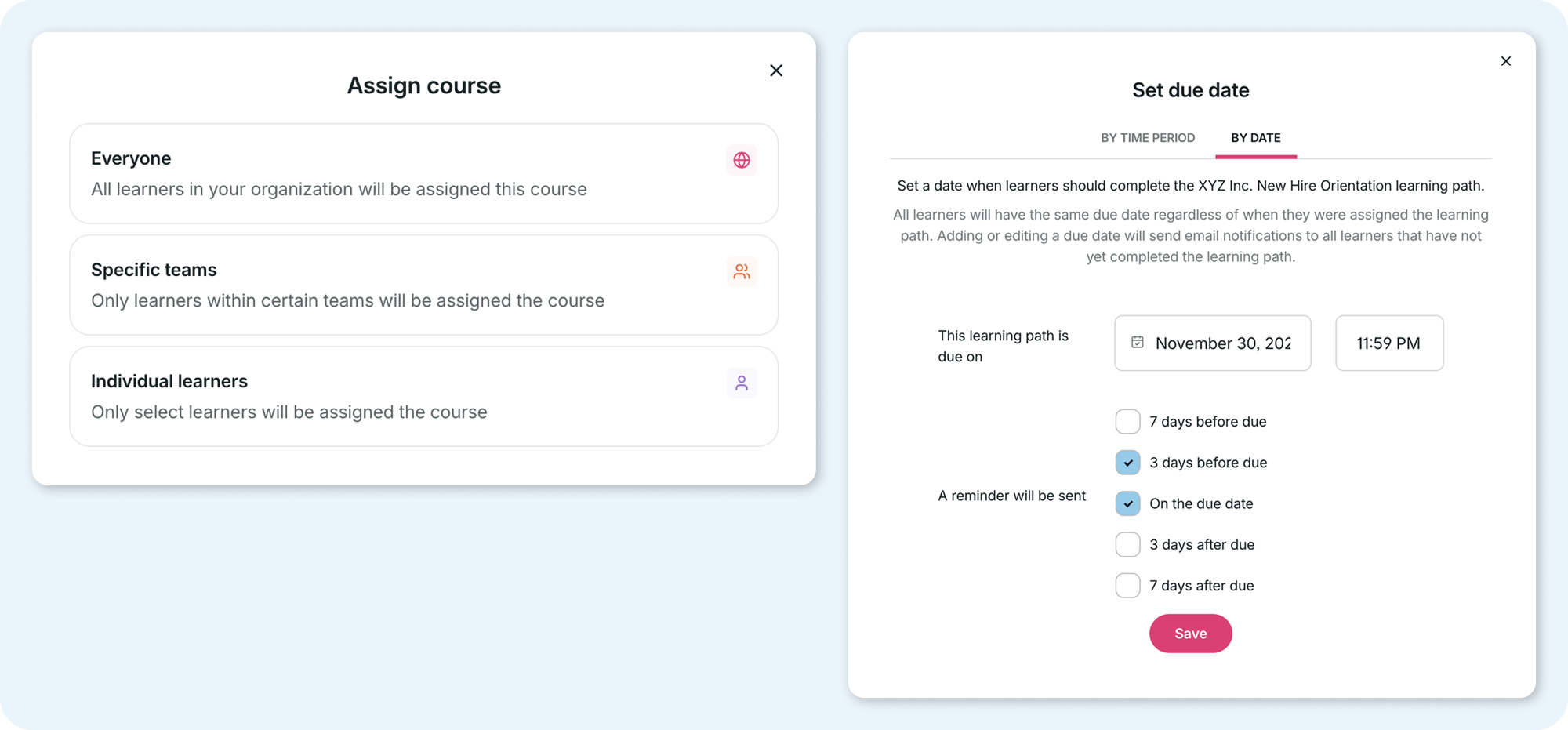
When you’re onboarding several people, manually tracking everyone’s courses in spreadsheets gets old fast. With GoSkills’ LMS features, administrators can:
- Organize learners into teams and assign courses based on their roles
- Set training deadlines for milestones such as the first 30, 60, and 90 days
- Schedule automated reminders to reduce manual follow-up
- Track course and learning path progress through detailed reports
2. Guide new hires with structured learning paths
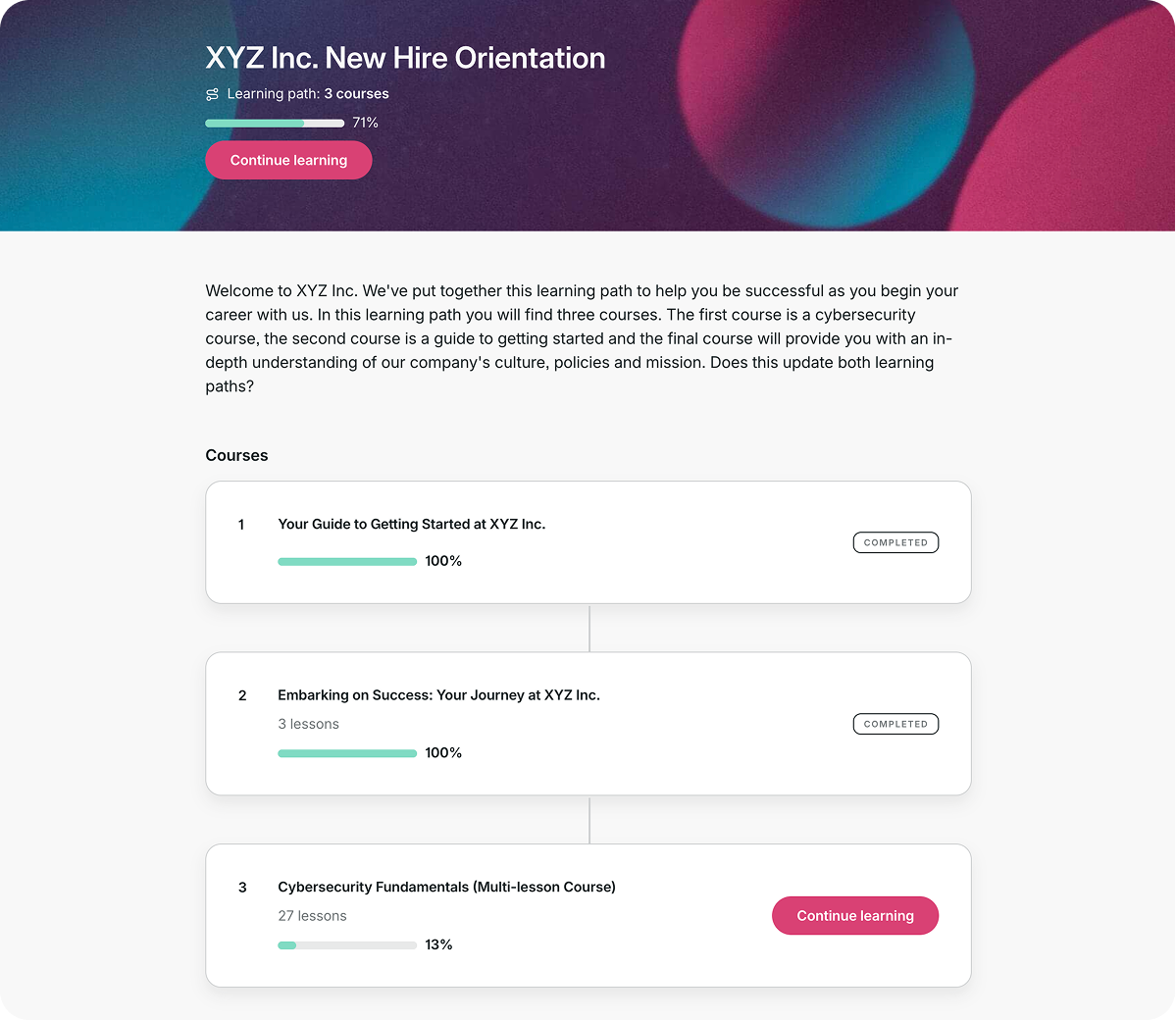
Learning paths organize training into a clear sequence, so employees know what to work on next. A support hire might start with customer service standards and product knowledge, while a new manager gets company policies alongside leadership and management training.
You can combine company-created courses with expert-led training from the GoSkills course library to build a learning experience tailored to each role.
3. Make custom course creation easy and interactive
Policies, systems, and procedures change. Your training should be easy to update, too. With its no-code course builder, HR teams and subject-matter experts can turn their knowledge into short lessons using videos, quizzes, and interactive activities.
Making training interactive is easy, too. Add flashcards, step-by-step activities, or branching scenarios to get new hires doing more than just reading.
Genie, GoSkills’ AI course creation assistant, can generate course drafts from prompts or existing documents, such as employee handbooks and training manuals. You can then review and edit the content before publishing.
There’s also a free employee onboarding course template if you’d like a head start.
4. Keep new hires engaged with bite-sized learning
Onboarding shouldn’t mean hours of uninterrupted video. GoSkills’ bite-sized lessons give new hires manageable steps to complete throughout the workday. Quizzes, certificates, and gamification help keep learners engaged, while the course library gives them a resource to revisit whenever they need a refresher.
Case study: How AWKO built a 90-day onboarding program with GoSkills
GoSkills became our hub for new hires. It gave them structure, clarity, and something meaningful to accomplish in their first 90 days.
— Sherilyn Sperling, Employee Relations & Development Manager at AWKO
The law firm Aylstock, Witkin, Kreis & Overholtz (AWKO) used GoSkills to replace repetitive new-hire training sessions with a structured onboarding program. New employees complete essential courses throughout their first 90 days, with clear deadlines and progress tracking. HR and IT staff also began turning their expertise into reusable courses.
The results speak for themselves: AWKO achieved a 95% course completion rate in 2024 and 91% from January through November 2025, while active learners increased from 112 in 2023 to 211 in 2025.
Want to see how they pulled it off? Read the full AWKO case study.
Employee onboarding software FAQs
1. What is the best employee onboarding software for small businesses?
The best employee onboarding software for small businesses depends on what you need to streamline. BambooHR is a strong choice for HR records and checklists, Gusto handles US payroll and paperwork, and Zoho People offers an affordable starting point. For structured onboarding training, GoSkills combines ready-made courses, custom course creation, and progress tracking.
2. Does HR software handle employee onboarding, or do I need a dedicated tool?
Most HR software handles employee records, paperwork, and onboarding checklists, but it may not cover everything your team needs. For example, an LMS like GoSkills can complement your HR system with role-specific courses, learning paths, and completion tracking. Other tools may help with IT setup or team connection.
3. How much does employee onboarding software cost?
Employee onboarding software uses different pricing models depending on the platform. HR systems and learning platforms typically charge per employee or user, sometimes with a monthly base fee. Others use modular pricing or custom quotes. When comparing options, check for implementation fees, add-ons, and features that require higher-tier plans.
4. Is there free employee onboarding software?
Yes! Zoho People, Connecteam, Donut, and GoSkills offer free plans, although features and eligibility vary. GoSkills’ free plan lets teams create courses and invite learners, while reporting and full course-library access require a paid plan. You can also explore our guide to free and affordable LMS platforms.
5. Can employee onboarding software also handle offboarding?
Yes. Some HR platforms support both onboarding and offboarding, including document workflows, exit checklists, and access removal. Zoho People includes offboarding workflows in its paid plans, while Rippling can automate IT access removal when employees leave. Check which features are included in your chosen plan.
Less juggling. Better onboarding.
A great onboarding experience doesn’t come from finding one tool that does everything. It comes from choosing the right tools for the job, whether that’s delivering training, managing paperwork, coordinating tasks, or helping new hires feel connected.
And when it comes to training, GoSkills makes it easier to get new employees up to speed with ready-made courses, customizable learning paths, AI-assisted course creation, and progress tracking.
Ready to make onboarding training one less thing to juggle? Create a free GoSkills account to build your first course, or book a demo to see how GoSkills can support your team’s training needs.
Onboard with ease
Onboarding is easier than ever with GoSkills LMS. Get started in minutes — no credit card required!
Get your free account now