
What is an LMS? 'LMS' stands for Learning Management System — a software platform for creating, delivering, tracking, and managing training and educational programs. Organizations use an LMS to onboard new hires, upskill employees, maintain compliance, and train customers or partners — all from one centralized system. Modern platforms like GoSkills go further, combining course delivery with gamification, AI-assisted authoring, and built-in reporting.
Video: "What is an LMS?" in less than a minute
What is an LMS used for?
LMS platforms exist to solve one problem: delivering consistent training at scale. SoftArc's FirstClass, launched in 1990, is widely credited as world’s first true LMS. The category went mainstream in 2020, when COVID-19 lockdowns pushed corporate L&D teams to adopt distance-training tools almost overnight. Today, AI-driven shifts in job requirements have made the LMS essential again, this time as the engine behind rapid reskilling.
The numbers explain the urgency. Goldman Sachs Research estimates that roughly 300 million jobs globally are exposed to some degree of AI automation, with a baseline forecast that 6–7% of the workforce will eventually be displaced as adoption widens. Separately, the World Economic Forum's Future of Jobs Report 2025 found that 59% of the global workforce will need reskilling or upskilling by 2030. GoSkills' own UpSkilling Forecast research found nearly half of surveyed CEOs expect significant shifts in core skill requirements over the next two years.
To meet this demand, modern business LMS platforms like GoSkills have adapted: cloud-based, gamified microlearning, an on-demand AI tutor, robust course authoring tools, and a curated library of accredited business and soft-skills courses.
Common cloud-based LMS features
Most LMS platforms — whether built for a small business or an enterprise — share a common core: course creation tools, user enrollment and management, progress tracking, assessment capabilities, and reporting.
| Learning | Management | System |
|---|---|---|
 |  |
|
| Empowers users to access courses anytime, interact with engaging tools, and explore diverse media formats tailored to their learning preferences and goals. | Streamlines course and learner management with features like automated enrollment, progress tracking, and reporting, saving time for administrators. | A centralized platform for delivering training content online or offline, with seamless integration options for other tools and applications. |
Unlike a fully-loaded SaaS like GoSkills, free, open-source learning systems like Moodle and Open edX come "unbundled". They install with no pre-loaded learning content and provide only basic functionality out of the box, such as:
- Course creation and delivery
- Progress tracking with reporting and analytics
- Course enrollment, notifications, and recommendations
While these platforms are cost-effective, adding features or customizations often requires plugins, integrations, or technical expertise. In contrast, fully integrated solutions like GoSkills LMS simplify processes and remove technical barriers.
Types of LMS platforms
There are many types of learning platforms available. The right LMS depends on who's using it — HR managers, employees, students, or customers. Below are the main categories, including cloud-based LMS, corporate LMS, and LMS options built for small business.
| LMS type | Description | GoSkills | Other examples |
|---|---|---|---|
| Cloud-based LMS | Hosted in the cloud, accessible anywhere, and maintained by the vendor | ✓ | Google Classroom, Absorb LMS |
| White-label LMS | Can be fully customized with your branding and logo, making it appear as your own proprietary platform | ✓ | AcademyOcean, Northpass |
| Corporate LMS | Designed for businesses to train employees, partners, and customers | ✓ | SAP Litmos, Cornerstone |
| AI-powered LMS | Leverages artificial intelligence to build courses, personalize training plans, and optimize experiences | ✓ | Learnosity, Brightspace |
| Gamified LMS | Uses game mechanics like badges, leaderboards, and rewards to enhance engagement | ✓ | Kahoot, Growth Engineering LMS |
| Integrated LMS | Connects with other tools like HR systems, CRMs, or productivity software | ✓ | Workday Learning, Salesforce LMS |
| Mobile-first LMS | Focused on mobile learning with responsive design to optimize the user experience on any device | ✓ | EdApp, LearnUpon |
| Academic LMS | Built for managing coursework, grading, and student progress in educational institutions | - | Canvas, Schoology |
| Industry-specific LMS | Tailored to meet specific industry compliance and training needs | - | Healthcare LMS |
| Open-source LMS | Free and customizable, but requires technical expertise for setup and maintenance | - | Moodle, Open edX |
| Self-hosted LMS | Installed on local servers, offering high customization and data control | - | Blackboard, Totara |
Some platforms span multiple categories. GoSkills, for example, qualifies as a cloud-based, corporate, white-label, and AI-powered LMS — making it a strong fit for SMBs that need an LMS for small business without sacrificing enterprise-grade features.
Why do companies use learning management systems?
Companies invest in a corporate LMS to boost productivity, simplify training administration, and support employees through periods of change. Large corporations like Amazon, Walmart, and Target are putting billions into workforce upskilling for exactly these reasons.
- To boost employee productivity and retention. Skills training reduces workplace anxiety, strengthens team cohesion, and improves job performance — all of which support retention.
- To simplify training management. Elearning platforms help HR professionals manage and track training initiatives, so programs are delivered efficiently and outcomes are measurable.
- To support job seekers and employees. Training signals inclusion in a company's long-term plans, which helps offset the stress of layoffs and economic uncertainty. It also gives staff a structured way to broaden their skill sets.
Beyond professional development, employee training programs offer a structured way to engage staff, alleviate their stress, and foster a supportive workplace culture.
Recent trends suggest LMS adoption often reflects the social and economic climate. Key developments in recent years include:
- COVID-19 lockdowns (2020): During the pandemic, 70% of Learning and Development (L&D) departments in North America used learning management systems to support remote training.
- Post-lockdown LMS growth (2023): The Future of Learning Technologies report revealed that 83% of HR professionals viewed online learning technologies as critical to their L&D efforts. Additionally, 78% anticipated that the importance of employee training software would grow significantly in importance over the next three years.
- Workplace anxiety and burnout (2023-2025): The APA's 2023 Work in America Survey found that over 90% of workers prioritize organizations that value mental health, respect, and work-life balance. This underscores the need for employee skills training to address workplace stress and promote a healthy work environment.
Benefits of using an LMS
An LMS saves organizations time and money while giving employees a clearer sense of investment in their growth.
Organizational advantages
Employees can access training on their own schedule, cutting the cost of travel, in-person sessions, printed materials, and venue rentals. By delivering structured, scalable training, an LMS helps organizations cut costs and meet diverse learning needs at the same time.
By delivering structured, scalable, and efficient training solutions, an LMS helps organizations improve operational efficiency, reduce costs, and meet diverse learning needs effectively.
Additional benefits include:
- Tracking progress and performance with minimal admin effort
- Expanded accessibility — elearning content available anytime, anywhere
- Customized learning experiences tailored to individual needs
- Efficient content updates that keep materials current
- Consistent training delivery across the whole organization
- Automated admin tasks like enrollment, certification, and reminders
- Centralized data management for all learning materials and user data
- Enhanced security through encryption and access controls
Workplace learning benefits for employees
Training opportunities help employees feel included in a company's long-term plans, which fosters motivation and engagement — and the skills gained directly improve employability.
A sense of inclusion fosters motivation and engagement, while the skills they gain can enhance their careers and improve their employability.
Some platforms, such as GoSkills and Articulate 360 offer both course authoring tools for instructors and pre-built professional courses for learners. This dual functionality allows users to either create online course content or upskill at their own pace with ready-made courses in areas like leadership, technical skills, or personal development.
Additional benefits for learners include:
- Personalized learning paths: Tailored training that aligns with individual career goals
- Flexibility: On-demand access to training, enabling learners to balance work and personal responsibilities
- Professional growth: Opportunities to upskill and enhance career prospects, improving long-term employability
- Increased motivation: Feeling included in organizational plans fosters commitment and a sense of purpose
- Accessible expert content: Platforms like GoSkills and LinkedIn Learning offer high-quality, pre-built courses for immediate learning opportunities
Commercial LMS features
A modern LMS bundles together training management, user management, analytics, and security into one system. Here's how those functions typically break down:
| Function | LMS Features | |
|---|---|---|
| Training management | Content delivery | Customization |
| Enable easy upload and organization of materials, including PDFs, videos, audio, slides, and SCORM/xAPI-compliant files | Tools for creating targeted courses tailored to different departments, teams, or roles | |
| User management | Role permissions | Group management |
| Flexible role assignments, enabling administrators to define access levels for various user types | Automatically segment users based on roles, location, or milestones to streamline training efforts | |
Tracking, reporting, and analytics | Dashboards | Exportable reports |
| Provide visual insights into learner progress, course completion rates, and knowledge gaps | Automate report generation and schedule updates for administrators or stakeholders | |
| Assessment and certification | Exams and quizzes | Certification tracking |
| Create engaging assessments with automated grading and feedback | Automatically issue and renew certificates upon course completion, with alerts for recertification requirements | |
| Communication and collaboration | Social learning | Webinar integration |
| Encourage interaction through forums, chat tools, and peer-to-peer collaboration | Seamlessly connect with platforms like Zoom, Teams, and Webex for live training sessions | |
| Gamification | Built-in motivational tools | Goal-setting |
| Incorporate leaderboards, badges, and point systems to boost learner engagement | Allow learners to set personal goals in the form of daily streaks and minimum learning times | |
| Personalization | Learning paths | AI recommendations |
| Offer structured or flexible plans to guide learners through sequential or self-selected courses | Suggest courses based on past performance, user preferences, or skill gaps | |
| Automation | Enrollment and notifications | Dynamic rules |
| Automatically assign courses and send reminders to learners | Configure triggers for certifications, course assignments, or group management | |
| Accessibility | Mobile compatibility | Offline access |
| Ensure responsive design for access across smartphones, tablets, and desktops | Allow content downloads for learning or practice without internet connectivity | |
| Integration | Third-party tools | Single sign-on (SSO) |
| Sync with HR systems, CRM platforms, and analytics tools for a cohesive learning ecosystem | Streamline access by enabling users to log in through a single authentication point | |
| Branding and customization | White-labeling | Brand identity |
| Remove vendor branding to create a fully customized experience | Incorporate company logos, colors, and themes to maintain consistency with your corporate image | |
| Security and compliance | Data protection | Reliable uptime |
| Ensure adherence to privacy standards like GDPR, SOC 2, or ISO 27001 | Guarantee seamless user access with minimal service disruptions |
Enterprise learning platform use cases across industries
An LMS adapts to nearly any training context:
- Corporate development — onboarding, professional development, compliance
- Academic education — course materials, virtual classrooms, elearning
- Government training — public sector education and regulatory compliance
- Customer and partner training — product education and partner collaboration
- Certification and skill development — professional certifications and job-specific skills
- Remote and blended learning — flexible access to live or self-paced sessions
LMS potential downsides — and how to solve them
While learning management systems offer numerous benefits, they also come with some challenges:
1. LMS study requires self-discipline
Unlike traditional in-person training, where teachers or supervisors may enforce deadlines and ensure accountability, online training often requires learners to be self-motivated. In a self-paced learning environment, individuals with poor time management or low self-discipline may struggle, potentially limiting the effectiveness of the training.
Solution: Layer in scheduled follow-ups or mentorship programs where built-in check-ins and reminders fall short.
2. Employees may experience tech overload
In today's digital age, the average person consumes around 20GB of data daily, a number expected to grow exponentially with the rise of the Internet of Things (IoT). Employees already manage multiple tools, including collaboration platforms like Microsoft Teams and Slack and analytical tools like Tableau and Power BI. If not carefully managed, Adding LMS training to this mix can lead to digital fatigue or overwhelm.
Solution: Prioritize user-friendly software and bite-sized learning modules to reduce cognitive load.
3. The need for oversight can create administrative complexity
No business LMS is entirely "set it and forget it." These systems require consistent human oversight to maintain engagement and ensure operational efficiency. To prevent user disengagement and system stagnation, tasks such as updating content, tracking user progress, and responding to feedback are essential.
Solution: Assign a dedicated administrator to monitor usage and adapt the platform as needs evolve.
4. Leaders may struggle with content creation
Transitioning from traditional teaching methods to digital content creation poses unique challenges. Even the most charismatic educators may struggle to design engaging online materials that resonate with learners.
The rise of AI-driven authoring tools is reshaping content development, making it faster and more accessible. However, careful oversight is required to maintain quality. Experts anticipate that the demand for high-quality, engaging course material will outpace the development of new LMS software features. Organizations that prioritize content excellence will be better positioned to meet evolving learner expectations and stand out in the competitive digital learning space.
Solution: Pair instructional design expertise with the creativity and adaptability of a modern content creator.
Learn more: How to prompt-engineer using an AI elearning authoring tool
The shift from learning management to learning experience
To combat tech burnout and improve learner engagement, agile training platforms are evolving from traditional learning management systems to Learning Experience Platforms (LXPs). While an LMS focuses on content delivery and administration, an LXP puts the learner at the center of the experience. This addresses the challenges of digital fatigue with innovative, user-friendly features.
Learn more: What is a learning experience platform?
Platforms like GoSkills are at the forefront of this shift, offering tools designed to make learning more accessible and enjoyable:
- Bite-sized courses: Short lessons that minimize cognitive overload
- Gamification: Badges, leaderboards, and rewards to keep learners motivated
- Interactive tools: Videos, quizzes, and simulations to make learning engaging
- Social learning: Feedback to encourage collaboration
- Personalized training plans: Tailored content recommendations that align with learner goals
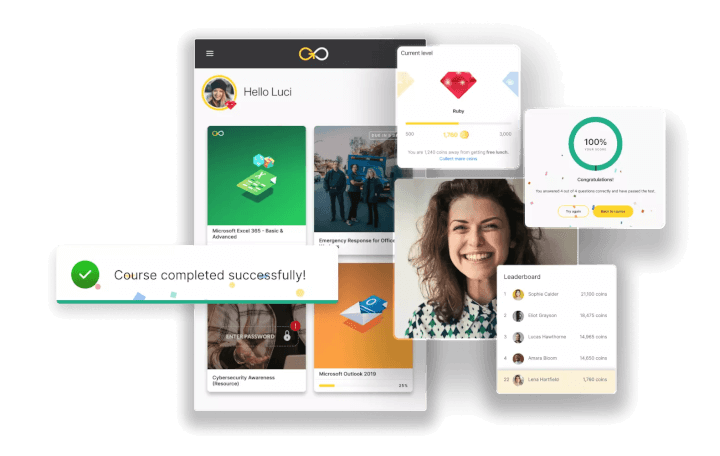
LMSs and learner engagement
Learning platforms with corporate experience rely on user metrics and customer feedback to improve engagement. By leveraging insights from HR departments, GoSkills developers adapt to shifting learner needs and changing workplace conditions.
There’s no fixed playbook for boosting engagement — learner preferences and workplace demands evolve. It's real-world user data, gathered over the years, that drives the transformation from LMS to LXP. This is how online learning programs remain relevant and effective in an ever-changing business landscape.
How to choose the right training platform
Selecting the right LMS is a critical decision that can significantly impact the success of your training and educational programs. To make an informed choice, follow these steps:
1. Identify your training needs
Start by understanding your specific training goals and audience:
- Are you training employees, onboarding new hires, or educating customers?
- Do you need features for compliance tracking, certification, or gamification?
- Is your focus on internal staff, external partners, or both?
Clearly defining your requirements ensures you choose a platform that meets your organization's objectives. For example, a business LMS may prioritize compliance features, while an academic LMS focuses on student progress and grading.
2. Evaluate LMS features
Look for an LMS with tools that align with your learning objectives:
- Mobile access: Ensure the platform supports training on mobile devices for on-the-go learning
- Content integration: Check if the LMS integrates with existing tools
- Analytics and reporting: Robust analytics can help track progress and measure training effectiveness
- Engagement tools: Features like gamification, interactive quizzes, and multimedia content can enhance learner motivation
GoSkills offers pre-built courses alongside course authoring tools, adding versatility to your training programs.
3. Compare LMS pricing models
Everyone wants an affordable LMS platform. Learning management systems offer various pricing options, including:
- Subscription models: Ideal for organizations looking for scalability and regular updates
- Licensing: Suitable for businesses that want to host their LMS on internal servers
- Open-source options: Free platforms like Moodle or Open edX can reduce costs but require technical expertise for setup and maintenance
Assess your budget and weigh the costs against the features and support provided by each option.
4. Request a demo or free trial
Testing the platform is essential before making a commitment:
- Explore the user interface to ensure it’s intuitive for both administrators and learners
- Test key features like reporting, course authoring, and mobile accessibility
- Gather feedback from a small group of end users to gauge ease of use and functionality
An LMS free trial can help you identify potential issues and ensure the platform aligns with your organization's expectations. Some platforms (like GoSkills) even have a free-forever version.
5. Consider scalability and support
As your organization grows, so will your training needs:
- Look for an LMS that can scale with your user base and support new features or integrations
- Evaluate the vendor’s customer support options, including live chat, documentation, and technical assistance
6. Assess security and compliance
Ensure the platform meets your organization’s data protection requirements:
- Does it offer encryption for sensitive data? Is the platform compliant with regulations like GDPR or HIPAA?
Related: LMS administrator guide
By carefully considering these factors, you can select an LMS that meets your current needs and drives measurable improvements. These include increased employee productivity, higher course completion rates, and a more skilled and adaptable workforce.
Example: GoSkills vs. LinkedIn Learning
Here’s a walkthrough of the “how to choose an LMS” steps, using GoSkills and LinkedIn Learning as examples. As you’ll see, the right LMS choice depends on the needs of the end users.
LinkedIn Learning offers an extensive library of courses, making it an excellent choice for individuals looking to upskill in areas like business, technology, and creative skills. Its integration with LinkedIn profiles provides added value, allowing learners to showcase completed certifications directly on their professional profiles.
GoSkills LMS, on the other hand, focuses on customizable features designed to meet the unique needs of small and medium-sized businesses (SMBs). With tools for course authoring, gamification, and reporting, GoSkills empowers businesses to create tailored learning experiences that align with their specific training objectives.
Here’s a side-by-side comparison of the two platforms:
| Feature | GoSkills LMS | LinkedIn Learning |
|---|---|---|
| Number of courses | 500+ curated courses | 20,000+ courses |
| Target audience | SMBs, corporate teams | Individual learners, professionals |
| Gamification | Yes | Limited |
| AI-powered authoring tools | Yes | No |
| Pre-built course library | Yes | Yes |
| Course customization | High | None |
| Reporting and analytics | Advanced | Basic |
| Pricing model | Subscription-based, SMB-friendly | Subscription-based, individual-focused |
| Learning paths | Customizable | Pre-defined |
Which platform should you choose?
Choose LinkedIn Learning if:
- You're an individual looking to self-upskill or explore a wide variety of topics
- You want easy integration with your LinkedIn profile to showcase certifications
Choose GoSkills LMS if:
- You're a small or medium-sized business looking for customizable tools to create training tailored to your team’s needs
- You need advanced reporting, gamification, or AI-powered authoring tools to enhance engagement
Related: Best LinkedIn Learning alternatives for learners & businesses
By evaluating your specific learning or organizational needs, you can select the platform that aligns best with your goals. GoSkills is the go-to choice for SMBs, while LinkedIn Learning excels for individual learners seeking a broad course selection.
The future of learning management systems
The LMS has grown far beyond its origins, evolving into a cornerstone of modern education and training. As digital content creation and user-centered design become essential, training software is transforming to meet the demands of both learners and organizations.
The social shift
- Evolving role of educators: Teachers are now digital content creators, blending instructional design with multimedia creativity to keep learners engaged
- Changing learner expectations: Remote work and hybrid learning have driven demand for self-paced, flexible learning experiences, influenced by trends like gamification and streaming
- Cultural adaptation: AI-assisted learning, gamification, and microlearning are becoming the norm, reflecting broader shifts toward on-demand, tech-driven solutions
The technological transformation
- AI and automation: Tools for content development, adaptive learning, and analytics are revolutionizing content delivery, though human oversight remains key to maintaining quality
- Integration and personalization: Advanced platforms integrate with workplace tools to create seamless, data-driven, and highly personalized learning journeys
- Rapid innovation: The pace of advancements in AI and digital platforms continues to redefine what an LMS can achieve, requiring ongoing adaptability from educators and administrators
While learning platforms excel in managing and delivering training today, their ongoing evolution signals a future where learning is more dynamic, engaging, and responsive to societal and technological changes. This socio-technological transformation ensures that the LMS will remain a vital tool for education and development in the years to come.
Frequently asked questions
What does LMS stand for? LMS stands for Learning Management System — software used to create, deliver, track, and manage training and educational content.
What is an LMS used for? Organizations use an LMS to onboard employees, deliver compliance training, upskill staff, and educate customers or partners, all while tracking progress and completion in one centralized system.
What's the difference between an LMS and an LXP? An LMS centers on content delivery and administration, while an LXP (Learning Experience Platform) centers on the learner, using personalization, recommendations, and social features to drive engagement.
Is GoSkills a cloud-based LMS or self-hosted? GoSkills is a cloud-based, white-label, AI-powered corporate LMS — it's vendor-hosted and maintained, so there's no infrastructure for your team to manage.
How much does an LMS cost? Pricing varies widely by model: open-source platforms like Moodle are free to self-host but carry hosting and technical costs, while SaaS platforms like GoSkills, TalentLMS, and Absorb typically charge per user or per active learner, ranging from roughly $2–$15 per user per month depending on scale.