
The best LMS is the one that fits your organization’s needs. It should make learning more engaging, simplify training management, and help your people learn, grow, and perform at their best.
Great training doesn’t happen overnight or by accident. It starts with a strong foundation, and choosing the right learning management system (LMS) is one of the most important decisions you’ll make.
The challenge? The “best LMS” looks different for every organization.
That’s why we’ve compared 20 leading learning management systems based on what they’re best for, from employee onboarding and compliance training to enterprise learning and customer education.
We analyzed each platform’s features, pricing, strengths, limitations, and user reviews and surveyed more than 50 verified HR, L&D, and training professionals to understand which platforms they recommend for different use cases.
Whether you’re buying your first LMS or replacing an existing one, this guide will help you compare your options and choose with confidence.
Want to keep this guide handy?
Download the complete Best LMS Compared guide as a free PDF.
What is a Learning Management System (LMS)?
A learning management system (LMS) is software that helps organizations create, deliver, manage, and track training in one central place. Instead of relying on spreadsheets, email, or paper-based processes, an LMS makes it easy to assign courses, monitor learner progress, measure completion rates, and report on training outcomes.
Modern LMS platforms support a wide range of training initiatives, including employee onboarding, compliance training, customer education, partner enablement, and professional development.
Methodology: How we researched the best LMS platforms
Choosing the best LMS isn’t just about comparing feature lists. It’s about understanding which platforms are the best fit for different organizations, learners, and training goals.
To create this guide, we combined independent product research with insights from more than 50 HR, L&D, and training professionals who have hands-on experience selecting, implementing, or managing learning management systems.
For each platform, we reviewed its features, pricing, strengths, limitations, and verified user feedback from leading software review sites, including those in the G2 Digital Markets network. We then weighed those findings alongside our survey responses to identify the platforms that consistently stood out across different training scenarios.
20 best LMS platforms compared
The LMS market is crowded, but that’s not necessarily a bad thing. Different platforms are built for different organizations, training goals, and learners. The comparison below summarizes 20 leading learning management systems to help you identify the best fit for your organization.
| Platform | Best for | Pricing model |
|---|---|---|
| GoSkills | Small to mid-sized businesses and growing teams that want to launch employee training quickly | Free plan, free trial, and paid per-user monthly or yearly plans available with as few as two seats |
| 360Learning | Collaborative learning and knowledge sharing | Free trial, monthly per-user plans, and custom pricing |
| Adobe Learning Manager | Enterprise learning in organizations using Adobe products | Free trial and custom pricing |
| Canvas LMS | Higher education and enterprise learning | Custom pricing |
| Cornerstone OnDemand | Large, regulated enterprises | Custom pricing |
| CYPHER Learning | Distributed enterprise and educational training | Custom pricing |
| D2L Brightspace | Higher education and analytics-driven enterprise learning | Free trial and custom pricing |
| Docebo | Enterprise learning for employees, customers, and partners | Custom pricing |
| iSpring Learn | Small and mid-sized businesses creating training with PowerPoint | Free trial and per-user pricing |
| Kallidus Learn | Mid-sized and enterprise compliance training | Custom pricing |
| LearnUpon | Employee, customer, and partner training | Free trial and custom pricing |
| LearnWorlds | Course creators, training businesses, and customer education | Free trial and subscription plans |
| Litmos | Corporate compliance and employee training | Free trial and custom pricing |
| Moodle | Organizations needing an open-source LMS with maximum customization | Free self-hosted version and paid cloud plans |
| Rippling Learn | HR-integrated employee training and compliance | Custom pricing |
| Sana Learn | AI-first enterprise learning and knowledge management | Custom pricing |
| Skilljar | Customer and partner education | Custom pricing |
| TalentLMS | Flexible training for small and growing businesses | Free plan and paid subscription plans |
| Thinkific | Course creators and businesses selling online courses | Free trial and paid subscription plans |
Choosing the LMS That’s Best For You
Learn how to evaluate learning management systems against your unique needs.
1. GoSkills LMS
GoSkills is a cloud-based LMS and learning experience platform (LXP) built for small to mid-sized businesses and growing teams. It combines an AI-powered course builder, a built-in course library, and an intuitive learner experience to help organizations launch employee training quickly without the complexity of a traditional enterprise LMS.
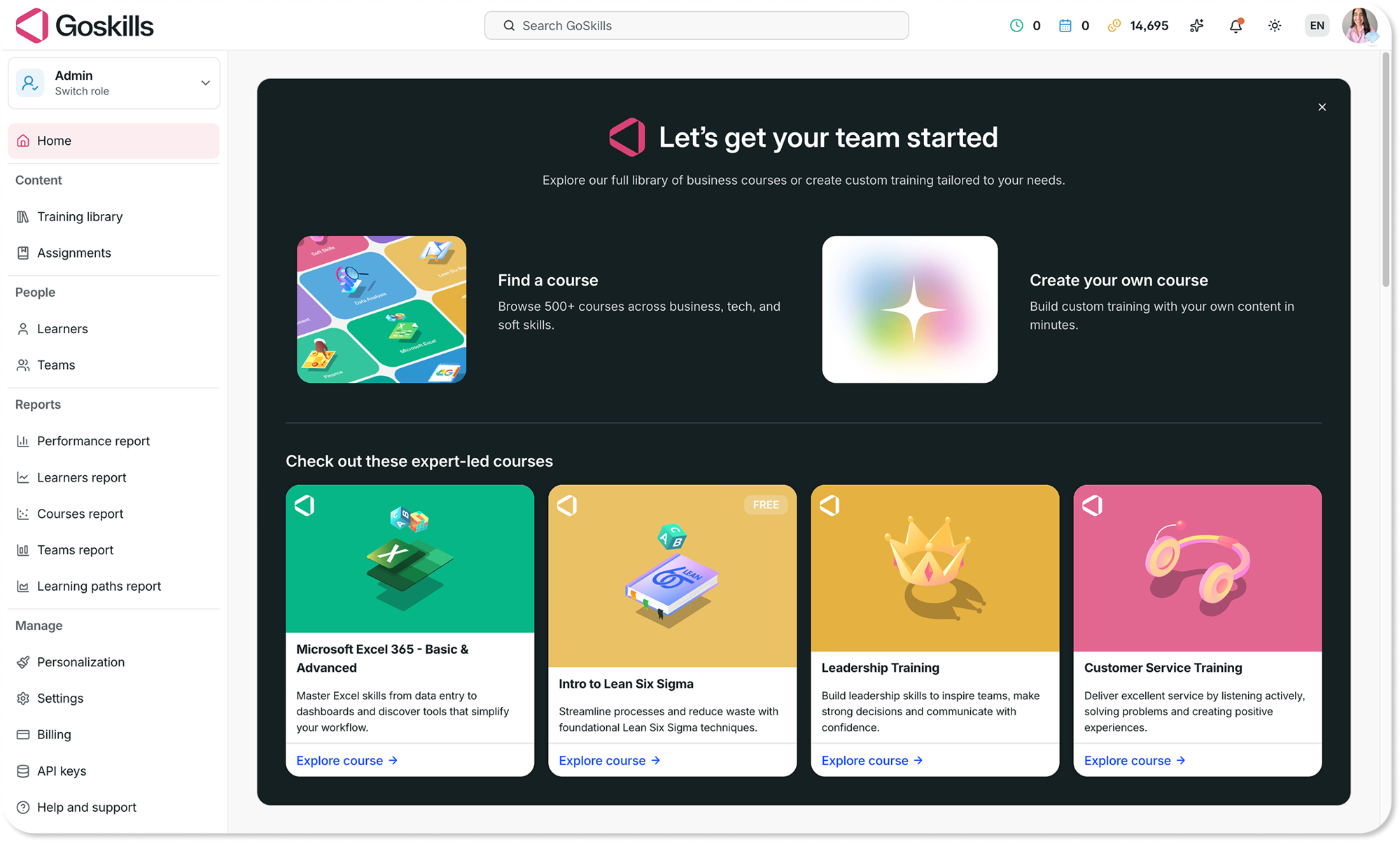
Who is GoSkills a good fit for?
GoSkills is an excellent choice for small businesses, SMBs, startups, and growing teams that want to get employee training up and running in hours instead of months.
As an affordable LMS with a forever-free plan, GoSkills is particularly well suited to organizations without a dedicated L&D team, thanks to its straightforward setup, built-in content, and easy-to-use administration tools.
In our survey of HR, L&D, and training professionals, GoSkills ranked among the top platforms for employee onboarding, was rated as having the most user-friendly learner experience, and emerged as the leading recommendation for small-business training.
| Key features |
|
|---|---|
| Pros |
|
| Cons |
|
| Pricing |
|
Experience the difference
Start transforming the way your organization learns — no credit card required. Get started in minutes!
Create your free account now2. 360Learning
360Learning is a collaborative learning platform designed to help organizations capture and share internal knowledge at scale. By enabling subject matter experts (SMEs) to create and improve training content, it makes collaborative learning a core part of employee development.
Who is 360Learning a good fit for?
360Learning is best suited to mid-sized and enterprise organizations focused on employee onboarding, upskilling, and knowledge sharing. It’s a strong choice for companies that want to build a collaborative learning culture and involve SMEs in course creation.
| Key features |
|
|---|---|
| Pros |
|
| Cons |
|
| Pricing |
|
3. Absorb LMS
Absorb LMS is designed to help organizations deliver employee, customer, partner, and compliance training from a single platform. It combines AI-powered administration, flexible learning tools, and enterprise-ready capabilities to support growing organizations with diverse training needs.
Who is Absorb LMS a good fit for?
Absorb LMS is designed for mid-sized and large organizations that need to manage multiple training programs from a single platform. It’s a strong option for businesses looking for a balance between ease of use, compliance features, and enterprise scalability.
| Key features |
|
|---|---|
| Pros |
|
| Cons |
|
| Pricing |
|
4. Adobe Learning Manager
Adobe Learning Manager is built for organizations delivering large-scale training across employees, customers, and partners. It combines personalized learning, automation, and deep integration with the Adobe ecosystem to support enterprise learning programs.
Who is Adobe Learning Manager a good fit for?
Adobe Learning Manager is worth serious consideration for mid-sized and enterprise organizations, especially those already using Adobe products. It’s designed to deliver personalized learning experiences across employees, customers, and partners from a single platform.
| Key features |
|
|---|---|
| Pros |
|
| Cons |
|
| Pricing |
|
5. Canvas LMS
Canvas LMS has deep roots in education and growing adoption across corporate training. Its intuitive interface, extensive integration ecosystem, and mobile-first design support structured learning across schools, universities, and businesses.
Who is Canvas LMS a good fit for?
Canvas LMS appeals to higher education institutions, schools, and organizations looking for a structured learning environment with extensive integration options.
| Key features |
|
|---|---|
| Pros |
|
| Cons |
|
| Pricing |
|
6. Cornerstone OnDemand
Cornerstone OnDemand is an enterprise learning platform built for large organizations with complex training, compliance, and talent management needs. As part of a broader talent management suite, it combines learning with performance, recruiting, and workforce development.
Who is Cornerstone OnDemand a good fit for?
Cornerstone OnDemand is designed for large enterprises, particularly those operating in highly regulated industries such as healthcare, finance, manufacturing, and government.
| Key features |
|
|---|---|
| Pros |
|
| Cons |
|
| Pricing |
|
7. CYPHER Learning
CYPHER Learning is an AI-powered learning platform built for businesses, educational institutions, and training providers. It combines automation, course creation, and competency-based learning in a single platform.
Who is CYPHER Learning a good fit for?
CYPHER Learning is designed for organizations looking for an AI-driven platform that supports corporate training, education, or commercial learning.
| Key features |
|
|---|---|
| Pros |
|
| Cons |
|
| Pricing |
|
8. D2L Brightspace
D2L Brightspace is a learning platform focused on personalized learning, advanced analytics, and flexible course delivery. Originally developed for education, it also supports organizations with complex learning and reporting needs.
Who is D2L Brightspace a good fit for?
D2L Brightspace is designed for universities, colleges, and organizations looking for advanced analytics, personalized learning, and extensive integration options. It’s a good fit for teams with dedicated learning administrators and more complex training requirements.
| Key features |
|
|---|---|
| Pros |
|
| Cons |
|
| Pricing |
|
9. Docebo
Docebo is an AI-powered learning platform built for organizations delivering training to employees, customers, and partners at scale. Its enterprise-focused feature set, automation tools, and multi-portal capabilities make it a strong choice for managing multiple audiences from a single platform.
Who is Docebo a good fit for?
Docebo is designed for mid-sized and enterprise organizations that need to deliver learning across multiple audiences. It stands out for its advanced AI capabilities, scalable administration, and support for extended enterprise training.
| Key features |
|
|---|---|
| Pros |
|
| Cons |
|
| Pricing |
|
10. iSpring Learn
iSpring Learn is a learning platform designed to help organizations create, deliver, and track employee training with minimal setup. It’s known for its integration with iSpring Suite, which allows organizations to turn PowerPoint presentations into online courses.
Who is iSpring Learn a good fit for?
iSpring Learn is designed for teams that already create training in PowerPoint or need a straightforward platform for onboarding and compliance training. It’s particularly relevant for organizations already using iSpring Suite to author courses.
| Key features |
|
|---|---|
| Pros |
|
| Cons |
|
| Pricing |
|
11. Kallidus Learn
Kallidus Learn is a learning platform that combines onboarding, compliance, and employee development in one place.
Who is Kallidus Learn a good fit for?
It’s designed for mid-sized and enterprise organizations looking to centralize training while connecting learning with skills and performance.
| Key features |
|
|---|---|
| Pros |
|
| Cons |
|
| Pricing |
|
12. LearnUpon
LearnUpon is a cloud-based learning platform that helps organizations deliver employee, customer, and partner training from a single system. Its multi-portal architecture makes it easy to create separate learning experiences for different audiences.
Who is LearnUpon a good fit for?
LearnUpon is designed for mid-sized and enterprise organizations that need separate learning environments for employees, customers, or partners. It stands out for its multi-portal capabilities and strong customer support.
| Key features |
|
|---|---|
| Pros |
|
| Cons |
|
| Pricing |
|
13. LearnWorlds
LearnWorlds is a learning platform designed for organizations and creators that want to build and sell online courses. Its interactive learning tools, white-label capabilities, and built-in website features support customer education and commercial training.
Who is LearnWorlds a good fit for?
LearnWorlds appeals to training providers, consultants, course creators, and organizations delivering customer education. It stands out for its ability to create branded learning experiences without relying on third-party websites or e-commerce tools.
| Key features |
|
|---|---|
| Pros |
|
| Cons |
|
| Pricing |
|
14. Litmos
Litmos is a corporate learning platform built to help organizations deliver employee training, compliance programs, and professional development. Its built-in content options and mobile learning capabilities make it a practical platform for workplace training.
Who is Litmos a good fit for?
Litmos works well for mid-sized and enterprise organizations delivering employee training and compliance programs. It’s particularly relevant for businesses looking for an extensive off-the-shelf course library alongside custom training capabilities.
| Key features |
|
|---|---|
| Pros |
|
| Cons |
|
| Pricing |
|
15. Moodle
Moodle is an open-source learning platform that gives organizations complete control over how they create, customize, and deliver online learning. Its extensive plugin ecosystem and flexible deployment options make it one of the most customizable learning platforms available.
Who is Moodle a good fit for?
Moodle appeals to universities, public sector organizations, and businesses with dedicated technical resources that value flexibility, data ownership, and extensive customization.
| Key features |
|
|---|---|
| Pros |
|
| Cons |
|
| Pricing |
|
16. Rippling Learn
Rippling Learn is a learning platform built into the Rippling workforce management system. It uses HR data to automatically assign training based on events like new hires, promotions, and role changes.
Who is Rippling Learn a good fit for?
Rippling Learn is designed for organizations already using Rippling for HR and IT management, especially those looking to automate onboarding and compliance training within a single workforce platform.
| Key features |
|
|---|---|
| Pros |
|
| Cons |
|
| Pricing |
|
17. Sana Learn
Sana Learn is an AI-native learning platform that combines learning management, course authoring, enterprise search, and AI assistants in a single experience. Now part of Workday, it remains a standalone platform that organizations can use alongside their existing HR systems.
Who is Sana Learn a good fit for?
Sana Learn appeals to enterprise organizations looking for an AI-first alternative to traditional learning platforms.
| Key features |
|
|---|---|
| Pros |
|
| Cons |
|
| Pricing |
|
18. Skilljar
Skilljar is a customer education platform designed to help organizations train customers, partners, and resellers at scale. Its branded learning portals, certification programs, and CRM integrations make it purpose-built for external training.
Who is Skilljar a good fit for?
Skilljar works well for B2B organizations with dedicated customer education or partner enablement programs, including software companies looking to improve product adoption through structured learning.
| Key features |
|
|---|---|
| Pros |
|
| Cons |
|
| Pricing |
|
19. TalentLMS
TalentLMS is a cloud-based learning platform built for small and growing businesses that need a flexible way to deliver training. It combines course creation, AI tools, gamification, branches, and an optional content library in a single platform.
Who is TalentLMS a good fit for?
TalentLMS works well for small and mid-sized businesses looking for a flexible, general-purpose training platform.
| Key features |
|
|---|---|
| Pros |
|
| Cons |
|
| Pricing |
|
20. Thinkific
Thinkific is a learning platform built for creators, entrepreneurs, and businesses that want to create and sell online courses. In addition to course creation, it includes website, community, and e-commerce tools to support online learning businesses.
Who is Thinkific a good fit for?
Thinkific is a natural fit for course creators, coaches, consultants, and small businesses selling online courses.
| Key features |
|
|---|---|
| Pros |
|
| Cons |
|
| Pricing |
|
Evaluating LMS platforms? Try our free LMS recommender and get a personalized shortlist.
Best LMS by use case
To help you narrow your shortlist, we surveyed more than 50 HR, L&D, and training professionals with hands-on LMS selection and implementation experience, then considered those insights alongside independent product research, including verified ratings, pricing, feature sets, and user feedback. Together, these helped us identify the platforms that consistently stood out for each use case.
| Use case | Top LMS platforms |
|---|---|
| Employee onboarding | GoSkills, LearnUpon, Absorb LMS |
| Compliance training | Absorb LMS, Cornerstone OnDemand, GoSkills |
| Enterprise-grade learning | Docebo, Cornerstone OnDemand, Litmos |
| Small business training | GoSkills, TalentLMS, 360Learning |
| Customer and partner education | Skilljar, LearnWorlds, Thinkific |
| Most user-friendly learner experience | GoSkills, Canvas LMS, Absorb LMS |
| AI-powered learning | Sana Learn, GoSkills, Docebo |
1. Best LMS for employee onboarding
A great onboarding experience helps new hires become productive faster while ensuring everyone receives consistent training. An LMS for employee onboarding should help you create structured learning paths, automate reminders, and track each learner’s progress from day one.
What to look for
- Automated onboarding workflows
- Role-based learning paths
- Mobile access
- Progress tracking
- Easy course creation
Top LMS platforms
- GoSkills is one of the strongest options for employee onboarding, combining a library of 500+ expert-led courses with AI-powered course creation, learning paths, automated assignments and reminders, and an intuitive learner experience that helps new hires get up to speed quickly.
- LearnUpon is a strong choice for organizations looking to streamline employee onboarding with automated learning paths, intuitive administration, and scalable training for growing teams.
- Absorb LMS is well suited to organizations onboarding employees at scale, combining AI-powered administration, flexible learning tools, and robust reporting to deliver consistent training experiences across teams.
2. Best LMS for compliance training
Compliance training often requires more than assigning a course. Organizations may need certification tracking, recurring assignments, reporting, and audit-ready records, especially in regulated industries.
What to look for
- Certification tracking
- Automated reminders and recurring training
- Reporting and audit trails
- Role-based assignments
- Compliance dashboards
Top LMS platforms
- Absorb LMS is one of the strongest choices for organizations with complex compliance requirements, offering robust reporting, AI-powered administration, and multi-audience training.
- Cornerstone OnDemand excels in highly regulated industries, combining compliance management with workforce development, certification tracking, and enterprise-grade reporting.
- GoSkills is a solid option for compliance training, particularly for small and growing teams that need one platform to create custom training, import existing content, automate assignments, reminders, and course refreshers, issue certificates, and track completion with built-in reporting.
3. Best enterprise LMS
Enterprise organizations often manage learning across thousands of employees, multiple business units, and global locations. At that scale, scalability, security, integrations, and advanced administration become essential.
What to look for
- Multi-tenancy
- Advanced reporting
- Enterprise integrations
- Global language support
- Advanced security, including SSO
Top LMS platforms
- Docebo is a leading choice for enterprise organizations delivering training to employees, customers, and partners from a single platform.
- Cornerstone OnDemand excels in highly regulated industries where compliance, workforce development, and talent management are closely connected.
- Litmos is well suited to enterprise organizations that need to deliver training at scale, offering strong compliance capabilities, global deployment, and extensive integration options.
4. Best LMS for small business training
Small businesses often need an LMS that’s easy to launch, simple to manage, and affordable to scale. They also tend to have smaller HR or training teams, making ease of use and fast implementation just as important as advanced features.
What to look for
- Straightforward setup and administration
- Affordable, transparent pricing
- Built-in learning content
- Simple reporting and learner management
- Room to grow as your team expands
Top LMS platforms
- GoSkills stood out as the top LMS for small-business training in our survey of HR, L&D, and training professionals. It combines AI-powered course creation, a library of 500+ expert-led courses, transparent pricing with a free plan, and intuitive administration, making it easy for lean HR teams and managers to launch and scale employee training.
- TalentLMS works well for small and growing teams looking for a flexible, general-purpose training platform.
- 360Learning is a strong option for growing businesses that want to make collaborative learning part of everyday work, enabling managers and SMEs to create and share training without relying on a dedicated L&D team.
5. Best LMS for customer training
A customer training learning management system helps organizations educate customers at scale through onboarding, product training, and certification programs that improve adoption, engagement, and long-term customer success.
What to look for
- Branded learning portals
- Certification programs
- E-commerce capabilities
- Customer progress tracking
- CRM integrations
Top LMS platforms
- Skilljar is purpose-built for customer and partner education, with branded academies, certification programs, and deep CRM integrations.
- LearnWorlds combines customer education with interactive course creation, built-in website tools, and e-commerce capabilities.
- Thinkific is a strong choice for organizations that want to create, market, and sell customer training through a single platform, combining an intuitive course builder with built-in website, community, and e-commerce tools.
6. Best LMS for learner experience
One finding from our survey stood out above all others: 88% of respondents said an intuitive learner interface is the most important factor when choosing a training platform. It’s a strong reminder that choosing an easy-to-use LMS can have a significant impact on learner engagement, adoption, and training completion.
What to look for
- Intuitive navigation
- Mobile learning
- Gamification
- Personalized learning paths
- Engaging course experiences
Top LMS platforms
- GoSkills delivers an engaging learner experience through bite-sized lessons, quizzes, gamification, certificates, personalized course recommendations, and an AI tutor that provides learners with on-demand support. It’s consistently recognized by G2 for Ease of Use, Ease of Setup, Ease of Administration, and Highest User Adoption.
- Canvas LMS offers a clean, familiar interface with strong mobile apps and structured learning experiences.
- Absorb LMS combines a modern learner experience with personalized learning and AI-powered recommendations.
7. Best AI-powered LMS
Artificial intelligence is transforming how organizations create, deliver, and personalize learning. While AI capabilities vary significantly between platforms, many now use AI to simplify course creation, automate administrative tasks, and improve the learner experience.
What to look for
- AI-assisted course creation
- Personalized learning recommendations
- Administrative automation
- AI-powered learner support, such as just-in-time Q&A
- Skills intelligence
Top LMS platforms
- Sana Learn combines AI-native course creation, a personal AI tutor for learners, and automated learning management. Now part of Workday, it remains compatible with a wide range of HR systems.
- GoSkills combines AI-powered course creation with an AI tutor and course recommender that help personalize the learner experience. Organizations can generate complete courses, quizzes, and assessments, or transform existing documents into bite-sized training in minutes.
- Docebo offers one of the most comprehensive AI feature sets, with tools that support content creation, personalized learning, and enterprise-scale automation.
Experience the difference
Start transforming the way your organization learns — no credit card required. Get started in minutes!
Create your free account nowWhat to look for in an LMS to deliver a better learning experience
Every organization has different training goals, but certain LMS capabilities consistently rank among buyers’ top priorities. To understand what matters most, we also asked the HR, L&D, and training professionals in our survey which features have the biggest impact when evaluating a learning platform.
Want to dig deeper? Explore our guide on what to look for in an LMS for a detailed breakdown of these and other key features to consider before choosing a platform.
1. Intuitive learner interface
An intuitive learner interface was the highest-ranked priority in our survey, selected by 88% of respondents. A clean, easy-to-navigate experience helps learners complete training with confidence, improves adoption, and reduces support requests.
2. Robust reporting and analytics
Completion rates only tell part of the story. Buyers want reporting that helps them measure learner progress, identify skills gaps, and understand the real impact of training.
3. Advanced AI capabilities
AI is becoming a core part of modern learning platforms. Organizations increasingly value tools that simplify course creation, personalize learning, and automate repetitive administrative tasks.
4. High-quality content library
A high-quality, curated course library helps organizations launch training faster without creating every course from scratch. The best libraries prioritize relevance over sheer volume, making it easier for learners to find the training they actually need.
5. Flexible pricing models
Pricing should scale alongside your organization rather than forcing you into enterprise-level costs before you’re ready. Buyers also value transparent pricing that makes it easier to compare platforms.
6. Automated admin workflows
Automation helps reduce manual work and keeps training on track. Features like automated enrollments, reminders, due dates, and recurring assignments can save administrators significant time.
7. Seamless tech integrations
An LMS should work alongside your existing technology stack. Integrations with HR systems, single sign-on, collaboration tools, and business applications help keep learner data accurate and reduce duplicate work.
8. Premium customer support
Implementation is often where good support matters most. Responsive onboarding, training, and ongoing assistance can make adopting a new LMS much smoother.
9. Mobile-first experience
Modern learners expect to access training wherever they are. A responsive mobile experience helps employees complete courses on the device that’s most convenient for them.
10. White-labeling and custom branding
While not essential for every organization, custom branding is particularly valuable for customer education, partner training, and organizations that want a fully branded learning experience.
Tip: Don’t evaluate an LMS based solely on the number of features it offers. Instead, focus on the capabilities that will have the biggest impact on your learners, administrators, and long-term training goals. The best LMS is the one your team will actually enjoy using and continue using as your organization grows.
Frequently Asked Questions (FAQs) about Learning Management Systems
1. What is the best learning management system?
The best learning management system depends on your organization’s size, training goals, and learners. For example, GoSkills is a strong choice for small businesses and employee onboarding, while platforms like Docebo and Cornerstone OnDemand are better suited to large enterprise learning programs. Rather than choosing the platform with the most features, focus on the one that best fits your specific use case.
2. What’s the difference between an LMS and an LXP?
A learning management system (LMS) is designed to create, deliver, manage, and track training programs. A learning experience platform (LXP) focuses on creating more personalized and engaging learning experiences through AI-powered recommendations, curated content, and social learning. Many modern platforms, including GoSkills, combine LMS and LXP capabilities in a single solution.
3. How much does LMS software cost?
LMS pricing varies widely depending on the platform and the size of your organization. Some providers, like GoSkills, offer transparent subscription pricing and a free plan, while others provide custom quotes based on the number of learners, features, or implementation requirements.
Look beyond the subscription price. Consider implementation, content creation, integrations, and ongoing administration when comparing the total cost of ownership.
4. Is investing in an LMS worth it?
For most organizations, yes. An LMS helps standardize training, reduce administrative work, improve learner engagement, and track training outcomes. It can also streamline employee onboarding, support compliance initiatives, and make it easier to scale learning as your organization grows.
5. How do you choose the right learning management system?
Start by defining your training goals, learners, and must-have features before comparing platforms. Once you’ve created a shortlist, schedule personalized LMS demos to see how each platform fits your workflows, then evaluate your top contenders through a structured LMS free trial using real administrators, managers, and learners. This approach makes it much easier to compare vendors and choose the platform that’s the best fit for your organization.
Choosing the LMS That’s Best For You
Learn how to evaluate learning management systems against your unique needs.
Ready to choose your LMS?
Choosing an LMS is an investment in how your organization learns, grows, and performs. The right platform should fit your training goals today while giving you the flexibility to support your team as your needs evolve.
Use this guide to build a shortlist, compare your options, and involve the people who’ll be using the platform every day. A little extra research now can save months of frustration later.
If GoSkills feels like the right fit for your organization, we’d love to show you around. Book a personalized demo to see the platform in action, or create a free business account and start building your first training program today.
Experience the difference
Start transforming the way your organization learns — no credit card required. Get started in minutes!
Create your free account now