
Training a small team well is one of the highest-leverage things a growing business can do. The right learning management system (LMS) makes it possible to onboard faster, build skills consistently, and stay on top of compliance, without a dedicated learning and development (L&D) team or a large training budget.
The best LMS for small business doesn’t try to do everything. Instead, it puts quality training within reach: affordable, easy to set up, and designed for the reality of running a lean operation.
This guide cuts through the crowded market to bring you the top LMS options for small businesses, with honest assessments of what each platform does well and who it’s actually built for.
What is the best LMS for small business?
The best LMS for small business depends on your team’s size, budget, and training goals — but a few qualities separate the right platforms from the rest: transparent pricing, fast self-serve setup, and tools that work for people without an L&D background.
For most small businesses, GoSkills stands out as the strongest all-round option. It combines a full LMS with a curated library of 500+ expert-led business and tech courses, AI-powered course creation, and a free plan with no setup fees — making it one of the few platforms that’s genuinely ready to use from day one.
That said, the right LMS for your business may look different depending on whether your priority is affordability, compliance, mobile learning, or collaborative content creation. Below is a summary of our top picks to help you find your fit.
Top learning management systems for small business at a glance
| LMS | Best for | Free-forever plan |
|---|---|---|
| GoSkills | Best overall — LMS with a ready-to-go, accredited course library and AI-powered course creator | Yes |
| 360Learning | Collaborative, peer-driven learning | No |
| Coassemble | AI-powered microlearning for lean teams | Yes |
| iSpring Learn | Compliance-driven employee training | No |
| LearnUpon | Scaling teams that train both staff and external audiences | No |
| Litmos | Growing SMBs needing compliance at scale | No |
| SafetyCulture | Deskless and frontline workforces | Yes |
| TalentLMS | Tight budgets or teams that prefer to build their own training content | Yes |
| Tovuti | Gamified, engagement-heavy training | No |
| Trainual | SOP documentation and role-based onboarding | No |
Best LMS for small business: 10 top picks
Finding the right LMS for your small business means cutting through platforms built for enterprise teams with large L&D budgets and IT departments. The LMS systems below work particularly well for small businesses — evaluated on pricing transparency, self-serve setup, AI capabilities, mobile learning, and reviewer sentiment from G2, Capterra, and Trustpilot.
One reliable signal: if a platform won’t publish its pricing, it’s usually not built for a budget-conscious small business. We’ve flagged this where relevant.
1. GoSkills: Best LMS for small business overall 🏆
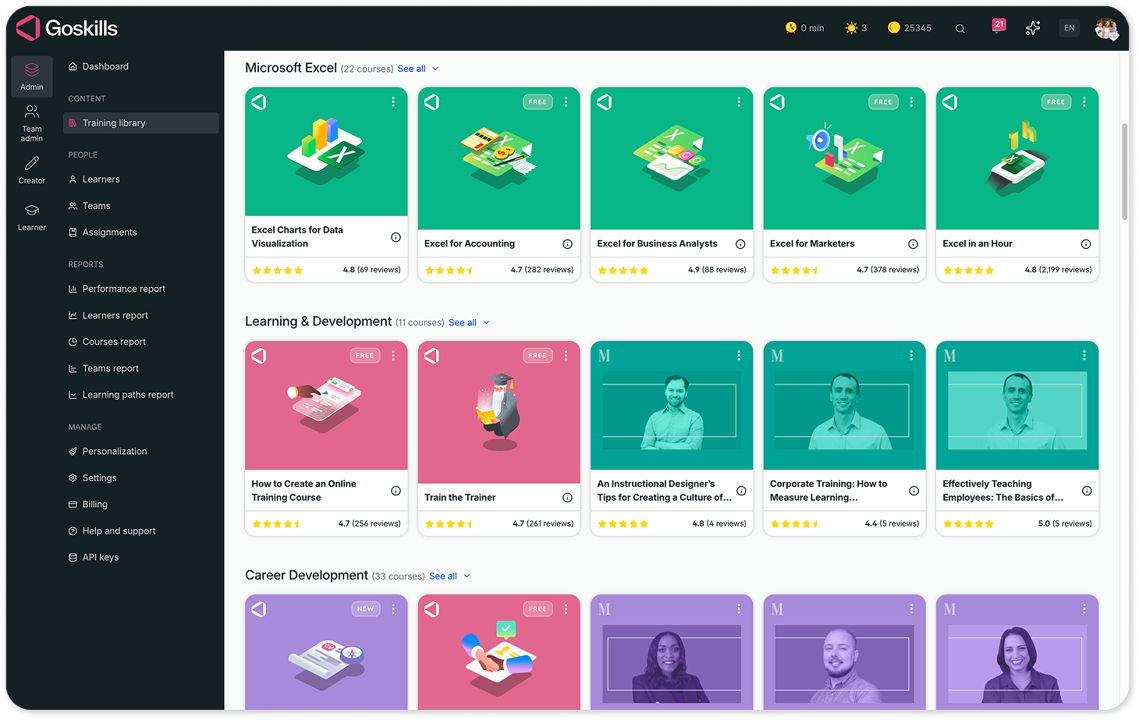
GoSkills is the ideal solution for small businesses that need to launch high-quality training in hours rather than weeks. With no implementation fees, a modern interface, and a built-in library of accredited business courses, it is ready to assign on day one.
Why GoSkills stands out
GoSkills occupies a unique position by acting as both a fully featured Learning Management System (LMS) and a Learning Experience Platform (LXP). While the LMS handles administration and tracking, the LXP side focuses on the learner experience, helping employees discover personalized content tailored to their specific roles and goals. This combination is ideal for small businesses where a manager or HR generalist often handles training instead of a dedicated instructional designer. Rather than starting from scratch, users can assign expert-led courses immediately and build custom training alongside them using the platform’s AI-powered course builder.
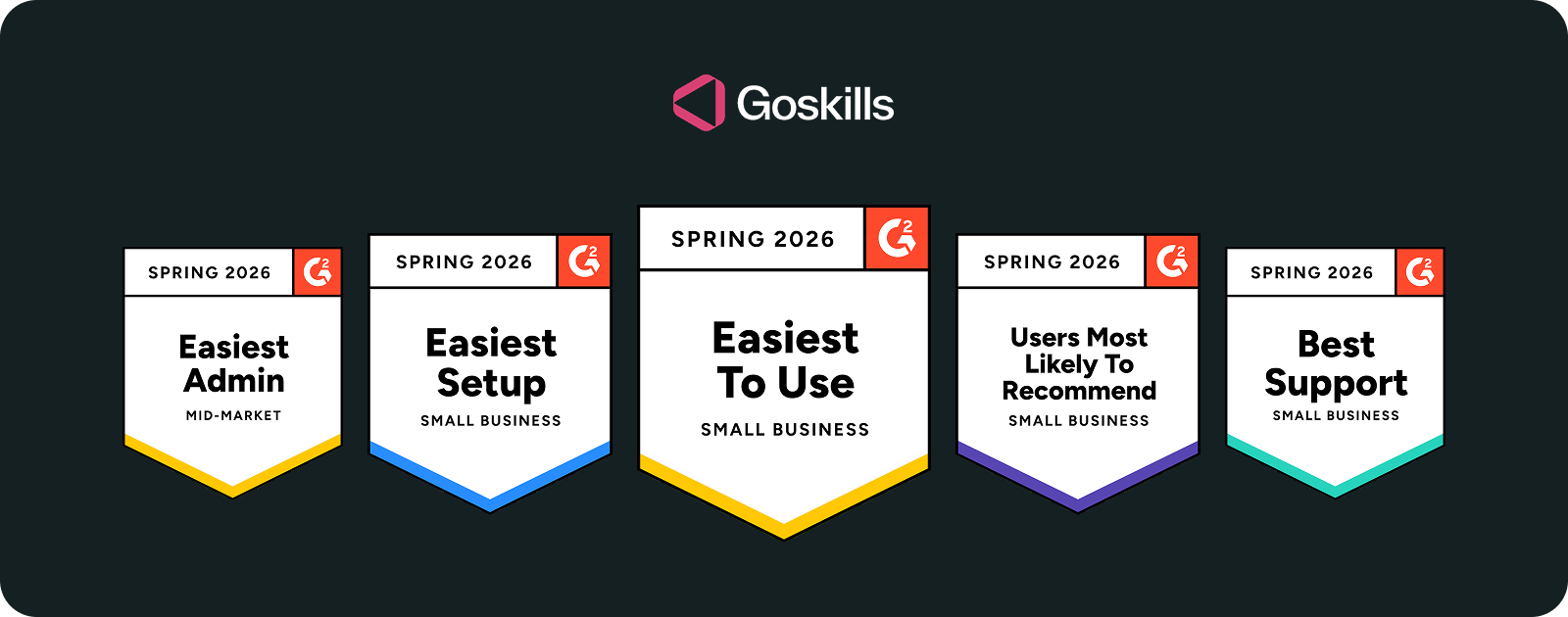
Trusted by over 10,000 organizations, GoSkills consistently ranks #1 on G2 for Ease of Use, Ease of Setup, and Ease of Doing Business With in the Small Business category. This makes it a top choice for lean teams that need high value without a steep learning curve or expensive onboarding.
Key features of GoSkills
- AI course creator (Genie): Generates full syllabuses, lessons, and quizzes from a simple prompt or existing documents like PDFs and PowerPoints.
- Free built-in course builder: Create custom training and host existing content right next to off-the-shelf courses.
- 500+ expert-led courses: A curated, in-house library of accredited business and tech courses designed in a microlearning format for better retention.
- AI tutor and recommender: Provides on-demand learner support and personalized course suggestions based on individual employee goals.
- Gamification: Badges, coins, and leaderboards keep learners engaged.
- Deep reporting and analytics: Track progress from a high-level team view down to specific content blocks to identify and bridge skills gaps.
- Mobile-first learning: Access training via the dedicated GoSkills app or any web browser at any time.
- Transparent pricing: No implementation fees, no lengthy contracts, and no hidden costs.
GoSkills pros and cons
Pros:
- Proven engagement: The gamified microlearning approach drives course completion rates above 40%, which is more than triple the industry average.
- LMS and LXP hybrid: Combines robust management tools with AI-powered features to deliver a modern, learner-first experience.
- Rapid, technical-free deployment: Small teams can configure the platform and manage users without technical IT expertise or support.
- Security and integrations: Offers enterprise-grade security, including SOC 2 compliance, paired with secure SSO access and automated user provisioning (SCIM).
- Low barrier to entry: Zero implementation fees mean you can start training the same day you sign up.
Cons:
- Course scope: The library focuses on practical business and tech skills, so it may not cover highly specialized industrial or niche trade requirements.
- Tiered reporting: While a free plan is available, comprehensive reporting and advanced analytics are reserved for paid tiers.
I appreciate how GoSkills ensures an easy, quick, and intuitive setup process. The reports and layout are well-designed, and the gamification features add an enjoyable touch to the learning experience. Its scalability and extensive course offerings make it a valuable tool for our training needs.
— Bismoy M, G2 Reviewer
GoSkills pricing
GoSkills offers a free-forever plan that includes full access to LMS features and the ability to preview up to 10 lessons per course from their award-winning library. Paid tiers (LMS Pro, GoSkills Courses, and Platinum) unlock the full library of 500+ courses, advanced team management, and robust reporting analytics. Volume discounts are available for larger teams, and annual billing options can further reduce the total cost. See current GoSkills pricing.
Who GoSkills is for
GoSkills is the premier choice for small businesses that need to deliver high-quality training without the “enterprise” headache or price tag. It is specifically helpful for:
- Lean HR and operations teams: Those who need a plug-and-play solution that doesn’t require a dedicated instructional designer or technical IT support.
- Fast-growing startups: Companies that need to onboard new hires rapidly using a mix of off-the-shelf business skills and custom internal processes.
- Quality-conscious managers: Leaders who want their team to learn from accredited, award-winning content rather than generic, unvetted videos.
- Budget-smart organizations: Businesses that want a professional, modern learning experience without the hidden implementation fees or long-term contract lock-ins.
Experience the difference
Start transforming the way your organization learns — no credit card required. Get started in minutes!
Create your free account now2. 360Learning: Best for collaborative, peer-driven learning
360Learning is built around a collaborative learning model: the idea that employees who already have expertise can create and share training with colleagues. This reduces the heavy reliance on a dedicated L&D team and turns internal knowledge into a competitive advantage. It is a strong alternative for businesses that prefer to build 100% of their own content through peer-to-peer sharing.
Key features of 360Learning
- Collaborative authoring: Subject-matter experts can build and publish courses directly without needing an instructional designer.
- AI-powered review: Tools like AI Smart Review help automate the grading of open-ended learner responses and suggest improvements.
- Social learning environment: Integrated discussion boards, upvoting, and peer feedback loops make the platform feel like a social network.
- AI relevance scoring: Automatically flags content that may be outdated or underperforming to ensure the training remains accurate.
- Mobile learning: Offers a native app with offline playback, allowing employees to access peer-created content anywhere.
360Learning pros and cons
Pros:
- Decentralized creation: Empowers non-experts to contribute to the company’s knowledge base, which is ideal for niche internal processes.
- Flexible billing: Their active-user model ensures you only pay for the learners who actually log in during a given month.
- Self-service setup: The entry-level tiers are designed for rapid deployment without a lengthy procurement process.
- High engagement: The social nature of the platform typically leads to higher completion rates through peer accountability.
Cons:
- No built-in content: It does not include a pre-made library of accredited courses, meaning your team must create all training from scratch.
- Reporting flexibility: Some users find the data export options and PDF summary features less intuitive than those of more traditional LMS platforms.
- Feature gating: Advanced features like SSO (Single Sign-On) and API access typically require a move to higher-priced custom tiers.
360Learning pricing
360Learning offers a Team plan for organizations with a smaller headcount. This tier typically includes core collaborative features and requires no setup fees. For scaling companies that need advanced integrations and security controls, Business and Enterprise tiers are available via custom quotes. A free trial is usually available to test the collaborative workflow.
Who 360Learning is for
This platform is a great fit for small businesses with deep internal expertise where institutional knowledge is the primary training asset. It works best for teams that want employees to actively contribute to the learning ecosystem through a social, decentralized model rather than relying on a top-down approach.
3. Coassemble: Best for AI-powered microlearning
Coassemble is designed for lean teams that need to create and deliver microlearning content quickly. It stands out for its flat, creator-based pricing rather than per-learner fees, making it an attractive option for companies that expect their headcount to grow rapidly. The platform is built around a no-code drag-and-drop builder, offering a straightforward deployment path for those without technical backgrounds.
Key features of Coassemble
- AI Create suite: Includes document-to-course, prompt-to-course, AI images, and AI narration features available across all plans.
- Creator-based pricing: A flat fee covers a set number of content creators while providing unlimited learner views.
- Customizable templates: No-code templates allow for fast, interactive content creation without a graphic designer.
- SCORM export: Training can be exported to other systems or stand alone using embed links.
- Loginless learner access: Managers can share training via a direct link, allowing learners to access content without the friction of account setup.
- Real-time collaboration: Multiple creators can draft, review, and edit training materials simultaneously.
Coassemble pros and cons
Pros:
- Predictable costs: The creator-based pricing model ensures that training costs do not increase simply because your team is growing.
- Generous free tier: Access to the full AI suite on the free plan is uncommon and offers high value for testing.
- Zero friction: Loginless sharing is ideal for temporary staff or quick updates where you want to minimize barriers to entry.
- Speed to market: The combination of AI tools and pre-built templates allows for rapid deployment of new training modules.
Cons:
- Design rigidity: The screen-design customization is limited, which may feel restrictive for organizations with very strict branding guidelines.
- Processing limits: AI generation from exceptionally large documents can sometimes produce generic outputs or require manual cleanup.
- No native App: While the player is fully responsive for mobile browsers, there is no dedicated app for offline learning.
Coassemble pricing
Coassemble offers a free-forever plan for one creator that includes unlimited courses and learner views. The Team plan increases the creator limit and is available on annual billing cycles. Because they do not charge per-learner fees on any plan, it remains a highly scalable option for small businesses. Enterprise pricing is available for organizations requiring custom creator limits and enhanced security.
Who Coassemble is for
This platform is an excellent fit for lean teams that need to produce microlearning at a high frequency without worrying about per-user costs as they scale. It is particularly useful for organizations that want to leverage AI to turn existing documentation into training in minutes rather than days.
4. iSpring Learn: Best for compliance-driven employee training
iSpring Learn is a practical option for compliance-heavy small businesses. It combines a pay-per-active-user pricing model with an authoring suite that works directly inside PowerPoint, which is particularly useful for teams where a non-technical administrator owns the training content.
Key features of iSpring Learn
- iSpring Suite AI integration: Build courses and interactive role-plays directly in PowerPoint using generative AI to create outlines, quizzes, and even slide visuals.
- Pay-per-active-user model: You only pay for the learners who actually log into the platform during a given month, ensuring cost efficiency for variable training needs.
- Offline mobile mode: Native iOS and Android apps allow for offline access, making it a top choice for remote and field teams.
- Pre-built courses: Includes a starter library to help businesses accelerate the launch of basic compliance and onboarding programs.
- 360-degree performance reviews: Built-in appraisal tools that go beyond standard LMS features to help track employee development.
- Detailed compliance reporting: Specifically designed to track certifications and progress across all content types for audit purposes.
iSpring Learn pros and cons
Pros:
- Familiar workflow: The PowerPoint-to-course pipeline significantly lowers the barrier to entry for admins who aren’t professional designers.
- Cost predictability: The active-user model prevents you from paying for “ghost users” who are not currently in training.
- Supportive evaluation: They offer a 30-day free trial, which is longer than many other competitors in the space.
- Reliable offline learning: The mobile app is robust, allowing field workers to complete compliance training without a stable internet connection.
Cons:
- Design limitations: Branding and interface customization options are relatively basic compared to more modern, “experience-focused” platforms.
- Evolving automations: While the AI tools are strong, advanced automation for personalized learning paths is still more limited than in some enterprise-level rivals.
- Missing key integrations: It lacks native connections to some popular small business tools like Slack or Personio, which may require manual workarounds.
iSpring Learn pricing
iSpring Learn uses a pay-per-active-user model where you register an unlimited number of employees but are only billed for those who log in during the month. Volume discounts are available for annual billing cycles, and they offer a 30-day free trial to test the PowerPoint integration. Pricing usually scales based on the number of active seats required.
Who iSpring Learn is for
This platform is an excellent fit for compliance-driven small businesses where a non-designer admin manages training. It is particularly effective for teams already working in PowerPoint that need a reliable way to deliver and track mandatory certifications to a mobile or remote workforce.
5. LearnUpon: Best for multi-audience training at scale
LearnUpon is designed for organizations that need to train employees, customers, and partners from a single, unified platform. While it typically serves teams at the larger end of the small business scale, its ability to segment audiences makes it a top contender for companies with complex external training needs. Implementation is a guided process that usually involves dedicated support to ensure your portals are configured for long-term success.
Key features of LearnUpon
- Multi-audience portals: Manage separate, branded environments for different groups like employees and resellers from one central hub.
- Create+ (AI authoring): A native AI tool that transforms existing PDFs, videos, and web links into structured, interactive courses in minutes.
- Global accessibility: Support for instant course translation into over 120 languages and lifelike AI narration.
- Automated learning journeys: Use branching logic to create personalized training paths that trigger automatically based on learner data.
- Business integrations: Native connections to Salesforce, HubSpot, Personio, and Slack to sync training with your existing workflow.
- Live learning Support: Tools to manage and report on both online content and live, instructor-led webinars in one place.
LearnUpon pros and cons
Pros:
- Scalable architecture: Ideal for businesses that need to deliver professional training to external partners and clients without mixing data.
- Guided onboarding: Their implementation consultants and success managers provide high-touch support that is rare for SMB-focused tools.
- Rapid content conversion: The Create+ feature helps small teams overcome content bottlenecks by turning raw documentation into finished courses quickly.
- Strong reliability: The platform is highly stable and widely recognized for its clean, intuitive learner interface.
Cons:
- No free trial: There is no self-serve way to test the platform before entering a formal sales conversation.
- Opaque pricing: Detailed costs are not public, which may slow down the comparison process for budget-conscious buyers.
- Platform complexity: Many of the features are overkill for small teams that only need straightforward, internal-only training.
- Setup time: Deployment typically takes several weeks of dedicated effort rather than being ready to use on day one.
LearnUpon pricing
Pricing for LearnUpon is custom and is calculated based on active learner volume and the number of portals required. Since it is an enterprise-grade solution for the mid-market, implementation fees often apply to cover professional onboarding services. Contact their sales team for a custom quote and a platform demo.
Who LearnUpon is for
LearnUpon is a strong fit for small businesses with 100 to 200 employees that need to maintain professional, branded training portals for both staff and external customers. It is particularly valuable for companies that prioritize human-led support during setup and want a system that integrates deeply with their CRM and HR technology stacks.
6. Litmos: Best for growing SMBs needing compliance at scale
Litmos is a cloud-based LMS that excels at off-the-shelf compliance content through a modern, AI-enhanced platform. It is a practical choice for growing small businesses in the 50 to 200 employee range that need to deploy mandatory training quickly without building courses from scratch.
Key features of Litmos
- Extensive compliance library: Access a massive repository of ready-made courses covering harassment, cybersecurity, and safety, allowing for immediate deployment.
- Platinum AI suite: Features an AI Assistant, AI-powered course authoring, and “AI/ML Video Assessments” that provide automated feedback on learner performance.
- Custom roles and permissions: A 2026 update that allows growing businesses to define granular access levels for different departments and managers.
- Native mobile apps: Full-featured iOS and Android apps that support offline learning and push notifications to keep deskless or remote workers engaged.
- AI-generated playlists: Automatically curates personalized learning paths for employees based on their job titles and historical performance.
- Robust reporting: Includes automated report scheduling to keep stakeholders updated on compliance status and audit readiness.
Litmos pros and cons
Pros:
- Speed to market: The combination of a user-friendly interface and pre-built content makes it one of the fastest platforms for launching a new training program.
- Scalable management: Features like automated user assignment and team-based catalogs help HR managers handle increasing headcounts with ease.
- Innovative evaluation: The AI video coaching tool allows for consistent, objective assessment of soft skills at scale.
- Reliable support: Recognized for responsive customer success teams that assist with initial rollout.
Cons:
- Reporting limitations: While automated, the reporting engine can be rigid, often requiring manual data cleaning for complex custom views.
- Cost of innovation: Many of the best AI features and advanced analytics are restricted to the top-tier Platinum plan.
- UI experience: Some reviewers note that while functional, the interface can feel slightly dated compared to newer, “experience-first” competitors.
Litmos pricing
Litmos offers three primary tiers (Foundation, Premier, and Platinum AI) with pricing calculated per monthly active user. The content library is typically added as a separate module, allowing businesses to pay only for the courses they need. A 14-day free trial is available to test the platform, and annual contracts generally offer the best overall value.
Who Litmos is for
Litmos is an ideal fit for growing businesses that need a robust, reliable system to handle the heavy lifting of compliance and onboarding. It is specifically helpful for organizations in the 50 to 200 employee range that want to automate their training workflows and use pre-built content to stay ahead of regulatory requirements.
7. SafetyCulture: Best for deskless and frontline workforces
SafetyCulture (which fully integrated the SC Training/EdApp platform in early 2026) is a mobile-first solution designed specifically for businesses with frontline or distributed teams. It excels in industries where employees don’t work at a desk, such as retail, hospitality, construction, and healthcare.
Key features of SafetyCulture
- Mobile-first native apps: High-performance apps for iOS and Android featuring offline mode, push notifications, and QR-code course sharing.
- AI Training Creator: An upgraded engine that converts PowerPoints, PDFs, and text prompts into mobile-optimized microlessons in seconds.
- Global translation: Uses advanced machine learning to translate training content into over 100 languages, making it ideal for diverse, multilingual teams.
- Canva integration: A built-in connection to Canva allows non-designers to create professional visuals and branding for their lessons.
- Gamification and spaced repetition: Uses “Brain Boost” technology and leaderboards to ensure training sticks and completion rates stay high.
- Operational checklists: As part of the wider SafetyCulture platform, training can be linked directly to daily inspections and safety checks.
SafetyCulture pros and cons
Pros:
- Purpose-built for frontline: The entire user experience is optimized for a phone screen, not a desktop computer.
- Highly accessible: Offers a free-forever tier for small teams of up to 10 learners, which includes the core AI creator tools.
- Speed of content creation: The AI-powered conversion tools are consistently rated as some of the fastest in the market for 2026.
- Social learning: Includes features like "Heads Up" for quick video announcements and peer-to-peer discussion boards.
Cons:
- Assessment rigidity: Quiz editing can be limited; users occasionally find it difficult to add complex diagrams or modify quizzes once they are live.
- Content nuance: AI-generated content can occasionally feel generic and usually requires a human touch to add company-specific context.
- Desktop limitations: The platform is significantly less effective for office-based teams that prefer long-form, desktop-first learning.
SafetyCulture pricing
SafetyCulture offers a free plan for small teams of up to 10 users. For larger organizations, the Premium plan is billed on a per-user, per-month basis and unlocks advanced analytics, SSO, and AI translation. A 30-day trial of the Premium features is usually available.
Who SafetyCulture is for
This platform is the gold standard for small businesses in boots-on-the-ground industries like construction, retail, or hospitality. It is specifically helpful for managers who need a fast, mobile-friendly way to get safety or operational knowledge into the hands of a busy, multilingual workforce.
8. TalentLMS: Best for tight budgets and rapid self-serve onboarding
TalentLMS is a budget-friendly choice for small businesses that want to launch training quickly without a lengthy sales conversation. Its interface is designed to feel lightweight and intentional for smaller teams.
Key features of TalentLMS
- TalentCraft AI suite: A native authoring tool for course creation, image generation, and test design.
- Flexible free tier: Provides a no-credit-card-required plan for up to five users and ten courses, which is ideal for testing the system.
- Interactive video AI: Automatically generates and embeds quiz questions at specific timestamps within uploaded videos to improve learner engagement.
- Native mobile apps: Full-featured iOS and Android apps with offline access, allowing employees to train without an internet connection.
- Multitenancy (branches): Allows businesses to create separate, branded portals for different departments, locations, or external partners.
TalentLMS pros and cons
Pros:
- Pricing transparency: One of the most accessible pricing models in the industry, allowing for an immediate start without a sales call.
- Fast implementation: The platform is purpose-built for self-service, with most small businesses launching their first courses within hours.
- Security standards: Includes mandatory two-factor authentication (2FA) for administrators and optional 2FA for all other users as of 2026.
- Broad integration support: Connects easily with common small business tools like Zoom, Slack, Salesforce, and BambooHR.
Cons:
- Breadth over depth: The library focuses on high-level “soft skills” and workplace essentials, which may feel too basic for advanced learners or specialized technical industries.
- Feature gating: Advanced automation, custom reporting, and complete white-labeling are reserved for higher-priced tiers.
- Support response times: Standard support is primarily email-based, which can lead to slower resolutions for teams on lower-tier plans.
- Pricing consistency: Users have noted that renewal rates can be less flexible than initial sign-up pricing, potentially impacting long-term budget planning.
TalentLMS pricing
TalentLMS offers a free plan for up to five users and ten courses. Paid tiers (Core, Grow, and Pro) scale based on total user count with public, transparent pricing. An active-user billing option is also available, providing a flexible alternative for companies with fluctuating training requirements. Annual billing typically offers the most significant discount.
Who TalentLMS is for
TalentLMS is specifically helpful for small businesses that prioritize affordability and need to launch a training program almost immediately. It is an excellent fit for teams that want to build their own internal knowledge base using AI-assisted tools rather than relying on an external library of accredited content.
9. Tovuti: Best for gamified, engagement-heavy training
Tovuti is an engagement-focused LMS that offers a wide variety of interactive content types and built-in gamification to help small businesses overcome low course completion rates. Using its native AI builder, Dizi, administrators can rapidly generate full courses from simple prompts or uploaded documents, automatically integrating multimedia and interactive activities to prevent passive learning. This approach makes it a strong contender for teams that want to turn routine training into a social, competitive, and highly interactive environment.
Key features of Tovuti
- Dizi AI Builder: Rapidly generates interactive courses from a prompt, PDF, or Word document with built-in multimedia suggestions.
- Interactive activity library: Includes a diverse range of built-in activities like memory games, flashcards, and drag-and-drop interactions without needing third-party plugins.
- Plug-and-play gamification: Easily deploy leaderboards, badges, and achievement systems to spark friendly competition.
- Ready-made course library: A massive collection of pre-built courses covering compliance, soft skills, and professional development ready for immediate assignment.
- White-label mobile app: A native mobile experience that can be fully branded with your company’s logos and colors.
- Security certifications: Holds SOC 2 Type 2 and other enterprise-grade security certifications, providing high-level data protection for regulated industries.
Tovuti pros and cons
Pros:
- Native interactivity: Because interactive elements are built directly into the platform, you don't need to purchase or learn external authoring tools.
- High engagement focus: The deep emphasis on gamification and social learning typically leads to better knowledge retention and higher completion rates.
- Security credibility: The SOC 2 Type 2 certification is a significant advantage for businesses in sectors like finance, legal, or healthcare.
- Responsive support: Recognized for helpful and proactive customer success teams during the onboarding process.
Cons:
- Learning curve: Because the platform is so feature-rich, new administrators often report a steeper learning curve compared to simpler tools.
- Implementation time: Setting up complex gamification rules and custom branding can take more time than plug-and-play systems.
- Reporting interface: Some users find the reporting and analytics interface less intuitive than the rest of the platform when looking for specific data.
- Entry costs: Even with new starter tiers, the per user cost remains higher than budget-first options like TalentLMS.
Tovuti pricing
Tovuti offers tiered pricing designed to fit the needs of different team sizes. While they have historically used a custom quote model, they now provide more transparent entry points for smaller businesses through “Starter” and “Growth” plans. A free trial is now available.
Who Tovuti is for
This platform is an excellent fit for small businesses that want to move beyond basic slide-based training to drive employee engagement through gamification. It is particularly valuable for organizations in regulated fields that require high security standards and those that want to build complex, interactive content without needing a suite of external software.
10. Trainual: Best for SOP documentation and role-based onboarding
Trainual is not a traditional LMS. It is a documentation-first SOP and playbook tool with light LMS features, making it a practical option for small businesses that need to standardize processes and onboard new hires consistently rather than deliver formal elearning. It serves as a single source of truth for “how we do things,” combining training with a searchable company wiki.
Key features of Trainual
- AI Knowledge Assistant: An internal AI search tool that allows employees to ask natural language questions and receive instant answers pulled directly from your documented policies.
- Trainual Compose: An AI-powered editor that drafts SOPs, role descriptions, and training modules from simple prompts or existing documentation.
- Video-to-SOP converter: A 2026 feature that automatically transforms video walkthroughs and voice recordings into formatted, step-by-step written instructions.
- Role-based training paths: Automatically assigns training and policies to employees based on their job title, ensuring they only see information relevant to their position.
- Interactive org chart: A visual directory that links every employee to their specific responsibilities and required training modules.
- Accountability tools: Includes e-signatures for policy acknowledgment and automated quizzes to verify that teammates have mastered their assigned processes.
Trainual pros and cons
Pros:
- Operational clarity: Moves beyond simple learning to define exactly who is responsible for what, which is vital for growing small businesses.
- Rapid content capture: The ability to turn a screen recording or quick voice note into a formal procedure makes it easy for busy experts to contribute.
- Centralized knowledge: Acts as a single source of truth for the company, drastically reducing the time managers spend answering repeat questions.
- Scalable templates: Includes hundreds of pre-built templates for common business needs like HR policies, sales scripts, and marketing workflows.
Cons:
- Documentation focus: It is less suited for businesses that primarily need to host complex, interactive SCORM files or highly academic course materials.
- Initial setup time: Because it is a documentation platform, it requires an upfront investment of time to capture and organize company knowledge.
- Admin mobile access: While the learner app is strong, some advanced administrative and editing tools are currently restricted to the desktop version.
- Seat minimums: Many pricing tiers require a minimum seat count, which may make it a more expensive option for very small teams.
Trainual pricing
Trainual offers three primary tiers: Core, Pro, and Premium. Pricing starts at a flat monthly rate that includes the first 10 seats, with an additional per-user fee for every employee added after that. While they do not offer a free-forever tier, a free trial is available to explore the documentation and AI tools. A one-time implementation fee typically applies to all new accounts.
Who Trainual is for
Trainual is a good fit for small businesses that need to formalize their operations and get the business out of the owner’s head. It is specifically helpful for service-based businesses, franchises, and startups that want a searchable, interactive manual that defines their culture, roles, and every standard operating procedure.
Find the right LMS for your small business
Learn how to evaluate LMS options against the unique needs of your small or medium-sized business.
Do small businesses really need an LMS?
Yes, and the case for it is stronger than ever. According to Josh Bersin’s February 2026 Definitive Guide to Corporate Learning, 74% of companies say they are not keeping up with business demand for new skills despite significant training investment. An LMS gives small businesses a structured way to close that gap.
Think of the last time you hired someone new. Without a structured LMS, onboarding relies on whoever has time to walk them through processes: inconsistent, time-consuming, and impossible to track. With an LMS, that new hire works through a structured learning path, completes knowledge checks, and gets up to speed faster and more consistently. The same platform then handles ongoing upskilling, compliance renewals, and performance tracking as they grow with the business.
The best LMS for small businesses isn’t a watered-down enterprise tool. It’s a platform designed from the ground up for lean teams, tight budgets, and varying levels of L&D expertise. If that sounds like your business, an LMS isn’t optional — it's a competitive advantage.
Frequently asked questions (FAQs) about LMS for small business
1. What is an LMS?
A learning management system (LMS) is software that delivers, tracks, and manages employee training and online learning programs. It allows businesses to create or import training content, assign it to employees, monitor progress, and report on completion and performance. Modern LMS platforms also support AI-powered course creation, mobile learning, gamification, and integration with HR tools.
2. How much does an LMS cost for a small business?
LMS costs for small businesses vary significantly by platform and pricing model. Platforms like GoSkills offer genuine free-forever plans, while paid tiers typically range from a flat monthly fee to per-user monthly billing. Enterprise platforms require a sales quote and don’t publish list pricing. As a general rule, if a vendor won’t share pricing without a sales call, expect an enterprise-level budget to follow. Always look for platforms with no implementation fees and no high user minimums, as these hidden costs add up quickly for small teams.
3. What is the easiest LMS to use for a small business?
GoSkills is rated #1 for Ease of Use and Administration on G2 in the Small Business LMS category, making it the top choice for small businesses where the person managing training isn’t necessarily an L&D professional. The platform is designed for self-serve onboarding, with a no-code course builder and an interface built for managers and HR generalists, not instructional designers or IT teams.
4. Can a small business use a free LMS?
Yes. GoSkills offers a free-forever plan with genuine LMS functionality, not just a limited trial. It includes access to the course builder, LMS features, and a selection of courses from the library, giving small businesses enough to evaluate the platform properly before committing to a paid plan.
5. What’s the difference between an LMS and online training software?
The terms are often used interchangeably, but there’s a practical distinction. An LMS is a platform that manages the full training lifecycle: content creation, assignment, tracking, reporting, and certification management. Online training software sometimes refers more narrowly to tools that deliver pre-built courses without the full administrative and reporting layer. Most modern platforms blend both. GoSkills, for example, functions as both a learning management system and an online training platform, combining course creation and tracking tools with a ready-to-go library of expert-led courses. When evaluating tools, focus less on the label and more on whether the platform does what your team actually needs: content creation, learner tracking, mobile access, compliance management, or some combination of all of these.
The smart choice for your small business
Finding the best LMS for your small business comes down to one question: what does your team actually need to get training running? For most small businesses, that means a platform that’s easy to set up without IT support, affordable without hidden fees, and capable of delivering training on day one.
GoSkills delivers all three. With a free plan, no implementation fees, AI-powered course creation, and a library of 500+ accredited business and tech courses ready to assign immediately, it’s the LMS built for teams that need training to work, not training to become a burden.
Start for free (no credit card required), or book a demo to see GoSkills in action.
Experience the difference
Start transforming the way your organization learns — no credit card required. Get started in minutes!
Create your free account now