
In the world of corporate training, there is a common misconception that "enterprise" is synonymous with "better." We assume that more features, higher price tags, and complex configurations equate to a more robust learning culture.
However, for many organizations, an enterprise learning management system is like buying a Swiss Army knife when all you need is a reliable pair of scissors. You end up paying for 50 tools you’ll never use, and the complexity actually prevents your team from getting the job done.
Both startups and large corporations should first understand the distinction between an enterprise LMS and a small-business LMS to achieve successful training ROI.
Enterprise LMS vs. small business LMS
At its heart, the choice between these two structures isn't just about the number of users you have; it’s about your operational philosophy. Let's pick them off, one by one.
Scale and user management
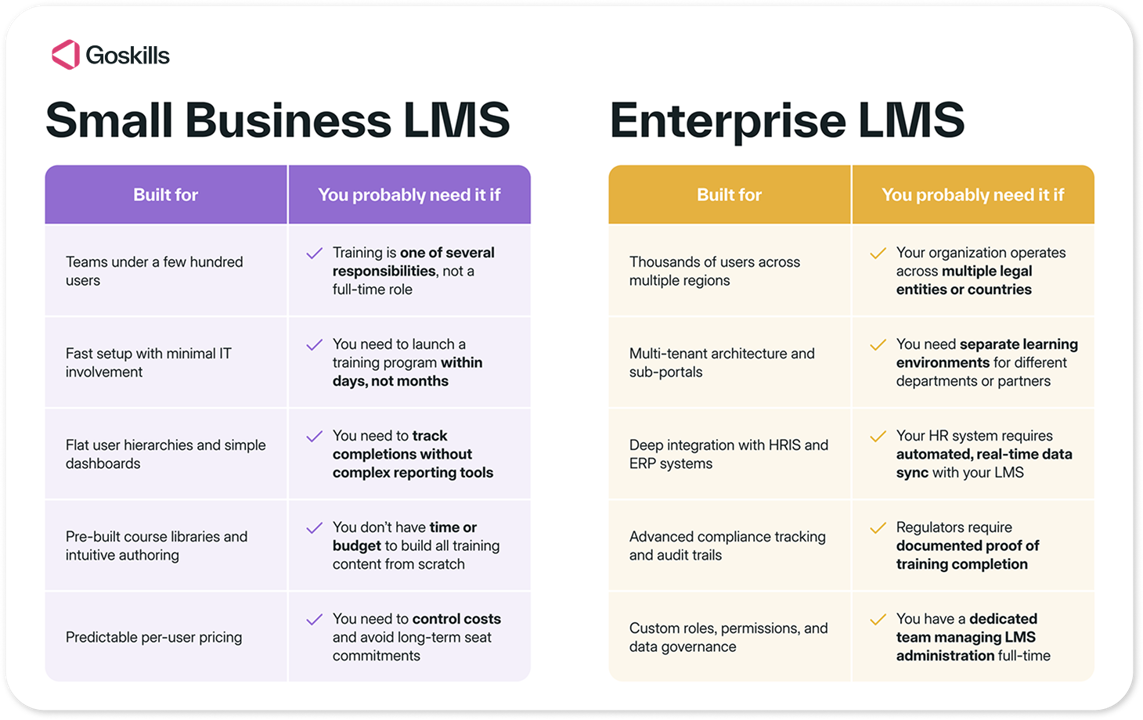
An enterprise LMS assumes you have tens of thousands of users, often spread across different legal entities, countries, and languages. It excels at multi-tenancy — the ability to create separate sub-portals for different departments or external partners that look and act like independent systems.
A small business LMS (often referred to as an LMS for SMBs) focuses on flat hierarchies. It’s designed for a team where the HR manager might also be the L&D lead. The goal here is visibility: seeing exactly who has finished their compliance training in a single, clean dashboard without needing a degree in data science to pull a report.
Complexity vs. ease of use
Enterprise systems are "configurable," which is often code for "you need a consultant to set it up." Every workflow can be tweaked, but this flexibility comes at the cost of the user experience.
Conversely, small business LMS platforms prioritize time-to-value. They follow the "don't make me think" school of design. If an employee can't figure out how to start their employee onboarding checklist within ten seconds of logging in, the platform has failed.
Must read: Compare the best LMS platforms and their use cases
What features do you actually need?
To choose the right tool, you have to separate "nice-to-haves" from business-critical. Let’s look at how the features stack up.
| Feature | Small business LMS | Enterprise LMS |
|---|---|---|
| Customization | Lightweight branding (logos, colors). | Full white-labeling, custom CSS, and API-driven portals. |
| Integrations | Plug-and-play with Slack, Microsoft Teams, and common CRMs. | Deep, custom hooks into complex HRIS (e.g., Workday, SAP) and ERPs. |
| Course Creation | Built-in, intuitive authoring tools and AI assistants. | Often requires external SCORM software. |
| Reporting | Automated PDF/CSV exports of core metrics. | Predictive analytics, heatmaps, and custom SQL queries. |
| Support | Help center, email, and live chat. | Dedicated account manager and 24/7 technical premium support. |
Customization & white-labeling
Small businesses usually just want the platform to feel familiar to their learners. Adding a logo and a brand color is usually enough. Enterprise players, however, often require capabilities where the LMS engine sits in the background while the front-end is a completely custom-built internal site.
Integrations (HRIS, CRM, and beyond)
For a small-to-medium business (SMB), an integration should take five minutes. For instance, you want your learners to be able to use single sign-on with their existing Google or Microsoft account. For an enterprise, integrations are a massive IT project involving data mapping between the LMS and a global HRIS to ensure that when someone is promoted in the London office, their learning path updates automatically.
Built-in library vs. custom course builder
Many enterprise systems are "empty boxes." They provide the tech, but you have to bring your own content. Small business platforms frequently include or integrate directly with pre-made course libraries (like Excel, Leadership, or Soft Skills training) because they know small teams don't have time to build every single course from scratch.
Pricing models explained
The sticker price of an LMS is rarely the final price. Understanding the Total Cost of Ownership (TCO) is where many L&D managers get caught off guard. Include the following factors when making budget decisions.
Pay-per-user (active vs. registered)
- Enterprise LMS: Usually requires a "registered user" annual contract. If you buy 5,000 seats and only use 2,000, you are still paying for 5,000.
- Small business LMS: May use an "active user" model. You only pay for the people who actually log in during a given month. Alternatively, businesses may have the flexibility to add or remove licenses on a month-by-month basis based on the number of learners required to take courses during that period.
Implementation fees
- Enterprise platforms: Almost always charge a setup fee or implementation fee that can range from $5k to $50k+
- Small business LMS platforms: Typically have zero setup fees or a very nominal one-time onboarding charge.
Maintenance costs
- Enterprise LMS: Often requires a full-time LMS administrator.
- Small business LMS: Designed to be managed in 2–3 hours a week by an existing HR staffer.
Implementation timelines: weeks vs. months
If you need to launch a compliance course by the end of the month, an enterprise LMS is not your friend.
- Small business LMS: These are SaaS (Software as a Service) platforms. You sign up, upload your logo, import your users via a CSV file, and you’re live. Timeline: 1–14 days, depending on the platform you choose.
- Enterprise LMS: These require discovery phases, IT security audits, custom API development, and multiple rounds of UAT (User Acceptance Testing). Timeline: 3–6 months.
Peer-to-Peer Tip: If your organization is growing rapidly, don't let a "3-month implementation" turn into a "6-month delay." Sometimes, starting with a nimble tool allows you to build a learning culture now while you figure out your long-term requirements.
Choosing the LMS That’s Best For You
Learn how to evaluate learning management systems against your unique needs.
Checklist: Is your business considered "enterprise" or "small"?
Ignore your revenue for a moment. Look at your training workflow. You likely need an enterprise LMS if:
- You have multiple legal entities that require completely separate branding and data silos.
- You must integrate with a legacy, on-premise HRIS that doesn't have an open API.
- You have a dedicated team of 3+ people whose only job is LMS administration.
- You need the system to be available in 20+ different languages with localized UI.
You likely need a small business LMS if:
- You need to get your first training program up and running in under 30 days.
- You want an all-in-one solution that includes both the platform and the courses.
- Your "L&D team" is one person wearing five different hats.
- User adoption is your #1 metric — you need the software to be as easy to use as Netflix or Spotify.
Enterprise & small business LMS examples
To give you a clear picture of the market, here are the top examples of LMS platforms categorized by their target operational scale.
Enterprise LMS systems: Built for complexity
These systems are designed for global corporations (1,000+ employees) that require high security, deep integration with legacy HR software, and the ability to manage multiple branches of users. Three examples are listed below.
| Enterprise LMS Examples | Best For | Key Enterprise Feature(s) |
|---|---|---|
| Docebo | Large companies that want AI-driven personalization. | AI-powered features that encourage social learning across massive departments. |
| Cornerstone OnDemand | Highly regulated industries. | Talent Management Suite |
| D2L Brightspace | Global organizations | Higher education, predictive analytics |
Small & Mid-Market LMS: Built for agility
These platforms are designed for teams (5–1000 employees) that need to launch quickly, don't have a dedicated LMS administrator, and prioritize an intuitive user interface. Consider the following examples.
| Small Business LMS Examples | Best For | Key Enterprise Feature(s) |
|---|---|---|
| GoSkills | Businesses with 5-1000 learners and a small or non-existent dedicated L&D team. | Built-in course library, set up in 1 hour, AI course creation. |
| LearnUpon | Mid-market companies (scaling from 100 to 1,000+ employees). | 24/7 support |
| Easy LMS | Training providers, consultancies, and small companies (2-500 employees) focused on customer onboarding | Flat-fee pricing |
Frequently asked questions
1. Can a small business use an enterprise LMS?
Technically, yes, but it’s often a case of over-tooling. You will likely end up with a high "shelfware" rate — paying for features your team finds too confusing to use. The budget waste on unused seats and setup fees can be significant.
2. What is the average implementation time for an LMS?
For an SMB-focused tool like GoSkills, you can be up and running in a few days. For an enterprise-grade legacy system, expect 12 to 24 weeks from the date the contract is signed to the date the first learner logs in.
3. Does GoSkills cater to both enterprise and small-to-medium businesses?
GoSkills is uniquely positioned to bridge the gap. We provide the "Enterprise-grade" features — like robust reporting, AI course authoring, and SOC2 security — but deliver them in a package that is simple enough for a team of 10 to master in an afternoon. It’s the enterprise power without the enterprise headache.
Quick reference summary
| Requirement | Choose This... | Examples |
|---|---|---|
| Tight Budget / Rapid Launch | SMB LMS | GoSkills, Easy LMS |
| All-in-one Content + Tech | SMB / Mid-Market LMS | GoSkills, TalentLMS |
| Direct HRIS/ERP Sync | Enterprise LMS | Cornerstone, SAP Litmos |
| Collaborative / Social Learning | Enterprise LMS / LXP | 360Learning, Docebo |
The bottom line: If you have an IT department and a 6-month window, look at Docebo or Cornerstone. If you have an HR manager who needs results by Friday, look at GoSkills or Easy LMS.
Conclusion: Making the final call
Choosing an LMS isn't about finding the most powerful software on the market; it’s about finding the best fit for your current operational reality.
If you are a global conglomerate with complex data-sharing needs and a massive IT budget, the Enterprise route is built for you. But if you are a growing company that values speed, user engagement, and clear ROI, a small-business LMS will almost always yield better results.
Don't let marketing jargon distract you. Focus on user adoption. After all, the most expensive LMS in the world is the one that your employees refuse to use.
Ready to see an LMS that scales with you? Start your free trial with GoSkills today.