
The best digital business solutions today typically work online. It makes sense that your staff training tools should, too. Smart companies can prepare for future challenges by implementing a cloud-based learning management system (LMS).
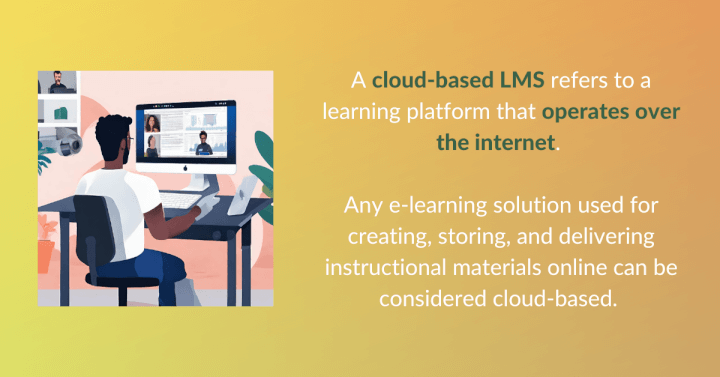
A cloud-based LMS refers to a learning platform that operates over the Internet. Any e-learning solution for creating, storing, and delivering instructional materials online (instead of using local servers or on-premises hardware) can be considered “cloud-based.”
🎯Jump to: The 10 best cloud-based learning management systems
With a cloud-based LMS:
- Learners can access online courses anytime and anywhere they like, on whatever device they are using.
- Course designers and instructors can easily create, manage, and fine-tune training materials using artificial intelligence, online resource libraries, and engagement data analytics.
- Administrators can track, accelerate, and guide learner progress toward training goals that directly benefit the business.
- Learners and instructors can communicate and collaborate through messaging features, community forums, and other channels.
 This article provides practical guidelines to help you simplify corporate training and maximize the benefits of online learning for your company.
Cloud-based LMS vs on-site platforms
A cloud-based LMS and an onsite LMS primarily differ in how they are hosted and how users can access them.
A cloud-based LMS is hosted by the vendor or a third-party provider on the web and can be accessed anytime and from anywhere using online devices. With cloud-based solutions, you won’t need expensive hardware to house the platform. Everything can be managed remotely on the web. Almost always, it only takes common devices such as PCs, tablets, and mobile phones to download and install the client application. The bulk of your training data, including courses and learner information, will be stored online. That means you won’t need to build, maintain, and secure your own infrastructure on-site.
An on-site LMS (also called on-premises or self-hosted) runs on servers your organization owns or rents. You install the software, configure the database, secure the environment, apply every update, and own every failure. The software license might be free, but the operation is not.
This is the cost most training teams underestimate. An on-site LMS is a production web application, and someone has to own it: the operating system, the database, the web server, the SSL certificates, the plugin compatibility, and the integration with your HR system. For most small and mid-sized businesses, that person doesn't exist — and hiring them costs far more than the LMS subscription you were trying to avoid.
Examples of on-site learning management systems include:
- Moodle — the most widely deployed self-hosted LMS in the world, free under an open-source licence, with an enormous plugin ecosystem. Dominant in education; Moodle Workplace is the corporate edition.
- Open edX — the platform originally built by MIT and Harvard for massive online courses. Built for scale, and correspondingly demanding to operate.
- Chamilo — a lightweight open-source option, the easiest of this group to self-host, popular with small and mid-sized organizations and in Spanish-speaking markets.
- ILIAS — strong assessment and e-exam tooling, widely used by European universities and government bodies with strict compliance requirements.
- Canvas LMS — open source and self-hostable, with a more modern interface than most of this category. Instructure also sells it as a cloud product.
- Totara Learn — a commercial platform built on a Moodle fork, aimed at workforce compliance and performance management. Licensed through a partner network rather than downloaded free.
- Blackboard Learn — long the default in higher education, historically deployed on institutional servers.
Choosing the LMS That’s Best For You
Learn how to evaluate learning management systems against your unique needs.
10 Best cloud-based LMS platforms
Choosing the right training platform is a crucial business decision. With literally dozens of options in the market, how do you know which will best fit your company?
We've done some research to filter out the noise. Here are some excellent cloud-based LMS solutions you can choose from:
| 1. GoSkills LMS | 2. 360Learning |
| 3. Absorb LMS | 4. Adobe Learning Manager |
| 5. Docebo | 6. iSpring Learn |
| 7. LinkedIn Learning | 8. Litmos |
| 9. TalentLMS | 10. Tovuti |
1. GoSkills LMS
GoSkills LMS is a SOC 2 compliant, cloud-based LMS known for superior learner experience, fast implementation, ease of use, and affordability. GoSkills is popular among small and medium-sized businesses, and comes with a free forever plan.
Experience the difference
Start transforming the way your organization learns — no credit card required. Get started in minutes!
Create your free account now2. 360Learning
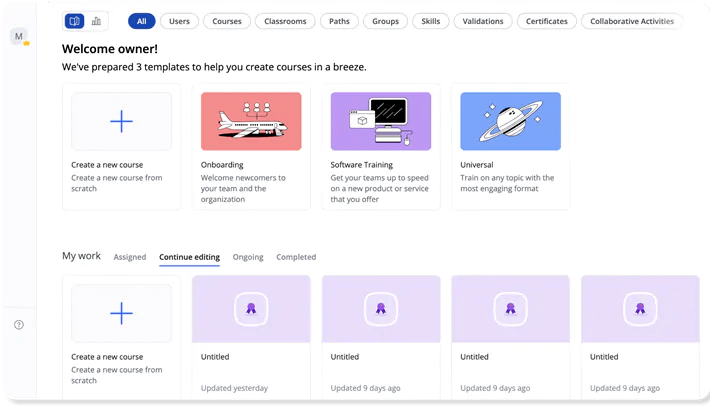 360Learning is a well-rounded training platform that promotes social learning by harnessing in-house experts. It has an intuitive UI for learners and course creators.
3. Absorb LMS
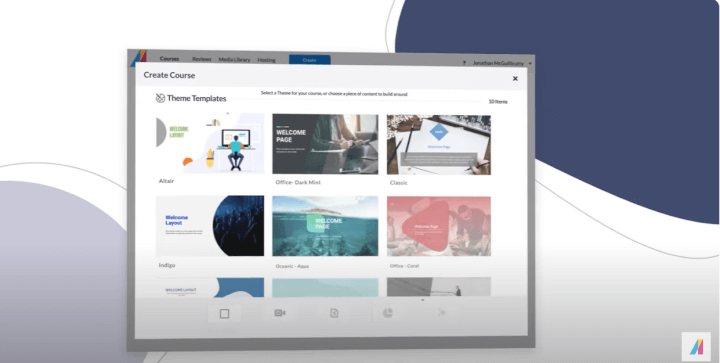 Absorb LMS is an intuitive cloud-based training platform known for its easy-to-use interface, effective administrative features, and e-commerce support. It's a good fit for large organizations and companies aiming to sell online courses.
4. Adobe Learning Manager
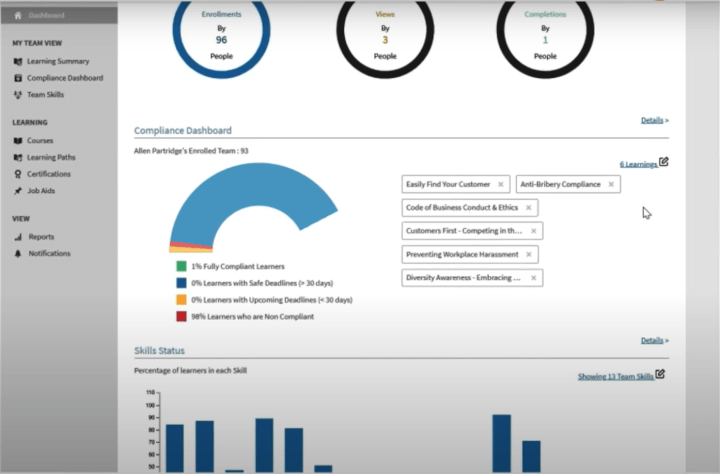
Adobe Learning Manager is a training platform focused on user experience. It is known for ease of integration and excellent learner engagement. This solution is best for mid-sized organizations looking to upskill employees and educate customers.
5. Docebo
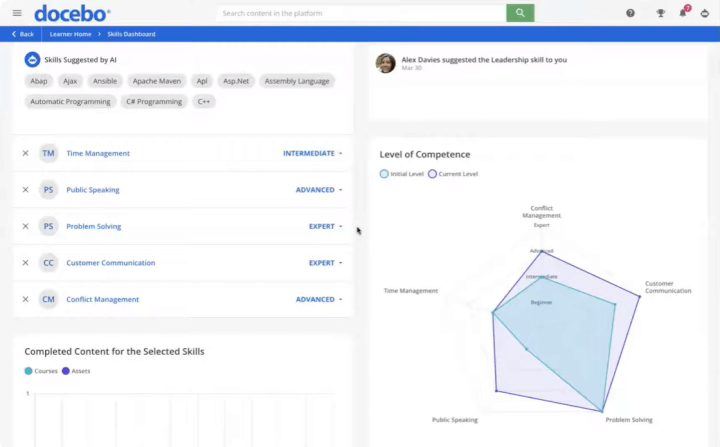
Docebo offers an end-to-end suite of services designed to facilitate learning in an enterprise environment. It is known for strong customization, social learning, and branding capabilities.
6. iSpring Learn
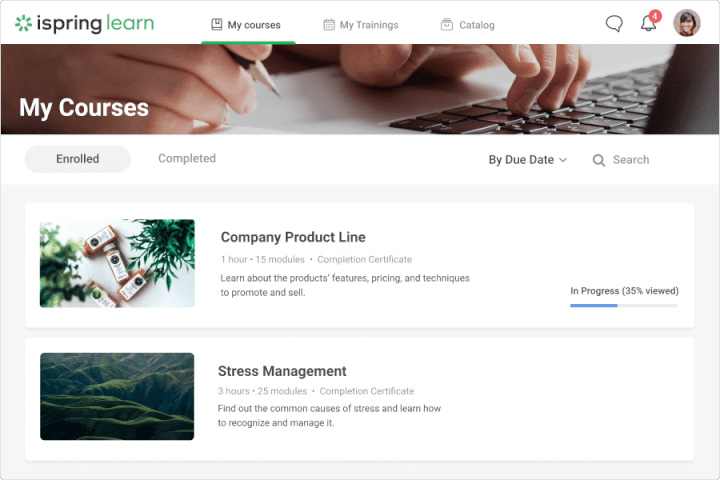
iSpring Learn features user-friendly content creation, gamification, and reporting. It integrates with iSpring Suite, an e-learning authoring tool used for creating advanced slide-based courses with quizzes, role-plays, and interactions.
7. LinkedIn Learning
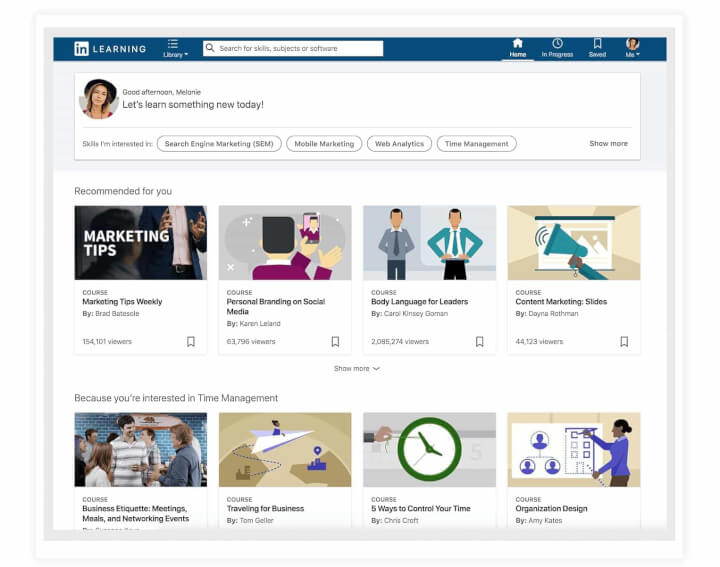
LinkedIn Learning offers a large library of high-quality courses led by industry experts. Earned certificates are easily shared on LinkedIn's social platform.
Related: Best Alternatives to Linkedin Learning
8. Litmos
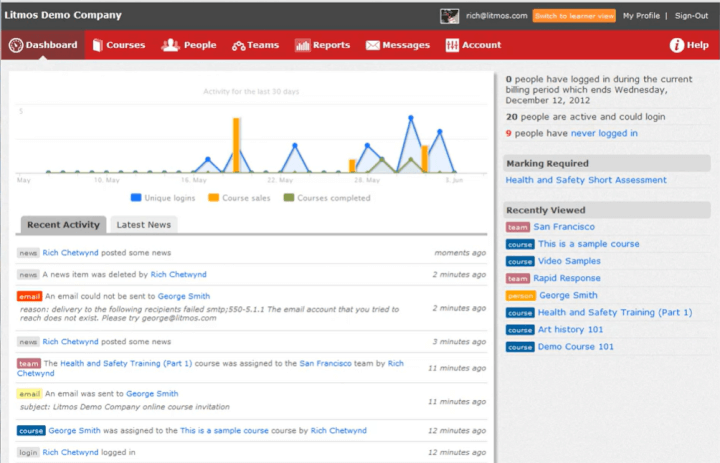
Litmos is known for its integration capabilities. The platform is a good fit for mid to large-sized companies, and comes with a free trial period.
9. TalentLMS
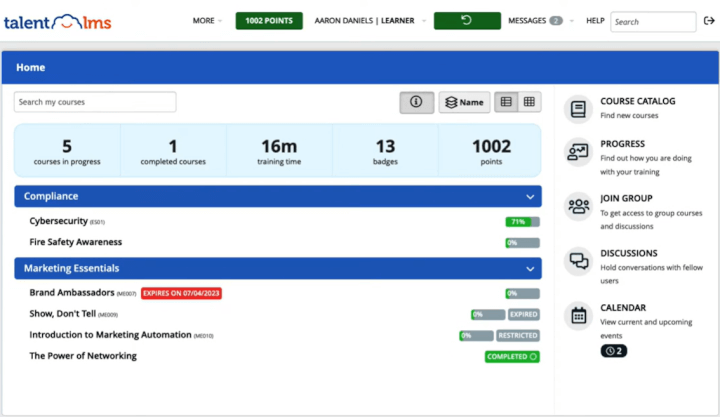
TalentLMS is known for its simple user interfaces and a wide variety of learning content. It is best suited for small to medium-sized organizations.
Related: Top TalentLMS alternatives for employee training
10. Tovuti
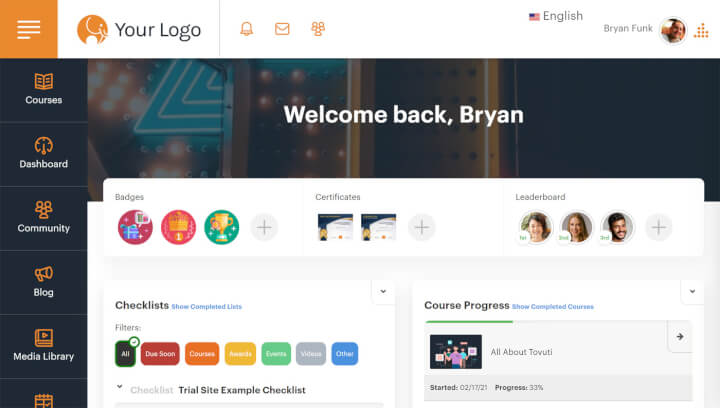
Tovuti is a comprehensive, flexible, and easy-to-use learning solution, known for robust training management features.
Benefits of a cloud-based LMS
With the above explanation, it should be fairly obvious to see why most organizations have implemented some version of cloud-based learning, but you might care for a direct answer. Many companies prefer cloud-based learning management systems because online training platforms are generally affordable, easy to use, and flexible.
Cost savings
According to Fortune Business Insights, the cloud segment of the LMS market continues to experience rising demand due primarily to flexible pricing and low maintenance requirements. This segment — which facilitates much of mobile learning, online tutorials, and interactive courses — provides an extra boost to the already brisk expansion of the LMS market (projected to reach $232.8 billion by 2032). In 2025, around 55% of all LMS installations were deployed on the cloud, while 45% were built on-site, as reported by Research.com.
Ease of maintenance
On-premises LMS solutions give organizations more control over their eLearning infrastructure. However, the responsibility, risks, and costs associated with maintaining the complex technology backbone of a corporate training program dissuade many companies from adopting on-site platforms. Updating the hardware and software components of your L&D apparatus can be very expensive. And unless you have a sufficient number of powerful servers, the ability to scale can also be limited.
These perceived disadvantages make cloud-based alternatives more attractive for many businesses. Unlike on-premises platforms, a cloud-based LMS does not require on-site servers or the significant IT resources needed to support them.
Convenience & flexibility
Cloud-based training also delivers higher engagement and better learning outcomes. The convenience, accessibility, and versatility of a cloud-based LMS provide a superior experience for all users — from course designers and instructors to learners and L&D managers.
With cloud technology, anytime/anywhere learning becomes the norm. Team members can learn new concepts and build skills using just their phones. With data streaming over the web, the range of content formats and teaching approaches instructors can choose from becomes virtually limitless. Developing immersive microlearning content gets easier. Cloud technology also supports online social learning communities where trainees, experts, and instructors seamlessly communicate and learn together.
Many companies prefer cloud-based learning management systems because online training platforms are generally easier to use, more affordable, and more flexible than on-premises alternatives.
All these factors inevitably lead to higher learner engagement, improved retention rates, and better training results. Incidentally, these are the metrics that truly matter. Some LMS platforms provide excellent data analytics to help you track and direct these metrics toward maximizing your training ROI.
How to find the right cloud-based LMS for your team
Now it's time to choose! What are the features you should look for in a cloud-based LMS? Here are some areas to consider before making your investment:
1. Security and compliance. Knowing who your LMS partners with to secure your company data is just as important as the advertised front-end features, if not more so. For example, does the LMS use single sign-on (SSO)? This feature carries a number of benefits, including ease of administration, reduction of security risk, and a more seamless learner experience. Making sure that the LMS uses a high-reputation SSO provider can give you greater peace of mind in deploying your training program.
2. Engagement capabilities. Intuitive training solutions that deliver outstanding user experiences should rank high on your shortlist. Some must-have features and capabilities:
- Ease-of-use. When navigation is intuitive and the user interface is appealing, learners will stay on the platform longer and return more often, helping them (and you) achieve your L&D goals faster.
- Microlearning. Short, interactive learning sessions are more digestible and enjoyable. They also give learners the confidence that they can chip away at their ultimate goal bit by bit.
- Gamified environment. Setting specific targets and celebrating those accomplishments with points, virtual coins, and other rewards are a proven method of motivating humans toward desired behaviors.
- Personalized learning tracks. AI-based course recommendations, customized learning paths, and the ability to assign courses to individuals or teams enable learning administrators to fill skill gaps exactly where needed.
- Quiz variety. Using different formats to perform knowledge checks caters to different learning styles and promotes retention.
- Pre-built course library. Some providers offer very few courses while others will likely overwhelm your team with thousands of available content. Don’t fall for sheer quantity. Go instead for balance, quality, and relevance. Chances are, your team won’t need a post-graduate course in organic chemistry. A few hundred expert-led courses on relevant business-oriented topics would be a good place to start.
- Accreditation and certificates. Look for LMS platforms that can generate and verify certificates of course completions. Shortlist those that offer courses recognized or accredited by certifying bodies such as the Project Management Institute and PeopleCert.
- A course builder. Many LMS platforms come with a course library. But sooner or later, you’ll need to develop new training materials specific to your company. To support your instructors and trainers, go for platforms that provide a suite of AI-powered course authoring tools.
- LMS reports and visualizations. Choose a platform that generates a comprehensive set of analytics that track all relevant metrics. You’ll need those data points to understand how well your training programs are doing, identify where improvements can be made, and orient your team’s learning journey toward business success.
3. Track record. Shortlist the ones that have consistently bagged numerous accolades from industry authorities over the years.
4. Feedback from customers. Check out third-party review sites like G2, Capterra, and Software Advice. Because customer satisfaction is the real acid test for any product, high review ratings (by a large number of verified customers) serve as the gold standard. Never settle for so-so customer satisfaction scores.
Verified User in Oil & Energy Small-Business (50 or fewer emp.) |
11/27/2024
|



Cloud-based LMS FAQs
What is a cloud-based learning management system?
A cloud-based LMS is a learning management system hosted by the vendor or a third-party provider on the web, accessed by users using online devices.
What is the difference between a cloud-based LMS and an on-premises LMS?
A cloud-based LMS is hosted by the vendor and accessed through a browser, with servers, updates, security, and backups included in the subscription. An on-premises LMS runs on servers your organization owns and maintains, which means you provide the hardware, IT staff, backups, and upgrades yourself. Cloud platforms launch in hours; on-premises deployments typically take weeks to months.
Do you need IT staff to run a cloud-based LMS?
No. Cloud-based employee training software requires no servers, no installation, and no system administrator. The vendor manages infrastructure, updates, and security. An on-premises LMS does require dedicated technical staff — at minimum a capable LMS administrator, and a DevOps engineer for more complex platforms.
What are examples of on-premises LMS platforms?
Moodle, Open edX, Chamilo, ILIAS, Canvas LMS, Totara Learn, and Blackboard Learn are all commonly deployed on an organization's own infrastructure. Several also offer hosted or managed versions for teams that want the software without running the servers.
Is an on-premises LMS cheaper than a cloud LMS?
Rarely. The software licence may be free with open-source platforms like Moodle or Chamilo, but the total cost of ownership includes servers, hosting, security patching, backups, upgrades, and administrator time. Those operating costs commonly reach five figures a year, and considerably more at scale.
Is a cloud LMS more secure than on-premises?
Not inherently — but in practice, for most organizations, yes. Cloud vendors employ dedicated security teams, patch continuously, and hold independently audited certifications such as SOC 2 and ISO 27001. An on-premises LMS gives you complete control, but control is only an advantage if you have the staff to exercise it. The realistic risk with self-hosting isn't a sophisticated attack; it's an instance running three versions behind because the upgrade kept getting postponed. When evaluating a cloud vendor, check for SOC 2 compliance, single sign-on support, encryption in transit and at rest, and published data residency options.
What are the disadvantages of a cloud-based LMS?
The main drawbacks of a cloud-based learning platform are reduced control, dependence on connectivity, and a subscription that scales with your headcount:
- You need an internet connection. By their nature, cloud-based systems need to be online to access content and AI tools online, though many platforms offer mobile apps with offline mode to work around this.
- Your data sits on the vendor's infrastructure. For organizations with strict data residency or sovereignty requirements, this can be disqualifying — though many vendors now offer regional hosting options.
- Cloud access means a recurring cost. Subscription models, though common these days, mean you are paying the vendor to host the platform on their server for you.
For most organizations, the above trade-offs are outweighed by not having to buy servers, hire technical staff, or own backups and security patching. But they're real, and they're worth weighing against your specific constraints rather than assuming cloud is automatically the answer.
Time to fly
So, the choice is yours - stay on the ground or soar in the cloud? When it comes to workplace training, a cloud-based LMS can serve as the fuel to propel your skills development program.
All things considered, online learning platforms are generally more affordable, easier to use and maintain, and much more versatile than on-premises solutions. Given the inevitable trend, the remaining question for most companies is not whether to switch but when and how.
Here’s the simple answer. You can switch now by just trying out GoSkills’ free forever plan. It comes with free accredited courses, a course builder, and an intuitive interface for all users. That covers everything you need to start right away, at no cost, to elevate your training program.
Experience the difference
Start transforming the way your organization learns — no credit card required. Get started in minutes!
Create your free account now