
Two products. One marketing budget. Which one deserves it?
Building a reliable sales forecast is about more than predicting future numbers. It's about making better business decisions.
In this GoSkills Excel Challenge, you’ll analyze 12 months of sales data for two competing products, identify which one shows the most reliable trend, and build a product sales forecast to help leadership decide where to invest next year’s marketing budget.
Here’s how to get started:
- Watch the challenge video for a complete overview.
- Review the instructions below.
- Download the Excel workbook and complete the challenge.
- Share your solution with our Excel Slack community.
- Watch the solution video once it drops to compare approaches.
Download the file here
Get the practice exercise to solve this challenge.
The challenge 🧗
Imagine you’ve been asked to recommend which of two products should receive next year’s marketing budget.
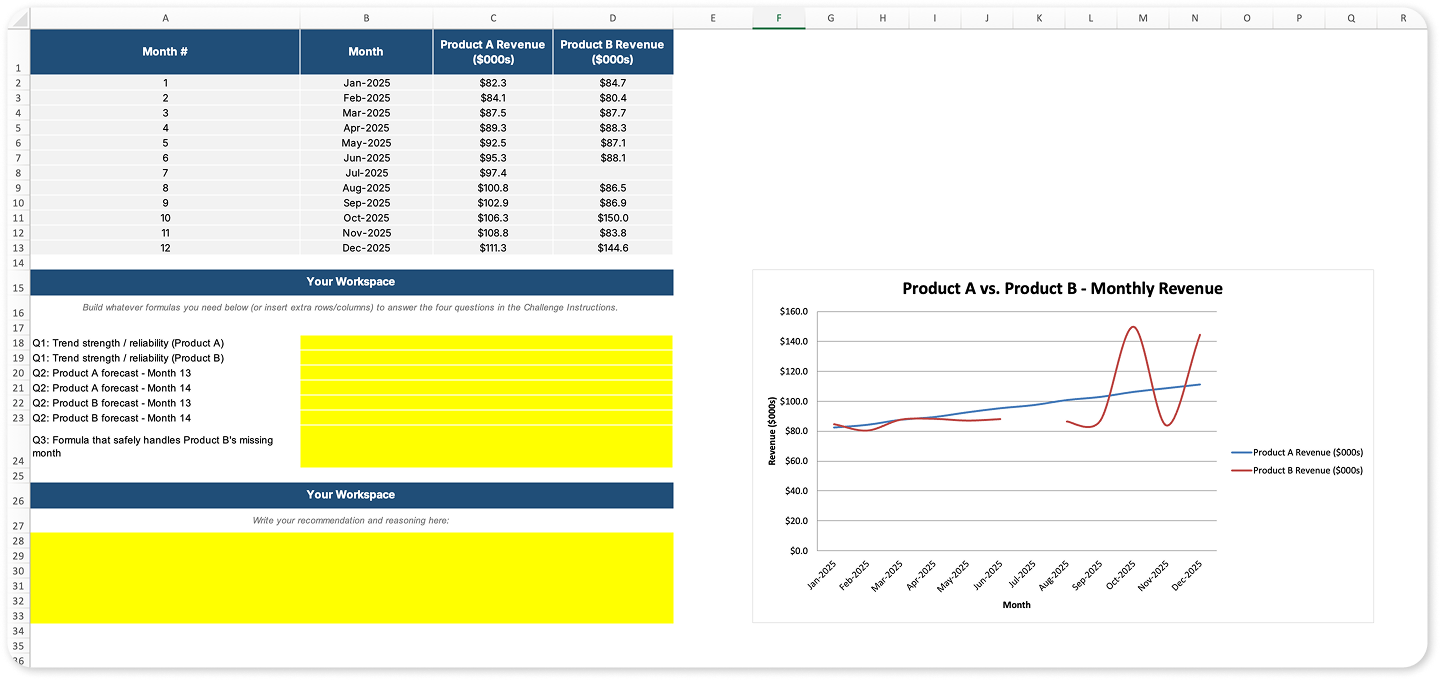
Both Product A and Product B have 12 months of historical sales data, but there’s a catch: one product is missing a month due to a reporting outage.
Your task is to analyze the data, determine which product shows the most reliable trend, build a product sales forecast, and recommend which product deserves next year’s marketing investment.
Your mission ✅
1. Evaluate the sales trends
Analyze the historical sales data for both products and determine which one shows the more reliable upward trend.
2. Build a product sales forecast
Forecast sales for months 13 and 14 for both products.
3. Handle the missing data
One product contains a missing month of sales.
Decide how you’ll account for the missing value without compromising your analysis.
4. Make your recommendation
Based on your analysis and forecast, recommend which product should receive next year’s marketing budget.
Support your recommendation using the evidence from your workbook.
The hint 💡
Need a nudge?
There are several ways to build a sales forecast in Excel, and choosing the right approach depends on the data you’re working with.
Before tackling this challenge, explore these practical trend analysis and forecasting techniques to help you evaluate trends, interpret historical data, and make more confident forecasting decisions.
A few concepts worth recapping 📚
1. What is a sales forecast?
A sales forecast estimates future sales using historical performance and trends. Businesses use sales forecasts to plan budgets, allocate resources, and make informed decisions about inventory, staffing, and marketing investments.
2. How do you create a sales forecast in Excel?
There are several ways to create a sales forecast in Excel, depending on your data and business goals. Common approaches include trend analysis, forecasting functions, moving averages, and regression techniques. This challenge gives you the opportunity to practice choosing the right method for a real-world business scenario.
3. Why is trend analysis important?
Trend analysis helps distinguish meaningful patterns from random fluctuations, making forecasts more reliable and helping decision-makers avoid conclusions based on short-term noise.
The solution ✅
There isn’t just one correct way to complete this challenge.
Did you solve it differently?
Share your formulas, charts, or overall approach with the GoSkills Excel Slack community and compare your solution with other Excel enthusiasts.
Need more Excel practice online? 🤩
If you enjoyed this challenge, continue building your Excel skills with more GoSkills Excel Challenges or explore the Excel blog for tutorials, tips, and hands-on practice exercises.
Looking to take your forecasting skills even further? The Financial Modeling Techniques course, taught by financial modeling expert Liam Bastick, shows you how to build robust financial models, model revenue, perform essential model checks, and create reliable forecasts that support real business decisions. It’s a natural next step if you’d like to strengthen your analytical and forecasting skills in Excel.
Keep learning, keep practicing, and see you in the next Excel Challenge! 👋

Join the Excel conversation on Slack
Ask a question or join the conversation regarding Excel challenges on our Slack channel.
Join Slack channel