
Running employee training is one thing. Doing it at a small or medium-sized business (SMB), alongside everything else on your to-do list? That’s another story.
360Learning has its strengths, especially when it comes to collaborative learning. But if you’re looking for ready-made courses, straightforward pricing, or a different approach to course creation, you might find a better fit elsewhere.
We’ve rounded up eight 360Learning alternatives to help you compare your options, understand the trade-offs, and find a platform that works for your team.
TL;DR: The best 360Learning alternative depends on what your team needs. GoSkills is a strong choice for small and mid-sized teams looking for 500+ ready-made courses on eligible plans, easy AI-assisted course creation, published per-seat pricing, and hands-on support. iSpring LMS suits PowerPoint-based authoring, while Absorb LMS is worth considering for more complex reporting and compliance needs. Docebo and LearnUpon focus on multi-audience training, Schoox serves frontline workforces, Trainual specializes in SOPs and onboarding, and Moodle offers open-source flexibility.
Pick your situation: Which 360Learning alternative fits your team?
Not every team explores alternatives for the same reason. Some want published pricing and ready-made training, while others have more complex reporting requirements or a different audience to train.
Start with the situation that sounds most like yours.
If you’re leaving 360Learning because... | Look at | Why |
|---|---|---|
| You’ve reached the 100-user Team plan limit | GoSkills | No 100-user cap; per-seat plans billed monthly or annually, starting at two licenses, with volume discounts |
| You want ready-made courses your team can start right away | GoSkills | 500+ business courses included on the Courses and Platinum plans |
| One admin builds most of your training | GoSkills or iSpring LMS | GoSkills for AI-assisted course creation from your own documents; iSpring for PowerPoint-based authoring |
| You need structured reporting and compliance administration | Absorb LMS | Centralized training oversight for more complex programs |
| You train employees, customers, and partners at scale | Docebo or LearnUpon | Training programs for multiple audiences |
| You have a frontline or multi-location workforce | Schoox | Training designed for distributed teams |
| You mainly need SOPs and onboarding documentation | Trainual | Process documentation, company knowledge, and onboarding playbooks |
| You want control over hosting and configuration | Moodle | Open-source flexibility for technically equipped teams |
| You want to start free and get help setting things up | GoSkills | A free-forever plan, plus a dedicated account manager and a 30-minute setup call on all paid plans |
Why teams look for a 360Learning alternative
Collaborative course creation is a central part of 360Learning’s appeal. Still, its pricing structure and feedback on G2 and Capterra point to a few considerations for smaller training teams.
1. Reporting and analytics can feel limited
Some reviewers find 360Learning’s completion reporting useful, while others want more flexible or detailed analytics. A few describe exporting data or building their own dashboards to get the view they need. Before switching, check whether the reporting in your current plan actually covers your needs.
2. There can be a learning curve
Getting familiar with 360Learning’s features, terminology, and course structure can take time. That learning curve may matter when the person managing training also has an HR or operations role.
Our guide to easy-to-use LMS platforms covers what to look for when simplicity matters.
3. The self-serve plan stops at 100 users
360Learning’s Team plan supports up to 100 users, with published per-active-user pricing, monthly billing, and no long-term commitment. Under this plan, a user counts as active from account creation until the account is deleted or deactivated. Businesses moving beyond the Team plan need to discuss a custom-quoted Business or Enterprise option.
360Learning supports larger teams, but moving from published pricing to a custom quote can make budgeting less predictable for growing businesses exploring affordable LMS platforms.
4. Some features require paid add-ons
The Team plan includes course authoring, learning paths, and reporting. Coaching, Live, Globalization, and Extended Academies, however, are optional add-ons charged separately per user each month.
Consider which extras you’ll actually use and how they affect the plan you’re evaluating.
5. Some reviewers mention technical issues
Some Capterra reviewers describe glitches or delays in resolving issues, while others praise 360Learning’s support. If your team has limited administrative resources, ask how a vendor handles technical problems before committing.
The 8 best 360Learning alternatives, compared
These eight platforms take different approaches to training. Compare who each one is best for, how its pricing works, and whether there’s a free option. We’ll cover content libraries and trade-offs in the profiles below.
Platform | Best for | Pricing model | Free plan |
|---|---|---|---|
| GoSkills | Growing startups, SMBs, and mid-market organizations seeking ready-made courses, flexible authoring, and hands-on support | Published per-seat pricing, monthly or annual; from two licenses | Yes; limited course-library access |
| Absorb LMS | Structured training administration, reporting, and compliance | Custom quote; content and other modules may be separate | No; free trial available |
| Docebo | Multi-audience, more complex learning programs | Custom quote; selected AI uses credits or add-ons | No free plan published |
| iSpring LMS | Admin-led training and PowerPoint course creation | Published active-user bands, billed annually; sales contact for other needs | No; 30-day trial |
| LearnUpon | Employee, customer, and partner education | Custom quote; tiered plans | No free plan published |
| Moodle | Open-source control and flexible hosting | Free self-hosted software; paid hosting options | Free open source; MoodleCloud has a trial |
| Schoox | Frontline and multi-location teams | Custom quote | No free plan published |
| Trainual | SOPs, onboarding, and process documentation | Custom quote; required one-time implementation fee | No; demo available |
1. GoSkills
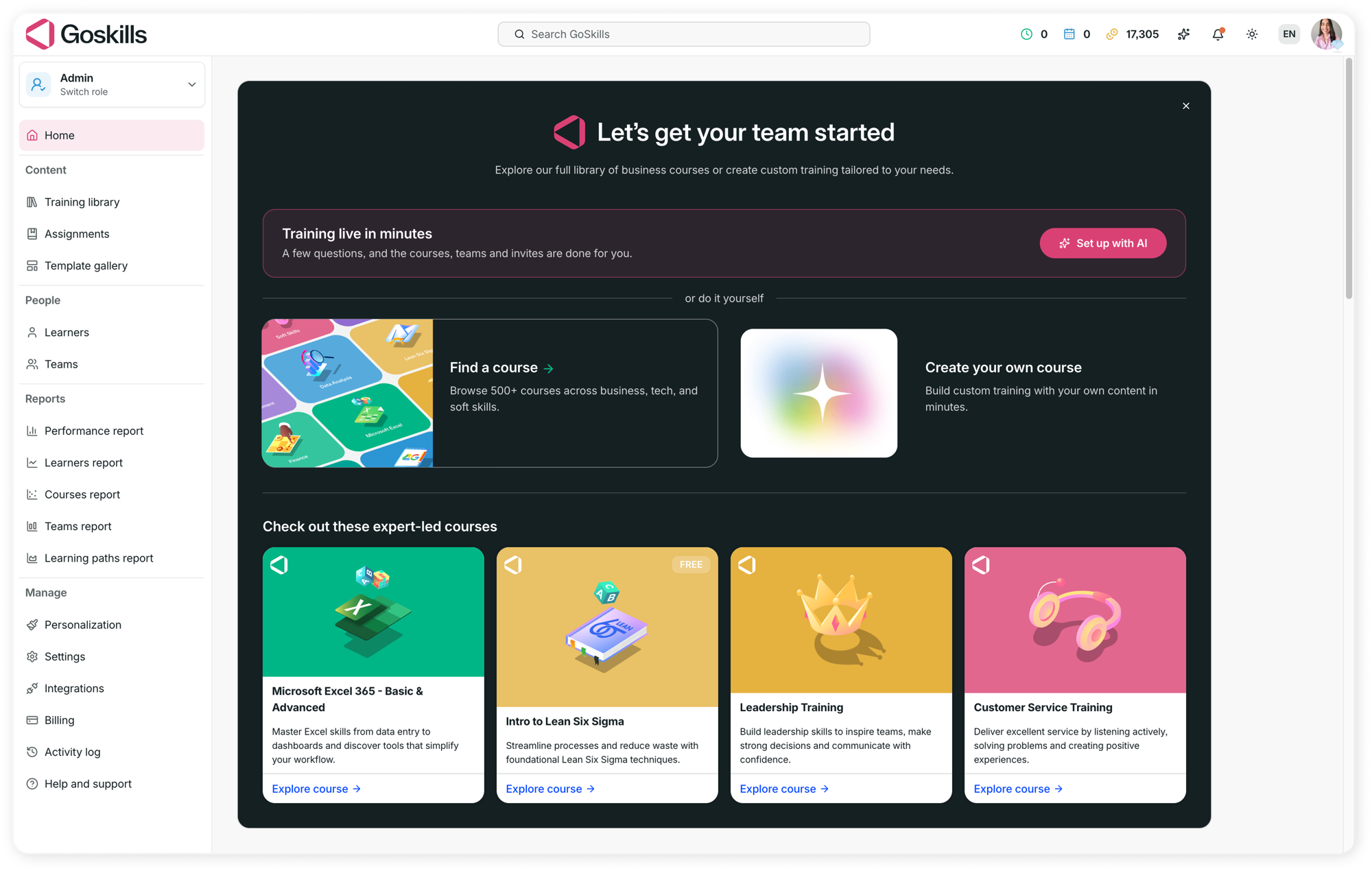
GoSkills is a ready-to-go Learning Management System (LMS) with Learning Experience Platform (LXP) capabilities for teams without a dedicated L&D department. With 500+ ready-made courses, an AI-powered Course Builder, and hands-on support, it’s like having your own L&D team in a box.
Who is GoSkills a good fit for?
GoSkills is a practical LMS for small business, especially if you’re managing employee training alongside other responsibilities. Here’s what you get:
- Ready-made courses: Choose from 500+ business courses on the Courses and Platinum plans, so you don’t have to build everything from scratch.
- Build your own courses, fast: The GoSkills Course Builder lets you create training from scratch or turn existing documents, like policies and manuals, into courses with help from Genie, its AI assistant. Customize lessons with text, images, and interactive elements like flashcards and timelines, even without instructional design experience.
- Human support: Every paid plan includes a dedicated account manager and a 30-minute setup call. GoSkills has also earned G2’s Best Support badge in the Small Business category.
“GoSkills is easy to use, both for setting up courses and for our crews taking them. We love how easy it is to create courses and the accuracy of the finished courses.”
— Operations Associate, Construction Industry, via Gartner Peer Insights
These benefits are worth comparing with 360Learning’s plans, which list third-party course-library integrations rather than a bundled library. Premium onboarding and dedicated account management are positioned under Enterprise, while implementation and technical support are available across its plans.
| Key features | 500+ ready-made courses on Courses and Platinum, AI-assisted course creation, interactive lessons, assignments, and reporting on all paid plans. SCORM import is available on LMS Pro and Platinum. |
|---|---|
| Pros | Ready-made business courses and course creation tools, dedicated account manager and 30-minute setup call on paid plans, free-forever plan, and published per-seat pricing. |
| Cons | Less emphasis on peer-led course co-authoring than 360Learning. Library courses focus on business skills. The free plan has no reporting or course imports and limits library access to 10 lessons per course. |
| Pricing model | Free plan; published monthly or annual per-seat subscriptions starting at two licenses. See GoSkills organization pricing. |
Experience the difference
Start transforming the way your organization learns — no credit card required. Get started in minutes!
Create your free account now2. Absorb LMS
Absorb LMS focuses on structured learning administration, reporting, and compliance training. It may appeal to organizations whose training requirements span several departments or programs.
Who is Absorb LMS a good fit for?
Absorb LMS is a potential fit for mid-sized organizations that need centralized oversight of compliance or other structured training. Because reporting needs vary, request a demo using your own audit and analytics requirements rather than assuming every report is included.
| Key features | Centralized learning administration, reporting and analytics, compliance-oriented tools, and AI-assisted capabilities. Absorb Amplify content is available separately. |
|---|---|
| Pros | Useful for structured training across departments, with more centralized oversight and reporting options. |
| Cons | Quote-only pricing makes early cost comparisons harder. Content may be licensed separately, and reporting capabilities should be demonstrated against your needs. |
| Pricing model | Custom quotes, with additional modules or content depending on the agreement. |
3. Docebo
Docebo is a learning platform for organizations managing training across employees, customers, and partners. Its administrative tools, integrations, and AI capabilities are designed for more complex learning programs.
Who is Docebo a good fit for?
Docebo fits organizations with established learning operations, multiple training audiences, and the resources to manage a more involved rollout. It supports internal and external learning from one platform.
| Key features | Multi-audience learning, integrations, AI-assisted content creation, reporting, and advanced administration. |
|---|---|
| Pros | Designed to manage employee and external-audience learning in organizations with more complex programs. |
| Cons | Requires a sales-led quote. Ready-made content is an add-on, and some AI features use paid credits; rollout and administration may be more involved. |
| Pricing model | Custom quotes with user-based models and optional add-ons. Evaluation options depend on your needs. |
4. iSpring LMS
Formerly known as iSpring Learn, iSpring LMS is designed for organizations that create and manage training centrally. Its PowerPoint-based authoring tools are especially relevant when one administrator develops most of the courses.
Who is iSpring LMS a good fit for?
iSpring LMS is a fit for teams that already work in PowerPoint or rely on an administrator to develop training. It supports SCORM content and AI-assisted authoring. Ready-made course libraries are available separately or through third-party integrations.
| Key features | PowerPoint-based authoring, AI-assisted course creation, SCORM support, learning paths, and centralized training management. |
|---|---|
| Pros | Familiar workflow for PowerPoint users, published pricing bands, and tools for structured course creation. |
| Cons | Desktop authoring requires Windows, and broader ready-made libraries may require separate subscriptions. |
| Pricing model | Published per-active-user pricing billed annually; other requirements by inquiry. Offers a 30-day free trial. |
5. LearnUpon
LearnUpon helps organizations deliver learning to employees, customers, and partners. Its tiered plans include tools for managing branded training experiences for different audiences.
Who is LearnUpon a good fit for?
LearnUpon may work for mid-sized teams that run employee learning alongside customer or partner education. Its features help organizations manage distinct learner audiences and track their progress.
| Key features | Training for multiple audiences, branded learning experiences, learning journeys, reporting, and integrations. |
|---|---|
| Pros | Well suited to businesses that train employees alongside customers or partners, with an implementation consultant and customer success support on every plan. |
| Cons | Quote-only pricing, and external content may require additional licensing. |
| Pricing model | Custom quotes, with tiered plans based on organization size and needs. |
6. Moodle
Moodle is an open-source LMS that gives organizations control over hosting and configuration. That flexibility can be valuable, but it also means taking more responsibility for setup and upkeep.
Who is Moodle a good fit for?
Moodle fits teams with in-house technical resources or a hosting partner to manage configuration, maintenance, and customization.
| Key features | Open-source learning management, course authoring and delivery, flexible hosting, and customization. |
|---|---|
| Pros | The open-source software has no license fee and offers control over hosting and configuration. |
| Cons | Self-hosting requires technical setup and maintenance. No bundled business-course library; MoodleCloud has restrictions on plugins and customization. |
| Pricing model | Free open-source software, with possible hosting and support costs. MoodleCloud offers published annual hosted plans and a 28-day trial. |
7. Schoox
Schoox is built for frontline and distributed workforces, particularly businesses managing training across multiple sites or franchises.
Who is Schoox a good fit for?
Schoox may suit retail, hospitality, manufacturing, and other organizations that need to reach employees across locations and shifts.
| Key features | Frontline-focused learning management, mobile access, multi-location administration, reporting, and a partner content marketplace. |
|---|---|
| Pros | Designed for distributed workforces and training across locations or franchises. |
| Cons | Its frontline focus may be unnecessary for smaller office-based teams. Pricing is not public; confirm partner-content licensing in your quote. |
| Pricing model | Custom-quoted subscriptions based on organizational requirements. |
8. Trainual
Trainual is designed for documenting processes, organizing company knowledge, and standardizing onboarding. It has a stronger SOP and operations focus than a traditional course-first LMS.
Who is Trainual a good fit for?
Trainual suits owners, HR teams, and operations managers who want repeatable onboarding and clearer documentation of everyday procedures.
| Key features | Process documentation, onboarding playbooks, company knowledge, templates, SCORM uploads, and progress tracking. |
|---|---|
| Pros | Focused on documenting repeatable processes and organizing employee onboarding. |
| Cons | Ready-made courses are an add-on. Pricing is not public, and a one-time implementation fee applies. |
| Pricing model | Custom-quoted plans with required implementation support and a one-time fee. |
What to keep (and check) when you switch
Switching LMS platforms isn’t only about gaining new features. It’s about keeping what’s working for your team, too.
Before deciding, check these four things:
- Easy course creation: Can you create and update training without creating extra admin work?
- Helpful support: What assistance can you expect with setup, migration, and troubleshooting?
- Learner engagement: In a GoSkills survey of more than 50 HR and L&D professionals, 88% selected an intuitive learner interface as a priority, more than any other factor. Make sure your next LMS is easy for employees to use.
- AI course creation: Can AI help turn your existing policies, documents, and other materials into useful training?
Plan your migration before canceling
A little preparation can save headaches later.
- Review your content. List the courses, learning paths, and completion records you need to preserve. Export available data and course packages before canceling.
- Check compatibility. Not every platform supports the same formats. Our guide to SCORM explains what to look for.
- Review your users. Identify accounts you no longer need and deactivate them where appropriate, especially if you’re on 360Learning’s active-user Team plan.
- Check the cancellation timeline. 360Learning says Team plan data is kept for 120 days after cancellation before being permanently deleted. Retrieve everything you need before that deadline.
- Test before launching. Ask a few learners and administrators to try the new platform before rolling it out to everyone.
For more advice, see our LMS migration guide.
When to stay with 360Learning
Not every team needs to switch. If employees regularly contribute to courses, peer discussions help people learn, and 360Learning’s reporting meets your needs, it may still be the right choice.
Moving platforms takes time. If your current setup supports your training goals, there’s no need to switch just for the sake of it.
If your needs are changing, our guide to enterprise LMS vs. small business LMS platforms can help you weigh your options.
Frequently asked questions about 360Learning alternatives
1. Is 360Learning an LMS or an LXP?
Both. 360Learning combines LMS functions, such as assigning courses and tracking progress, with LXP features, including learning recommendations and peer discussions. Learn more about LMS vs. LXP platforms.
2. What’s the best 360Learning alternative for a small business?
GoSkills is a strong option for small businesses looking for ready-made courses, easy course creation, and hands-on support on paid plans. For a broader shortlist, explore our guide to the best LMS platforms for small businesses.
3. Can I move my 360Learning courses to GoSkills?
Potentially. GoSkills supports SCORM, AICC, xAPI, and cmi5 imports on its LMS Pro and Platinum plans. Before canceling, check which of your 360Learning courses can be exported in one of these formats. Courses built in its own authoring tool may not export the same way as SCORM files you originally uploaded.
4. Can I build my own courses in GoSkills?
Yes. The GoSkills Course Builder is available on every plan. Genie, its AI assistant, can help you create courses from existing documents, while text, image, and interactive blocks let you customize lessons.
5. Does GoSkills have a free plan?
Yes. GoSkills has a free-forever plan with course-building tools and access to up to 10 lessons from each library course. Reporting and imported courses require an eligible paid LMS plan.
6. Does GoSkills work for teams with more than 50 people?
Yes. Paid GoSkills subscriptions start at two licenses, and teams training 50 or more people can contact the GoSkills team about tailored plans and volume pricing.
The right LMS makes all the difference
Exploring 360Learning alternatives? The best choice isn’t necessarily the platform with the longest feature list. It’s the one that fits your team’s needs, resources, and goals.
If you’re a small or mid-sized team looking to make training easier, GoSkills brings together 500+ ready-made courses on eligible plans, an AI-powered course builder, and hands-on support to help you get started.
Ready to see if GoSkills is the right fit? Start with a free account or book a demo to discuss your team’s training needs.
Experience the difference
Start transforming the way your organization learns — no credit card required. Get started in minutes!
Create your free account now