
You’ve got 60 orders, 10 customers, 12 products, and a handful of business questions to answer. Ready?
Your mission is to uncover customer insights, calculate revenue and profit metrics, and identify top-performing customers — all while putting your dynamic array skills to work.
Here’s how to get started:
- Watch the challenge video for a complete overview of the scenario.
- Review the instructions below to understand the tasks and guidelines.
- Download the Excel worksheet and share your solution in our Excel Slack community.
- Watch our solution to compare approaches.
The challenge 🧗
Imagine you’ve just joined the data team at a growing e-commerce company.
You’ve been given six months of order data covering 60 transactions, 10 customers, and 12 products. Your job is to turn that raw data into useful business insights and, along the way, put your dynamic array skills to the test.
Download the file here
Get the practice exercise to solve this challenge.
Your mission ✅
These five tasks are your mission:
- Retrieve the most recent order for a selected customer.
- Calculate net revenue for every order.
- Assign loyalty discount tiers based on customer spending.
- Generate a list of unique products purchased by each customer.
- Identify the top-performing customer in each region.
1. Retrieve the most recent customer order
Use a single formula to return the complete order record for a selected customer.
The challenge? Your formula should automatically retrieve the most recent order and return all relevant details.

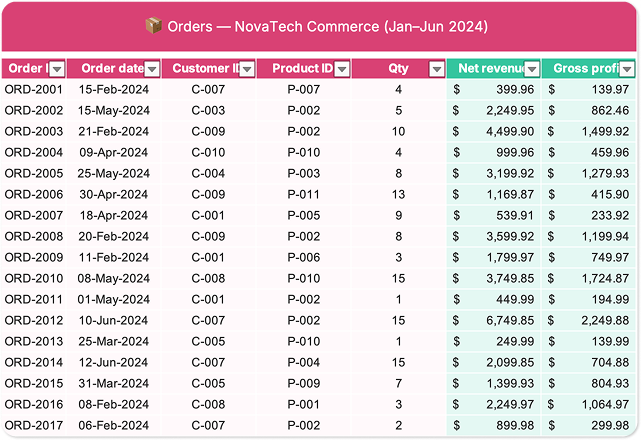
2. Calculate net revenue
Add a Net Revenue column to the Orders table.
Net revenue is calculated as:
Qty × Retail PriceYou’ll need to combine information from multiple worksheets to calculate the revenue generated by each order.
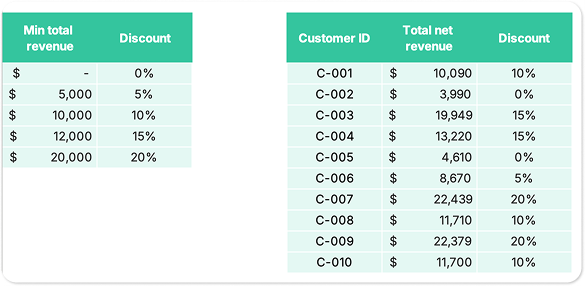
3. Assign loyalty discount tiers
Customers qualify for different discount levels based on their total spending.
First, calculate each customer’s total net revenue, then use that information to determine which loyalty tier they belong to.
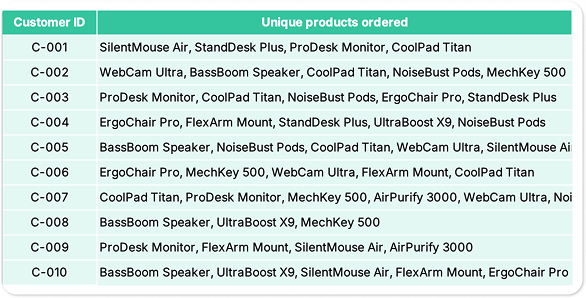
4. Generate a unique product list
For each customer, create a comma-separated list of all products they've purchased.
Duplicate products shouldn’t appear twice.
And one more thing: we want product names, not IDs!
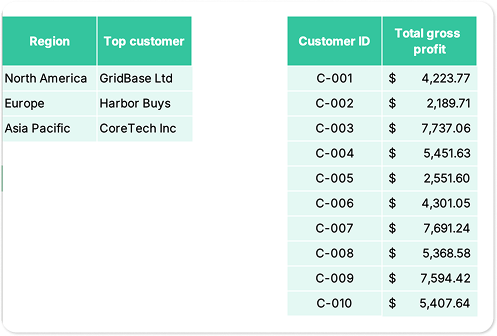
5. Find the top-performing customer in each region
Finally, calculate gross profit and determine which customer generates the most profit in:
Gross profit = Qty × ((Retail Price × (1 − Discount %)) − Cost Price)- North America
- Europe
- Asia Pacific
Can you identify the top performer in each region?
The hints 🕵️
Need a nudge?
Hint #1: Think dynamic arrays
Several tasks in this challenge become much easier when you leverage Excel’s dynamic array capabilities.
If you’re new to the concept, a dynamic array is a formula that can return multiple results and automatically spill them into neighboring cells.
Hint #2: Modern Excel functions are your friend
Functions like XLOOKUP and LET can help simplify complex calculations and make your formulas easier to read and maintain.
Rather than building everything with helper columns, see how much you can accomplish with a single formula.
What are dynamic arrays in Excel?
Dynamic arrays allow a formula to return multiple values and automatically populate adjacent cells with the results.
Introduced in Microsoft 365, dynamic arrays make it possible to perform tasks that previously required helper columns, complex formulas, or manual work.
They’re especially useful for:
- Filtering data
- Returning unique values
- Building dynamic reports
- Creating interactive dashboards
- Analyzing large datasets
This challenge gives you a practical opportunity to apply dynamic array concepts in a realistic sales analysis scenario.
The solution ✅
Excel is all about creativity and flexibility, and there’s rarely just one correct answer.
Did you solve the challenge differently?
Share your approach — or even your own challenge idea — with our Excel Slack community and compare solutions with fellow spreadsheet enthusiasts.
Need more Excel practice online? 🤩
If you enjoyed this challenge, keep the momentum going by exploring more GoSkills Excel Challenges or diving into our Excel blog for tutorials, tips, and practice exercises.
Want to keep building your Excel skills? Our Excel 365 – Basic & Advanced course, a favorite of 100,000+ learners, covers many of the techniques used in this challenge and plenty more to help you work smarter with spreadsheets.
Keep crunching those numbers — we’ll see you in the next challenge! 👋
Level up your Excel skills
Become a certified Excel ninja with GoSkills bite-sized courses
Explore Excel courses
Join the Excel conversation on Slack
Ask a question or join the conversation regarding Excel challenges on our Slack channel.
Join Slack channel